Latest From My Blog

Showing posts with label AdWords Explained. Show all posts

Want To Understand Your Keyword Performance Better Use Google Search Funnel Reports

- Credit goes to Jeff Baum (original writer) & PPC Hero Original Link


I’ve always taken a bottom line approach to evaluating keyword performance. I want to know how much was spent on clicks, how many conversions those clicks generated, and if my keywords are profitable and performing to client or in-house goals. I base optimizations on these bottom line metrics and decide whether to pause certain keywords.

What I have recently come to understand is that bottom line performance does not tell the entire story.  As users become more sophisticated in their searching patterns, the path from initial search to conversion is growing longer. This conversion path is called a ‘search funnel’.

Understanding an account’s conversion path will help you make more informed optimizations and overall account management decisions. Quite often, your underperforming keywords could be indirectly helping other keywords in the account to convert. Pausing an underperforming keyword that drives conversions in another area of the account will ultimately hurt overall volume and profitability.

Today we will dive into the search funnel report and discuss how to best use it, so you can better understand what comprises the conversion path.

What Is The Search Funnel Report?

The search funnel report documents a searcher’s entire path to conversion. Sometimes the path is just one query long. Other times it’s an entire series of keywords and queries. Search funnel data can be found in three locations: 1) The Adwords interface, by adding in the assisted clicks, impressions, & conversions columns, 2) By clicking on ‘tools’>conversions>search funnels, and 3) Google Analytics.

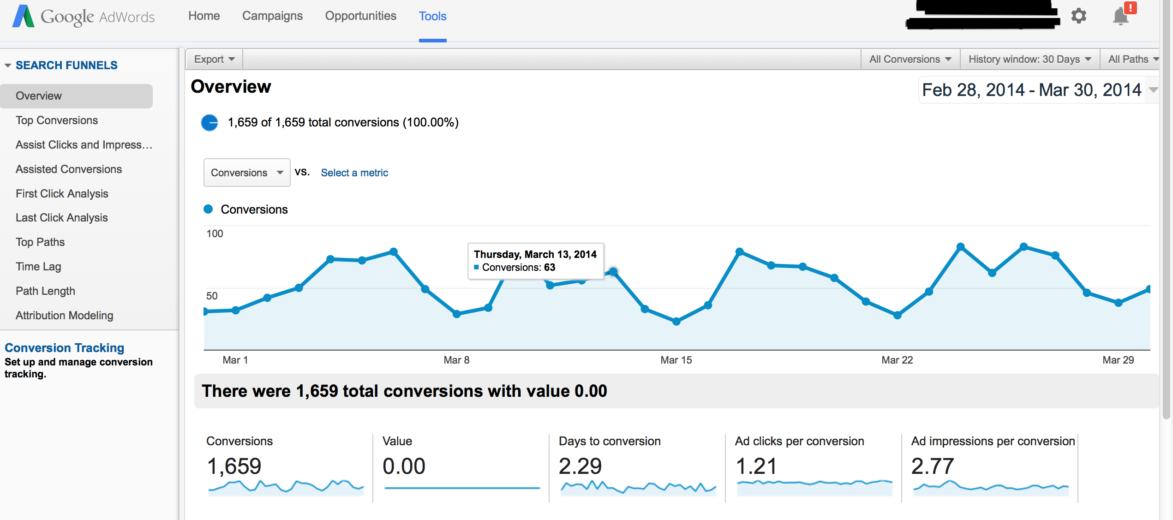
Below is an example of a search funnel report.

Search Funnel 1

Interpreting the search funnel report can seem daunting. There are dozens of mini reports and filters that show search funnel activity in a variety of ways. I’ve provided simple definitions to help make it easier to remember what the report’s key fields mean.

Assisted Clicks: Clicks on keywords that led to a conversion on a different keyword.

Assisted Impressions: Impressions that led to other impressions that led to a conversion.

First/Last Click Analysis: Keyword performance at the beginning or end of the conversion path.

Click Assisted Conversions: Total number of conversions a keyword contributed to by having assisted clicks.

Top Paths: The actual path searchers took that led to a conversion.

Path Length: The amount of clicks it took until a conversion occurred.

Attribution Modeling: What marketing channel got credit for the conversion?

Search funnel data is collected via conversion tracking. If conversion tracking is already installed, no additional set up is required. If tracking isn’t installed, all you have to do is create a conversion pixel and install it per Google’s directions. For more information on setting up conversion tracking, just visit Google’s help center.

Now that we have a basic understanding of what the search funnel report, the next question is:

How Should I Use The Data in the Search Funnel Report?

I use search funnel reports to communicate value to my clients, and to better understand user behavior. For instance, when it’s time to decide where to increase or pull back spend, I can justify keeping keywords live that might normally get paused if I were looking exclusively at the bottom line data.

Below is a sample keyword report that I pulled from the Google interface. All I did was add assisted clicks, click assisted conversions, assisted impressions, & impression assisted conversions.

keywords

The cost per converted click for ‘nursing associates program’ is $389. Based on that bottom line cost, I wouldn’t want to continue on with that keyword. However, there is 1 impression assisted click. Whether you value your assisted conversions equally as last click conversions or not, this extra conversion means the keyword is performing much closer to goal and is worth keeping live.

On the other hand, the 2nd keyword, ‘nurse degrees’ has only 1 conversion at a $327 cost per converted click, and it has 0 assisted clicks, conversions, or impressions. In this instance, I can be reasonably assured this keyword is not producing any conversions and is only running up cost, and can therefore be paused.

Below is an example of user behavior. I’m particularly interested in this query path. Notice the progression from a general interest search (‘degree in dental hygiene’), to a more targeted search (‘dental hygienist schools’), and finally to a specific search (‘dental hygienist schools Georgia’).

Screen Shot 2014-03-31 at 4.18.04 PM

From this simple view, I’ve learned 2 things: 1) general keywords are leading to conversions down funnel, and 2) User searches in this path are very deliberate. Each search becomes more refined as the searcher advances through their research process. I also learned I need to fill any keywords gaps by making sure my list contains keywords that mirror the conversion path my prospects are taking.
Attribution Modeling in AdWords --- from Google

 - Credit goes to PPC Hero Original link

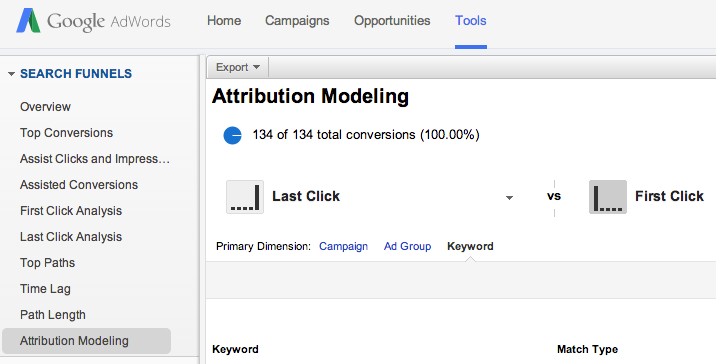
 Google has just released the Search Funnels Attribution Modeling Tool in AdWords. This tool allows you to identify campaigns, ad groups, or keywords that are assisting conversions or are a part of the conversion process. While this tool has been available in Analytics for quite some time, it’s a new feature in AdWords.
Where To Find It
You can find this by navigating to Tools and then Search Funnels. From there you can select Attribution Modeling to compare different models at the campaign, ad group, or keyword level. There are also tabs for Assist Clicks and Impressions, Assisted Conversions, and First and Last Click Analysis.
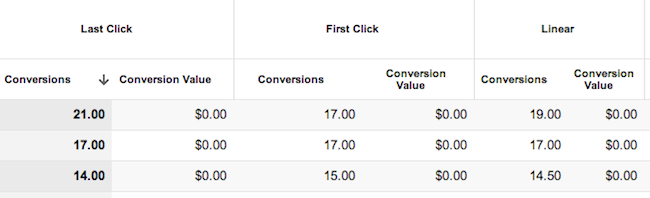
Attribution Modeling2
As a quick refresher, here is a definition of each model:
  • Last Click: credit goes to the last clicked keyword
  • First Click: credit goes to the first clicked keyword
  • Linear: credit is distributed equally among all clicks on the conversion path
  • Time decay: more credit is given to clicks that happen closer to actual conversion
  • Position-based: 40% credit is given to the first and last clicked keyword, and the remaining 20% is divided among the clicks in-between
Why It’s Helpful
While you could always access this data in analytics, it’s helpful to have it right in AdWords. The First Click attribution model is useful so that you don’t cut out or reduce bids on keywords that are aiding the conversion process but aren’t the last clicked keyword. If you find that users are visiting your page more than once via PPC ads before converting, you might change your ad copy strategy or adjust your bidding strategy.
keyword attribution
Some keywords have a greater impact as a first click or a last click.
AdWords makes it fairly simple to do this with the Model Comparison Tool and the Top Paths feature, which allows you to see all of the converting keywords in order of when they were clicked. I have also found the Query Path (within Top Paths) to be interesting to look at, as it gives you some insight as to how and when customers are searching for your products/services and clicking on your ads.
It is important to note however, that looking at this information in AdWords doesn’t quite give you the whole story. It might be worthwhile to still use Analytics to get a better understanding of all traffic sources coming to your site and how users are interacting with your site. I find that it’s helpful to look at both attribution modeling and top conversion paths in Analytics for both AdWords traffic and all other traffic.
This change isn’t an earth shattering one, but it is nice to see more Analytics features being implemented into the AdWords interface. This kind of information is helpful when making optimizations and getting an overall picture of your account and how your keywords and campaigns are interacting with each other.
What other features from Analytics would you like to see in AdWords?

For Better Attribution Modeling – Do We Use AdWords or Analytics?

- Credit goes to Corina Marcano (original author) & PPCHero.com  Original link

A few days back I read this post about AdWords’ Attribution Modeling being released within the UI. It is a great feature to have in AdWords, but as mentioned in the post, this information does not show us the whole story. In this article I will compare Attribution Modeling in AdWords and Analytics.
What are the main differences in how Attribution Modeling works in AdWords and Analytics?
AdWords Attribution Models allow us to understand how PPC campaigns interact with each other, while Analytics Attribution Models allows us to understand how multi-channels interact with each other during the conversion path.
Putting aside the fact that Analytics is able to show multi-channel interactions while AdWords isn’t, I will limit this analysis to PPC data. There are a few specific models in Analytics that seem interesting to define:
  1. Last AdWords Click: This model attributes 100% of the conversion value to the most recent AdWords ad that the consumer clicked on before converting. So if a consumer clicked once on your ad and then converted from another source of traffic, this type of model will attribute the conversion to the last clicked AdWords campaign.
  2. Last Interaction: This model attributes the conversion to the last touch point from ALL sources of traffic. So if you click on an ad and come back directly a week later and converted, Analytics will not attribute this conversion to AdWords but to direct traffic.
  3. First Interaction: This model attributes the conversion to the first touch point from ALL sources of traffic. So if you click on an ad and come back organically a week later and converted, Analytics will attribute this conversion to AdWords and not to organic traffic.
  4. The Custom Model: The most important model! In this model it is you who decides the rules of attribution. Imagine that you are running branded and generic campaigns. Maybe your client thinks that branded conversions are not as valuable as generic since the consumer was already looking for their brand. This type of model will allow you to assign a specific value to brand conversions compared to generic conversions. You could say that you want each branded conversion to be counted as half of a generic conversion.
On the other hand, AdWords tracks conversions with the model “Last Non-Direct Click”. This model ignores direct visits and attributes 100% of the conversion value to the last channel the consumer clicked on before converting, in this case PPC.
Another important difference is the expiration of each cookie. The default expiration time of AdWords’ cookie is 30 days while the expiration of the Google Analytics campaign cookie (__utmz) is set to 6 months by default.
For example, if you click on an ad and then come back directly from a bookmark, or by directly typing the URL within 30 days, this conversion will be attributed to your PPC campaign and accounted for in AdWords (attributed to the day of the click). This will not be the case if the conversion happens on day 31. However, Analytics will attribute this last conversion to AdWords (CPC) on the date it happened.
If you need to better understand the differences between AdWords and Analytics regarding conversion data, I strongly recommend reading this post.
Let’s look at it with a more specific example
I chose a few campaigns that were paused on December 31st so no additional conversions will be attributed to them in AdWords because of the 30 day window.
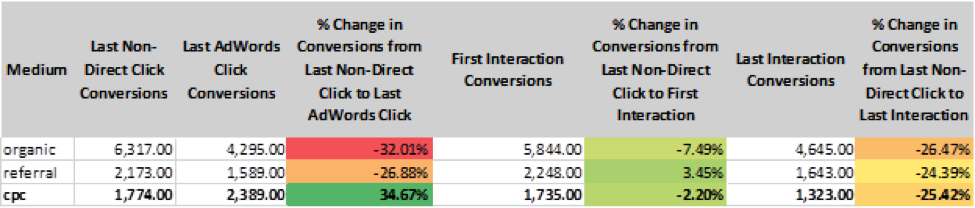
1.       For December 2013, this is the information I received from AdWords:
AdWords Attribution Data
As you see on the last line, there is no difference on the total conversions between each model. This is because with Attribution Models within AdWords, you are only able to see how your AdWords campaigns interacted with each other, but you cannot see how they impacted other sources of traffic.
2.       For the same month, this is the information I received from Analytics:
Attribution data from Google Analytics
The information we see in AdWords corresponds to the Model of “Last Non-Direct Click Conversions”. If we look closely at the data for the model “Last AdWords Click Conversion” we realize that CPC contributed to almost 35% more conversions than what it is accounted for in AdWords. Similarly, looking at the “First Interaction Model” and the “Last Interaction Model” we realize that AdWords has been credited for 2.2% more and 25% more conversions respectively when users came back directly to the website or through a bookmark.
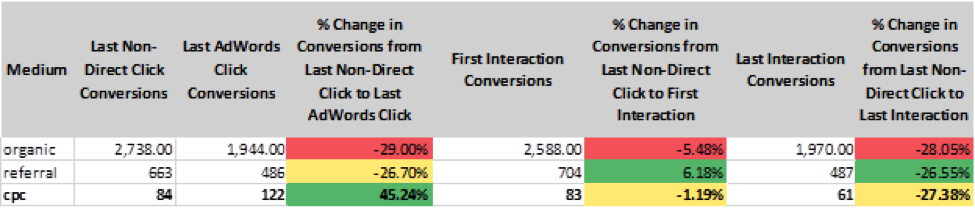
Looking at the same data in Analytics, but for February 2014, I noticed the following:
Google Analytics Attribution Data
CPC is still getting conversions attributed to after the campaigns have been paused and the 30 day window has expired!
PPC, a part of a whole
PPC should not be analyzed by itself. It is a piece, small or big, of a bigger puzzle and these campaigns have a lot more impact on bringing conversions than what we are able to see within AdWords. Analytics allows us to see a greater part of the puzzle and this is exactly the type of information that will definitely help us, digital marketers, to explain to clients the real impact PPC.
As Google evangelist Avinash Kaushik would say, “Optimize for the journey, not for a one night stand”.
So which one do you think is better?
*Note that the differences in Last non-direct click conversions (Analytics Chart) and Conversions (AdWords chart) are due to the 30 days window attribution, the time duration of each cookie, and the date the conversion is accounted for.

Few Problems Noticed For Adwords Impression Share Report

As is the case with many AdWords features, Google’s impression share report is a powerful, useful, but incomplete and potentially misleading tool for AdWords advertisers. There are two major issues with taking impression share reports at face value:
  • You don’t always want all the impressions
  • A small percentage of a large campaign can be much more impactful than a large percentage of a small campaign

In any PPC campaign there is a concept of diminishing returns – just because you can get x conversions at y price per conversion doesn’t mean that if you get 2x the conversions your cost per conversion will hold – in fact in a vast majority of cases it won’t. For this reason there are many instances where even if your campaign is profitable and you’re only capturing 40% of the possible impressions, you wouldn’t want to increase your budget or your bids to get all of the possible impressions.

The second issue with the impression share report is that a percentage of possible accessible impressions isn’t always the most useful and actionable data. This is because the percentage doesn’t take into account the actual impact of the additional impressions. For instance, if you have a campaign that is targeting a broad array of possible keywords, is highly profitable for you, spends 80% of your budget, and is only accessing 80% of the universe of possible impressions, that’s far more interesting than a campaign that spends 1% of your budget, wouldn’t be profitable if it expanded any further than it already has, and is intentionally targeting a narrow sliver of the possible keywords in that keyword niche that has 30% of impression share. But the flat impression share report makes this second metric look more alarming and gives the impression (no pun intended) that there is a lot more opportunity inherent in that number than there really is.

Weighted Impression Share Reports


WordStream’s relatively new Google AdWords Performance Grader is a free tool that includes an enhanced impression share metric – it layers budget data on top of impression share to offer a global metric rather than a “flat” impression share percentage applied to disparate data points (i.e. higher and lower budget campaigns). Instead, you get a more authentic view of the actual share of voice you’re sacrificing based on the relative share you’re accessing based on the budgets allocated to the different campaigns. You then get the same breakdown of share lost to budget/share lost to ad rank offered by AdWords, but with a more meaningful representation of your actual share of voice.

Impression Share

Additionally, another layer of context is placed on top of this as the report “scores” your impression share relative to advertisers spending similar amounts per month on AdWords. This helps advertisers understand how many value-added impressions they’re sacrificing, and helps them understand how that relates to similarly sized AdWords advertisers. By understanding these metrics they can then have a better grasp on what types of opportunities they’re leaving on the table, and in turn make smart decisions on how much and where to push additional budget and increase bids.

You can find out how your campaigns stack up, in terms of impression share as well as other key metrics like Quality Score and click-through rate, by running your own AdWords Performance Grader report.

Want To Create More Effective Ad Groups for PPC

Ad Groups: How to Create More Effective Ad Groups for PPC


Ad Groups are an essential component of pay-per-click marketing. Creating effective Ad Groups can help you to drive more traffic and leads at lower costs, while increasing the number of conversions on your site. This page will teach you:

  • What "Ad Group" means in reference to PPC advertising.
  • Why Ad Groups are important.
  • And, of course, how best to create an effective Ad Group for PPC.

So What's an Ad Group, Anyway?


Basically an Ad Group is the container for your keywords in your search marketing campaigns.

Ad Groups

PPC advertising is structured such that you first create an account, then create an ad campaign, which is home to Ad Groups.

Those Ad Groups then house:
In other words, ad groups are one of the main tools you have for organizing your PPC account into a meaningful hierarchy.

The Importance of Ad Groups


OK, so we now know that Ad Groups are basically a structural component within your PPC account. So why should you bother with them? What makes them important?
Ad Groups contain a lot of important stuff!

Most search engines look to your Ad Group organization to determine:

  • Which keywords your ads will show in response to.
  • What your ad will say when it runs.
  • Where the visitor will be taken when they click on your ad.
You're deciding:
  • Who to advertise to.
  • What to say to get their attention.
  • And how you'll make your final pitch when you set up an Ad Group.

How to Create Ad Groups That Really Work


"Really work" here means Ad Groups that cost less and convert more. Basically, in creating an Ad Group, you want to ensure that you're offering integration and consistency:

  • Integration - Create a system where you're consistently creating keyword groups, ad text, and landing pages that are tightly integrated with one another.
  • Consistency - This integration should lead to messaging consistency. Your ad text and landing pages should speak directly to the searches users are typing in to reach your site.

There are two central reasons these things are so important to you and to your business:
  • Lower Costs - Because of a system known as Quality Score, creating well-aligned Ad Groups means that you'll be paying less money for the same clicks.
  • More Conversions - If I search for "graphic design services" and your advertisement talks about your graphic design services, and then you send me to a page about those same graphic design services, I'm much more likely to convert than if your ad text or landing page have nothing to do with one another or aren't well integrated with your keywords.

So what actually goes in your ad groups? Text ads, of course! In our next lesson, we'll learn how PPC text ads work and how you can optimize your text ads for better PPC performance.

Want To Include Some Proven Calls To Action

There are a few key basics that every PPC text ad needs in order to rank well and generate clicks:
  • A compelling headline
  • Relevant keywords
  • A relevant display URL
  • A call to action


This post focuses on the last requirement. The call to action, or CTA, is the language that tells the searcher what to do – in other words, giving them a reason to click. (Aside from increasing your traffic, a higher click-through rate will also improve your Quality Score, which in turn will lower your costs.)
The default call to action is something like "Buy now!" This may be better than no CTA at all, but it's not very good. It's too familiar, too general and too pushy.

So what's a better call to action? It's good to remember that your CTA doesn't have to be a direct sales push – there are many other soft offers that can push someone to click through to your landing page. Let's take a look at some unusual CTAs and what you can learn from them.

Caveat: I don't know the actual CTRs of these ads; they're meant to be taken as inspiration for more creative creative. If you test different CTAs and find that generic, pushy language performs best in your particular market, more power to you. But don't settle for generic until you've tested.

#1. Show Off Testimonials


In a recent search for "cupcakes new york," these were the top ads:

testimonials

The CTA in the top ad ("Read the rave reviews we got!") really stands out. First of all, it sounds like a real person, not canned marketing jargon. Secondly, it gives you reason to believe that this bakery is a cut above, since they're bragging about reviews of their great cupcakes instead of expecting you to just take their word for it. I've seen a lot of studies suggesting that customer reviews have major influence over online buyers; I know that I always look for them before I buy from an unknown vendor.

This ad isn't perfect. I would have bumped the full call to action down to the second line, and made the first line more of a complete thought. But it's definitely stronger than the second ad, which has no CTA at all. And notice how the fourth ad resorts to the generic "buy/save now" language.

#2. Be Specific About Savings


A search for "K-cups" (the little cups used in single-serving coffee machines) returned the following ads.

call to action

The one that really stood out to me has a CTA that's not only very specific but very unusual. Several of the ads say how much you can save per box, but accordingly they kind of run together. This ad switches it up by saying "Lower your cost per cup" instead of "Save blah blah" – indicating that you'll get recurring, not one-time, savings. It partially compelled me to click out of pure curiosity, because I couldn't imagine what they were actually selling. (Turns out they are plastic caps that allow you to refill and reuse your K-Cups with your own ground coffee.) Again, avoiding the "buy/sell" language paid off here.

#3. Make Them Use Their Imagination


call to action

Here's a really interesting ad (displayed in response to "wedding planner boston") that only sort of includes a call to action. Instead of telling the searcher to call or sign up or buy, it asks them to "Imagine the spectacular setting of the Boston Public Library…"; this is both original and compelling. If I were getting married in Boston, I'd think that sounded pretty great. Note that the ellipsis at the end really makes a difference – it almost makes it feel more like travel writing than a crude PPC ad. It somehow both pulls you in and encourages you to keep fantasizing about your fabulous future wedding.

#4. Show Off Your Customers


This one is similar to #1, but the ad calls attention to an impressive customer list rather than reviews.

call to action

I didn't even know who Jim Rice was (sue me), but a lot of Boston people would recognize the name (he's a Red Sox player), so it's an eye-catching approach.

As a side note, whoever is doing Dr. Melki's PPC campaigns probably needs a lesson in negative keyword discovery. This ad displayed in response to a search for "engraving boston" – I highly doubt anyone searching for "engraving services" is really looking for Lasik surgery. (Google can fly pretty fast and loose with its broad matches.)

#5. Appeal To Their Sentimental Side


CTAs

This ad manages to describe the product and implore you to pamper your pooch at the same time: "Prevent joint pain" applies to both the bed and to you, if you buy it. As such it's sort of half a call to action, with the full call to action being "Love Your Dog!" I'd categorize this as a soft CTA since it's not directly commanding you to buy, buy, buy. I can see this working well on fawning owners, especially of older dogs.

#6. Make A Bonus Offer

Another way to stand out from the other sponsored links is to offer something additional beyond what the keyword phrase represents.

sponsored ads

A search for "carry-on bags" turns up this ad from REI, which wisely infers that people looking for carry-on luggage are preparing to travel! Accordingly the company advertises "Friendly Expert Travel Advice" along with this brand-name bags. This is probably a draw for the type of people that like to obsessively over-prepare for trips as well as spend too much on their luggage. ;)

#7. Provide Instant Gratification


The beauty of shopping via the Internet is that it's fast – you don't have to leave your house. The crappy part is waiting for your stuff to arrive. So offers that emphasize speed can be effective.

Google ads

This ad intuits that someone searching for "lawyers" doesn't have a lawyer and may just need advice – hence the offer is for live legal advice online, very appealing for people who just want a fast answer and aren't sure who to call.

Want To Konw The Relationship of Click-Through Rate & Ad Position

Everyone always asks me, “What’s a good click-through rate?” The standard answer I always hear is 2%. My answer is always, it depends.

If you don’t want your Quality Scores to suffer, you need to think twice about always targeting a 2% CTR. Quality Scores are very dependent on your CTR by Average Position, so it’s worth getting a good understanding of what this means.

So, what does it mean? People will usually click on the top ad of a SERP (search engine results page), because, well, it’s the first thing that they see. Position 1 will always have a high CTR, and CTR will continue to descend naturally in positions 2, 3, 4 and so on. This being the case, Google knows that position 1 and position 4 are not created equal, and therefore does not treat them equally.

Click-Through Rate By Ad Position

Google does not want to give up their prime real estate (position 1) for a 2% CTR when they can triple their revenue with a 6% CTR. Sure, you can bid up and get there, but what will Google do about this? Drop your Quality Score significantly so you are literally paying for it (or reward you with the dreaded “Rarely shown due to Quality Score” message that you may be seeing in your account).

The opposite is true of lower positions. If you’re putting up a 2% CTR in position 8, Google will reward you with a high Quality Score for bringing them clicks and revenue so low on the page. You’ll pay a lot less and may see Quality Scores of 7+.

Grade your click-through rate today!


So, What’s A Good Click-Through Rate?


Here are some good CTR targets, depending on ad position, for some 7+ Quality Scores:
Position 1: 6%+
Position 2: 4-5%
Position 3: 2-3%
Position 4: 1-2%
Position 5 and lower: 1%

Remember, Click-Through Rate isn’t the only thing that affects Quality Score, but it’s one of the largest factors and deserves some serious attention.

Are Ready For The Change To Enhanced Campaigns

Many advertisers we work with at WordStream have already upgraded to Enhanced Campaigns. I’ve been bullish on the changes since they were announced in February – though Enhanced Campaigns do come with some loss of control, I believe the benefits greatly outweigh the costs for most advertisers. Namely, those benefits include:
  • Easier management of mobile campaigns and better measurement of mobile ROI
  • More powerful bidding tools for local ads and display banner ads
  • Fewer campaigns to manage overall – a big timesaver

If you’ve been happily chugging along with your legacy campaigns, I’ve got bad news for you. On July 22, this coming Monday, upgrading to Enhanced Campaigns will no longer be an option. Basically, in about five days it’s sink or swim. Any campaigns that you have not already upgraded will follow the automatic upgrade path. Are you ready for the switch?

Enhanced Campaigns deadline


What Will Happen to Your AdWords Campaigns on July 22


Google recently outlined how the automatic upgrades will affect your campaigns. The below table explains what your default mobile bid adjustments will be depending on the type of legacy campaign device targeting you’re currently using:

Enhanced Campaigns Upgrade Path

If you don’t take matters into your own hands, Google’s default bid settings could really screw up your campaigns. In the first two cases, “similar advertisers” could be bidding way more or way less than you want to bid, and in the second two cases, you’d end up with the same bid across all types of devices, even though it’s likely your results vary based on what device users are using when they find your ads.

We recently did a mobile marketing case study based on a client of ours, Colombo Hurt. In the case of this law firm, mobile traffic was actually more valuable to them than desktop traffic. But another business type might find that mobile traffic isn’t good for them at all, and they’d be bidding the same on mobile as they are on desktop.

To avoid any mishaps, I strongly suggest you go ahead and manually upgrade your AdWords campaigns yourself using the AdWords upgrade center. That way, you can go into it knowing what all your bids are for different devices, times, and locations.

[MORE: Enhanced Campaigns FAQ]

3 Tips I’ve Learned from Upgrading Hundreds of Accounts to Enhanced Campaigns


We’ve helped hundreds of clients make the switch to Enhanced Campaigns. The client I mentioned above primarily uses AdWords to drive call-in leads. They used Enhanced Campaigns to test increasing mobile bids by +25%. With the better mobile tracking tools available in EC, they were able to determine that their mobile ads had higher average positions, higher CTR, lower CPCs, and lower cost per acquisition compared to desktop ads. Pretty awesome, right?

Here are a few tips I’ve gathered from watching these upgrades happen, so you can make sure the switch to Enhanced Campaigns goes as smoothly as possible:
  1. Don’t Forget to Upgrade When You Upgrade to Enhanced Campaigns: Using the EC upgrade wizard takes 10 seconds if you’re just setting a mobile bid adjustment factor. The key to truly upgrading to EC’s is to remember to take advantage of all the new features and functions that are now available, like new ad formats (including my favorite: mega sized site links), bidding tools, call conversion tracking, etc.
  2. Focus on Productivity Gains: EC's were made in part so that you don't have to replicate your campaigns a hundred times to target different combinations of device, location and time-based targeting. If you were previously spending a ton of time on managing hundreds of campaigns, consolidate them and use the time savings to pursue other PPC optimization activities, like landing page optimization!
  3. Don’t Underestimate the Value of Mobile: Most of my clients (by a 10:1 margin) say that they value desktop clicks more than clicks from mobile devices. But when we actually do the work of measuring the true value of mobile, we often find that calls to a business are worth way more than clicks to a website. Find out what the true value of mobile is for your business and adjust your bid strategy accordingly!


Check Your Upgrade Risk Now


We recently updated our AdWords Performance Grader with a new section that analyzes your Enhanced Campaign Readiness.

Enhanced Campaigns Audit

The tool provides a full report on your AdWords campaign performance – similar to the kind of insight you’d get from a professional PPC audit – but free and within minutes. And if you run the tool on your account before July 22, you’ll get a view into how many of your campaigns are at risk for automatic upgrade, as well as how many ad groups do not yet have a mobile preferred ad.

Want to Use AdWords Ad Sitelinks Extensions --- Here's A Quick Guide

In the first two installments of our series on AdWords ad extensions we covered AdWords location extensions and Google’s product extensions. Today we’ll walk through AdWords sitelinks, namely:
  • What are AdWords sitelinks and why are they important?
  • How do I use AdWords ad sitelinks in my account?
  • When should I use sitelinks in my AdWords account?

We’ll also provide information on why sitelinks may not be showing in your account and how best to leverage sitelinks in your campaigns.

What Are AdWords Sitelinks and Why Are They Important?


Sitelinks Example

Ad sitelinks are a feature in AdWords that offers you additional links to pages beyond the destination landing page in your ad. In the above image, “Free Shipping,” “Free Personal Engraving,” “3G or Wi-Fi models,” and “10-hour battery” are all sitelinks.

The image here is a good example of some of the powerful benefits sitelinks can provide, including:
  • Additional real estate for your ad (not unlike the other ad extensions)
  • The ability to highlight and elaborate on certain benefits and features (free shipping and personal engraving or 10-hour battery)
  • The ability to point to specific models of a product in response to a generic query (3G or Wi-Fi enabled)

The benefits of sitelinks are pretty obvious: you’re able to direct people to a greater number of pages on your site from within the same ad, without paying a premium. Using sitelinks can also help improve click-through rate (and subsequently Quality Score) and allow you to create a different experience for searchers.

How Do I Use Sitelinks in My AdWords Account?


Sitelinks are quite easy to set up within AdWords, like most of the ad extensions available to advertisers. Select “View: Sitelinks Extensions” in the Ad extensions tab, then click the “+ New extension” button:

Sitelinks Extensions

Next you’ll be presented with an option to either create a new sitelink extension, or use existing sitelinks from other areas of your account (called shared extensions):

create new sitelink extension

Shared extensions are handy if you’re leveraging the same sitelinks in multiple campaigns, but in the event that you’re creating a new sitelink or sitelinks you can click through to “Create new extension” and create the new sitelinks:

Add Sitelinks Extension

This leads us to the questions of when and how you should be leveraging sitelinks in your account.

When Should I Use Ad Sitelinks in My AdWords Campaigns?


Like with most AdWords extensions, ad sitelinks are a pretty useful tool and are typically valuable in any campaigns where they’re eligible. The trick is really in how you implement them, or which sitelinks you show. In understanding how to get the most out of AdWords sitelinks, it’s helpful to know a bit more about how they’re served by AdWords.

What Ads Get Sitelinks?


AdWords has a few different sitelink formats (from Google’s documentation on sitelink formats):
  • Three-line and two-line formats - Sitelinks are designed to trigger in situations where an ad provides the ideal answer for a search query. These ads are most likely to trigger on unique brand terms.
  • One-line format - Sitelinks will trigger with more generic terms, but may also include brand terms.
  • Embedded format - Sitelinks will trigger whenever your ad qualifies to appear above the search results and the text in your ad exactly matches one or more of your sitelinks.
 Basically the idea is you’ll only be showing sitelinks on ads/queries that you’re seen as highly relevant for (read: have a high click-through rate on) already.

Why Aren’t My AdWords Ads Showing Sitelinks?


The main reason your ads aren’t showing the sitelinks you added to your account is that they simply aren’t considered “authoritative” or “relevant” enough. As you can see from the above description Google wants to award sitelinks to sites that have displayed that they are synonymous with a branded query or are appearing above search results.

Sitelinks adwords


Create Sitelinks to Speak to the Queries They Show For


So as you’re thinking about which URLs to show for which queries you want to understand where your sitelinks are going to be showing. You can understand where a majority of your “above the fold” impressions are being generated by looking at a top vs. side report, and you can also drill down to look at how different extensions perform from within the ad extensions tab.

You want to tailor these sitelinks to speak to the queries generating “top” or above the fold impressions – like in the screenshot above, where the sitelinks nicely complemented the iPads query, which likely generates a large number of Apple’s impressions within that campaign (and where a single term is that core to your business, this would be another argument for splitting it out into its own campaign).

There are a number of different techniques for optimizing sitelinks – as Curt Weaver outlines in this post on the Marin blog, a number of the best practices around creating optimized sitelinks are similar to AdWords best practices in general, such as:
  • Understanding customer behavior
  • Testing different themes
  • Implementing proper tracking and closely monitoring results

Curt has some other useful tips for optimizing sitelinks, and if you’re looking for even more information on the subject, Melissa Mackey compiled (with the help of the #PPCChat folks) a great list of benefits of sitelinks. Finally, if you’re really hungry for AdWords sitelinks information, this PPC Chat streamcap is a goldmine filled with tons of helpful, actionable information from a variety of very smart PPC managers.

Ultimately, as with anything else within the AdWords platform, you want to take advantage of the edge offered to you by sitelinks and tailor your sitelinks so that they’re offering the right balance between increased clicks and increased conversions. And again, as with all things AdWords: test, analyze the data, and iterate!

Do You Think Your PPC Account Should Be Restructured ?

Let’s start by looking at a hypothetical scenario:
You’ve just been put in charge of a PPC account — either in-house or as part of an agency shakeup. It’s an account with a lot of history, and it is hitting goals, but…
After a few days spent familiarizing yourself with this account, you come to the conclusion that it’s not structured the way you would like. You sense a lot of opportunities for improvement: ad groups with too many keywords, budgets being eaten up by broad terms, keywords cannibalizing traffic from each other… and so on.

It’s at this point you need to come to a decision about how you’re going to move forward with the account:
  • Start gradually tweaking things within the current structure to generate improvements?
- Or -
  • Knock it all down and start from scratch?

Which would you go for?

This is a question we ask ourselves a lot when a new client comes on board, and it can be trickier to answer than you think. There are many different factors that determine which path to take. For one, building out a new structure is time-consuming. If the account is in good shape, you might be able to generate much better short-  and medium-term results by working with what you have. On the other hand, an account that’s in bad shape is going to be tough to work with and might not be able to hit the goals you’ve been given.

Some agencies will always redesign accounts completely from scratch. This can be helpful for a couple of reasons:
  • You can easily train people to understand all the accounts you manage
  • It speeds up repetitive tasks that are handled across a team of people

I’m not personally convinced it is always necessary or the right thing to do. If I came in as an in-house PPC manager, would my first actions be to tear down the current account and replace it with one I had built? Unless the account was in dire straits, probably not.

When Should You Restructure/Start Over?


I have a few personal metrics that I use:
  • An account more than 25% away from goal that doesn’t show improvement month-over-month
  • An account hitting goal that is showing non-seasonal, non-competitor related decline month-over-month for 3 straight months
  • Accounts with median keywords-per-ad-group over 30
 

Is Restructuring Always A Good Idea?


There are two competing ideologies at play here: “PPC Best Practices” and business reality. Take a look at the following graph, which highlights what we typically see after an account restructure for an account that is in the “good, not great” mold:

A chart showing performance dropping after implementing a new PPC structure

Performance initially drops with the shakeup. New keywords, bids and ads all come into play. It can take up to a few months for performance to get back to where it was under the old system.

Accounts that don’t respond well to change initially seem to have a peculiar trait in common: a ton of history and very little activity. Huge accounts that have just kind of sat there for years with very few changes tend, for some reason, to give us the biggest headache. Internally, we speak of accounts having their own personalities. In this case, I picture a grumpy old man in his chair — when you wake him up, he starts cursing at everyone and heads back to sleep.

For the business side of things to go smoothly, you’ll need to project at what point you break even. Take a look at the cumulative frequency of conversions from the previous chart. The red line below represents overall sales had we not rebuilt. The blue line shows post-rebuild performance.

Notice there is a 6-week period in which our total sales were below expectations. I like to call this the “valley of client unhappiness.” The trick to surviving it is setting expectations, showing incremental gains every week and communicating constantly. Make sure everyone is aware of the long-term reasoning behind your account changes so there is a reduced chance of knee-jerk reactions.

A cumulative graph of PPC sales with and without a restructure


Rules To Follow For Restructuring An Account


I went back and analyzed post-rebuild account performances for our clients. There was a fairly even split between this delayed improvement and immediate improvements being seen.
I’m sure a few of you, particularly within specialized verticals, haven’t ever had to deal with accounts that drop after “improvements.” You are either great at PPC or very lucky. For those of you like me who are neither, the following are the steps I put in place to maximize the chance of success with restructuring:

1. Make Sure Everyone Buys In

This is absolutely crucial if you want to succeed long-term. Sit down with your boss/client and spell out why you think the restructure is needed (it will improve long-term performance), what the negatives will be (short-term problems), and a rough approximation of how long it will be until this change pays off. If you can lay this out ahead of time, you won’t have to scramble to explain performance in the short term.

By ensuring you have buy-in, it also gives your boss/client another chance to stop you and say, “Hang on, we need every sale we can get right now, don’t blow things up until after Black Friday.”

2. Keep Bids The Same Where You Can

One of the simplest practical tips you can use when rebuilding an account is to keep things as similar as possible bid-wise at the start. New blanket bids will be much less efficient than ones that have been reached over months of tweaking.

I find the easiest way to do this is with a VLookup formula in Excel. Find out what your existing bids are and apply them anytime that same keyword and match type combination shows up.

3. Have An Overlap Period

Very rarely do I transition account structures without some kind of overlap period. This involves uploading the new structure without deleting the old. This allows time for my ads to start impressing and my image ads to be approved — and for me to fix any issues that almost always arise.

4. Recognize Your Failures

In business language, sticking with a failed change because you invested too much time and money into it is known as a sunk cost. Make sure your best AdWords efforts don’t turn into sunk costs of your own. Give your new account structure time to work, but recognize when it isn’t making things better. Typically, after a month or so, you should be able to tell if things are improving.

Along this train of thought, always download a backup of your account when you make big changes. There’s nothing worse than messing everything up and not being able to hit the reset switch.

5. Start With The Best Ad Only

If you want your restructure to be successful in the very short term, starting with only your historically best performing ad copy is a good way to go. By beginning with 3+ ad tests, you are dividing your new traffic amongst ads that might well be much worse. Typically, I tend to build out my ad testing with my structure, but then hold off uploading all but my best ad until a week or two later.

6. Put Top Keywords In Their Own Ad Groups

A lot has been made of single keyword ad groups in the past year, and personally I like them for my top keywords. By putting your top 100 or so into individual ad groups, you can check on them more easily and tailor better ads for them.

Adding “Important Keyword” labels is a really good idea, too — just in terms of keeping track of everything. You don’t want to think to yourself, six months down the line, “Hmm, I’m sure [x] used to be a really important keyword for us….”

7. Use A Consistent Naming Structure

There are many different ways to name your campaigns and ad groups. From the hundreds of accounts I’ve looked at, it seems like almost all of them do things slightly differently. Sometimes it’s “Nike – Shoes – Search,” other times “Google | Search | Brands | Nike | Shoes.” Keeping things consistent from the start is going to help a lot down the line (and it’s probably half the reason to restructure an account in the first place).

As always, I’d love to hear your restructure success and horror stories. Have you ever had troubles with changes you thought sh

Adwords Call Extensions --- Always Remember The Data Gaps

sew-phone

Do you have major gaps in call tracking data from Google AdWords Call Extensions? You just might, if you haven’t followed important rules. Thankfully, there are solutions to fill these data gaps.

Call Extensions Basics


Call tracking is fundamentally important for online advertising, yet so many companies completely miss this. The Google AdWords Call Extensions don't fill that need 100 percent (it only tracks calls from the SERPs, not your website). However, having a phone number published with your text ad means you can at least get a baseline understanding of how many potential leads or customers are willing to pick up the phone and call.


img-call-ext-serps


Setting up Call Extensions is simple. Using the Ad Extensions tab, choose to create the Call Extension at the ad group or campaign level. From there, enter your desired phone number. Then choose to utilize the Google forwarding number (which enables call reporting for non-mobile click-to-call activity) or to simply publish your phone number in the SERPs.

img-call-ext-new-number


Why is the Google Forwarding Number Important?


For mobile search traffic, Call Extension data is easy to access. A searcher clicks the phone number and calls. This “click-to-call” activity is tracked at the campaign, ad group, ad and keyword level in AdWords (via Segment > Click Type). Great!

For desktops and tablets, the data is fully dependent on the use of the Google forwarding number. When set up, you will be able to report on phone impressions, number of calls and create “call conversions” as an added metric (based on length of call). However, this data is limited to campaign and ad group layers only; there is no ad or keyword level data.

If you do not set up the forwarding number, you will be blind to how many calls you generate by using the Call Extension from desktops and tablets.

Call Extension Data Gaps


But what about those data gaps I mentioned? If you aren't mindful of the rules behind Call Extensions -- and more specifically forwarding numbers -- you stand a chance to have major gaps in your AdWords call tracking data:

Minimum click threshold per ad group. Your root phone number will show in the Call Extension without a minimum number of clicks. However, the forwarding number (and therefore deeper metrics for desktops/tablets) will only show if the ad group has a minimum of 20 clicks in a 4 week time period. Beware: You may be receiving calls but don't have the data to back it up! Made a bunch of changes lately and somehow saw Call Extension calls drop? This might be why.
Automated bids kill forwarding numbers. In short, if you use Conversion Optimizer, Target CPA Flexible Bid Strategies or other automated bids within AdWords, the Call Extension forwarding number WILL NOT WORK. If you are reporting Call Extension calls to a client or boss and run auto bids in AdWords, you need to follow up on how this affects your stats!

One serious issue to watch out for if you have ad groups that need to be paused and resumed frequently: This type of activity disrupts data flow and can force the forwarding number to stop showing!

Solutions and Alternatives to Fill Data Gaps


As with most data gap issues faced in marketing, there are solutions… or at the very least, alternatives. Here is a quick list of solutions and alternatives to avoid Call Extension data gaps:
  • If you are using Call Extensions with the Google forwarding number enabled, do a review of your campaign settings TODAY.
  • Do you have Conversion Optimizer or Flexible Bid Strategies running? Then the forwarding number isn’t working. Make a decision to either be O.K. without call data for desktops/tablets or change your bidding strategy.
  • Do your ad groups have enough data to trigger the forwarding number? If not, take the extra effort to beef these ad groups up so that the forwarding number will work.
  • If there is push-back from a client or internal decision maker on using the Google forwarding number, take the time to build a case for reporting and data clarity. This data is needed to understand performance of and optimize your campaigns.
  • If the forwarding number is simply not an option, secure a unique phone number that you dedicate to Call Extensions and can keep track of outside of Google AdWords.
  • Solve all of your problems and more! Get a service like Mongoose Metrics where you can track all of your calls. Bonus? You can record calls from all data sources (SEO, social, other paid channels) and with a deeper data set to boot. Full disclosure: I do not work for, do not get referral fees or have any other relationship with Mongoose – I just like their services!
 
Google’s Call Extensions are a great way to get additional phone calls and to better understand the behavior of your potential leads and customers. As with any feature in AdWords, Call Extensions are loaded with ifs, ands, and a plethora of caveats that force advertisers to pay extra attention to the details.

The Google forwarding number is a fantastic device for gaining call metrics from desktops and tablets, but the potential data gaps will trip you up if you are not careful. Review your Call Extension settings, traffic data and use of automated bids in AdWords to ensure you are generating “clean” call data.
+