Latest From My Blog

Showing posts with label Reduce CPC. Show all posts

Want To Understand Your Keyword Performance Better Use Google Search Funnel Reports

- Credit goes to Jeff Baum (original writer) & PPC Hero Original Link


I’ve always taken a bottom line approach to evaluating keyword performance. I want to know how much was spent on clicks, how many conversions those clicks generated, and if my keywords are profitable and performing to client or in-house goals. I base optimizations on these bottom line metrics and decide whether to pause certain keywords.

What I have recently come to understand is that bottom line performance does not tell the entire story.  As users become more sophisticated in their searching patterns, the path from initial search to conversion is growing longer. This conversion path is called a ‘search funnel’.

Understanding an account’s conversion path will help you make more informed optimizations and overall account management decisions. Quite often, your underperforming keywords could be indirectly helping other keywords in the account to convert. Pausing an underperforming keyword that drives conversions in another area of the account will ultimately hurt overall volume and profitability.

Today we will dive into the search funnel report and discuss how to best use it, so you can better understand what comprises the conversion path.

What Is The Search Funnel Report?

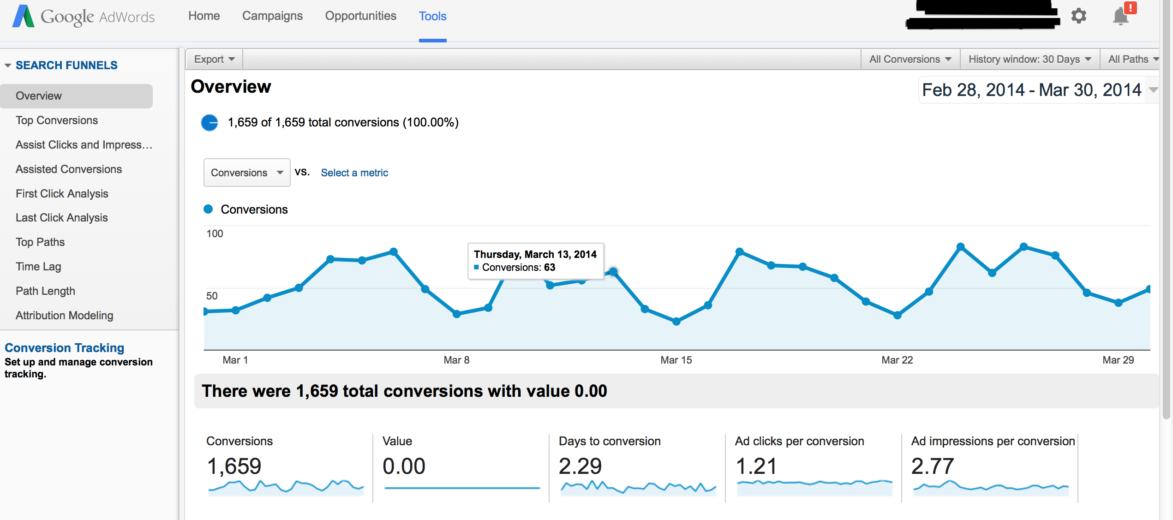
The search funnel report documents a searcher’s entire path to conversion. Sometimes the path is just one query long. Other times it’s an entire series of keywords and queries. Search funnel data can be found in three locations: 1) The Adwords interface, by adding in the assisted clicks, impressions, & conversions columns, 2) By clicking on ‘tools’>conversions>search funnels, and 3) Google Analytics.

Below is an example of a search funnel report.

Search Funnel 1

Interpreting the search funnel report can seem daunting. There are dozens of mini reports and filters that show search funnel activity in a variety of ways. I’ve provided simple definitions to help make it easier to remember what the report’s key fields mean.

Assisted Clicks: Clicks on keywords that led to a conversion on a different keyword.

Assisted Impressions: Impressions that led to other impressions that led to a conversion.

First/Last Click Analysis: Keyword performance at the beginning or end of the conversion path.

Click Assisted Conversions: Total number of conversions a keyword contributed to by having assisted clicks.

Top Paths: The actual path searchers took that led to a conversion.

Path Length: The amount of clicks it took until a conversion occurred.

Attribution Modeling: What marketing channel got credit for the conversion?

Search funnel data is collected via conversion tracking. If conversion tracking is already installed, no additional set up is required. If tracking isn’t installed, all you have to do is create a conversion pixel and install it per Google’s directions. For more information on setting up conversion tracking, just visit Google’s help center.

Now that we have a basic understanding of what the search funnel report, the next question is:

How Should I Use The Data in the Search Funnel Report?

I use search funnel reports to communicate value to my clients, and to better understand user behavior. For instance, when it’s time to decide where to increase or pull back spend, I can justify keeping keywords live that might normally get paused if I were looking exclusively at the bottom line data.

Below is a sample keyword report that I pulled from the Google interface. All I did was add assisted clicks, click assisted conversions, assisted impressions, & impression assisted conversions.

keywords

The cost per converted click for ‘nursing associates program’ is $389. Based on that bottom line cost, I wouldn’t want to continue on with that keyword. However, there is 1 impression assisted click. Whether you value your assisted conversions equally as last click conversions or not, this extra conversion means the keyword is performing much closer to goal and is worth keeping live.

On the other hand, the 2nd keyword, ‘nurse degrees’ has only 1 conversion at a $327 cost per converted click, and it has 0 assisted clicks, conversions, or impressions. In this instance, I can be reasonably assured this keyword is not producing any conversions and is only running up cost, and can therefore be paused.

Below is an example of user behavior. I’m particularly interested in this query path. Notice the progression from a general interest search (‘degree in dental hygiene’), to a more targeted search (‘dental hygienist schools’), and finally to a specific search (‘dental hygienist schools Georgia’).

Screen Shot 2014-03-31 at 4.18.04 PM

From this simple view, I’ve learned 2 things: 1) general keywords are leading to conversions down funnel, and 2) User searches in this path are very deliberate. Each search becomes more refined as the searcher advances through their research process. I also learned I need to fill any keywords gaps by making sure my list contains keywords that mirror the conversion path my prospects are taking.
Are You Facing Zero AdWords Conversions Problem

- Credit goes to Iain Dooley (original author) & unbounce  Original Link


It’s exciting when you first start buying AdWords traffic.
You have your offer, you have your landing page up, you’re gonna make it after all!
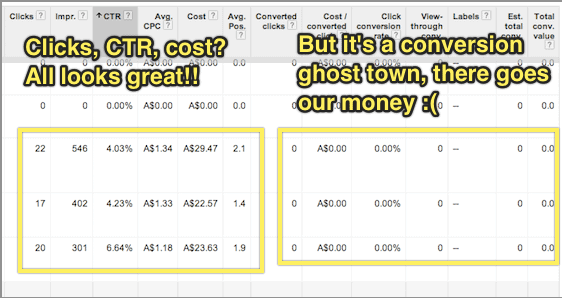
But that excitement quickly turns to dismay when you find that no one is buying your stuff. Nobody’s signing up.
And every day AdWords keeps taking your money.
At this point many people simply give up on AdWords.
“AdWords just doesn’t work for my business!”
“Maybe we’ll try Facebook ads!”
“We’ll do better with SEO and content marketing!”
The sad truth is that there are very few businesses that are likely to succeed in the long term if they can’t get even a few customers through AdWords initially.
That’s a pretty big claim, but read on and you’ll see why I’m confident in making it.

What’s your problem?

The first step in getting more AdWords conversions is figuring out what a conversion even means for your business.
AdWords conversion tracking allows you to see which of your ads and keywords are getting you the best results.
The actual mechanics of setting up conversion tracking are explained pretty well in Google’s own support documentation and on the face of it this seems like a pretty trivial issue.
If you run a SaaS business, you would set up a conversion event to trigger when someone signs up.
If you’re running an eCommerce business you would set up a conversion event to trigger when someone buys from you.
What the Google support documentation (and virtually every other resource on conversion tracking I’ve ever encountered) fails to discuss, though, is what to do when you have zero conversions.
AdWords-conversion-event

Separating out your marketing problem from your sales problem

Chances are that you’re not going to get sales or sign-ups immediately after you start advertising.
This is caused by one of the following 2 issues (or sometimes both):
  1. Keyword targeting: which search terms represent the best opportunities for you to connect with your target market cost effectively?
  2. Conversion: how do we actually sell to our target market?
You can think of these as being a “marketing problem” and a “sales problem” respectively.
If you find that you have a steady stream of affordable traffic from people looking for your product but no one buys, you have a sales problem.
If you find that you can’t afford or can’t find any significant traffic volume from people in your target market, you have a marketing problem.
It’s quite difficult to try and fix both marketing and sales problems simultaneously.
When you’re working on targeting your AdWords spend, especially if your product or service is a bit ambiguous or something quite new, it can be very useful to know which keywords indicate someone as being in your target market even if they haven’t bought from you yet.
For example, say you have a solution for small investors to quickly and easily purchase low-risk diversified company stocks with little research or upfront cash investment. Your target market is certainly online and searching for things related to your solution, but they’re not searching for exactly what it is you’re selling because they don’t know it exists yet.
You have a marketing problem.
Alternatively, say you sell ladies shoes in petite sizes. People are online searching specifically for what it is you’re selling, but they don’t buy from you.
You have a sales problem.
In other words, you want to try and solve your marketing problem independently of your sales problem and this is where using an “intermediary” conversion event in AdWords can help.

Placing the Conversion Event At the Beginning of Your Marketing Funnel

If you sell widgets, and people are looking for widgets, and they come to your site and don’t buy widgets from you, it’s pretty obvious that there’s a problem.
It’s not always immediately apparent, though, whether this is a marketing problem or a sales problem.
The trick here is to fix the marketing problem first by picking just a few of the most promising search terms and focusing on selling to these people.
That way you can hone your sales process while risking very little money on AdWords traffic that doesn’t convert.
But how do you know which search terms are the most promising if no one is actually buying from you?

A good example of this is if you’re running an online shoe store focused on shoes for early childhood up to age 4.
When someone searches for “kids shoes” and comes to your site, but doesn’t buy, was it because your site is poorly optimised and has a hostile user experience (a sales problem), or was it because people searching for kids shoes are mostly looking for shoes for school-aged children over the age of 5 (a marketing problem)?
To find out, you can place a conversion event at the start of your purchase process, rather than the finish. For example, you could trigger a conversion if someone adds any product to their cart.
Another tactic might be to put together a landing page that has a very simple headline/value proposition and a “Learn more” button that goes to your product page.
If you make your headline clear enough, eg. “Healthy shoes for children aged 4 and under” you can be certain that anyone who clicks “learn more” is looking for shoes for their children aged four and under.

Using Google Tag Manager to Track Conversions

In some cases, the task of triggering an “intermediary” conversion event can be technically laborious.
For example, imagine that I wanted to trigger a conversion event if someone went to any page on my site, other than the homepage. Or that I wanted to trigger a conversion when someone clicked “buy now”, triggering a checkout popup window (even if they didn’t complete their purchase).
Google Tag Manager is a tremendously useful tool for tracking complex conversion events in both AdWords and Google Analytics.
Not only can you do traditional “page based” conversions using “rule sets” that trigger your conversions (for example, “trigger this conversion on any page other than the homepage”) but you can attach conversions to virtually any event by using Google Tag Manager Auto Event Tracking.
There’s plenty of good info on how to get started with Google Tag Manager already around the interwebs, so I’ll leave the details of this as an exercise for the reader.

Tracking Multiple Conversion Events Simultaneously

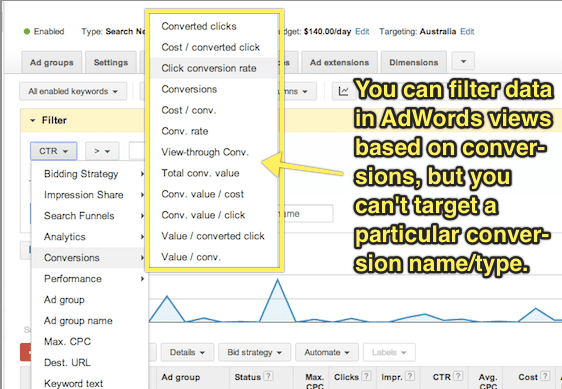
While you can use multiple conversion events and then extract data using AdWords segments to see which keywords are converting according to a particular event, I would highly recommend keeping things simple and just working with one single conversion event at a time.
Using a single conversion event at any given time means you can simply look at your conversion rate in all AdWords screens without having to download a report first and, more importantly, that you can filter your data within AdWords based on conversion rate.
adwords-conversion-event-2
It’s important to remember, though that if you’re working with a single conversion event at a time, that your “conversion rate” will change it’s meaning over time.
That’s to say that if you start off using a “click on any page other than the homepage” event as your conversion event while you target your keywords, then switch to “view of plans/pricing page” while you test your page copy, then switch to tracking “clicks of the signup button”, you will need to record when each of these changes is made so that you look at your conversion rate only within the appropriate timeframe.

Don’t Give Up!

Using PPC landing pages to drive sales for your business is like a super power.
In fact, it’s so powerful that Juan Martitegui from MindValley Hispano made the claim in his Mixergy Interview that “It’s not a business unless you have found a profitable way to buy customers.”
But remember that AdWords isn’t just marketing – it’s also market research. Setting realistic intermediary conversion events allows you to quickly, easily and cheaply validate ideas even before you start selling.
I hope that by applying the principles in this article you’ll be able to use AdWords conversion tracking to incrementally improve each stage of your conversion funnel, and build an unstoppable sales machine for your business or your clients.

Webinar --- Battle for Power in a Marketing Landscape

- Credit goes to PPCHero. Original link

Stretching the marketing dollar can be a daily battle and with the continuous tussle for PPC in particular, you’ve probably had your share of challenging issues and questions. How do you prioritize your marketing dollars? When should you think about moving your marketing budget around? How do you handle “micro-managing” of your PPC accounts? Should you hire an agency for PPC marketing, an in-house staff member, or go the automated path?
In the recording below, digital advertising experts from Hanapin, Searchforce, and Cabela’s talk marketing and contend their daily power struggles from their each unique perspectives, which cover every facet of the industry: an agency, in-house team, and automation software.
You’ll get expert-level PPC tips like:
*How to be a successful gladiator for your PPC accounts
*Insight into the different perspectives of PPC marketing
*How the market landscape can affect your PPC budgeting decisions
*How to tackle “micro-managing” of a PPC budget
Prepare for the ultimate battle of insights, tips, and expert-advice!
Here is the webinar recording:

Webinar Link


And here is the slideshare presentation:

 Slidshare Link

Some Of The Google Analytics Resources

- Credit goes to Ted Parry (Original Author). Original link


Google Analytics is one of the best free data analysis tools on the web. But having this powerful tool at your disposal is irrelevant if you don’t know how to harness its potential.
I suppose there is something to learn for people with varied expertise in Analytics from the post given below :

For Beginners

A quick guide for setup and get going:
  1. The Complete Guide to Setting up Google Analytics – This post is an opportunity to identify what code you’ll need, the account structure, and various other things necessary to get set up successfully.
  2. Beginner’s Guide to Google Analytics – This three-part series delves into setting up your account (part 1), setting up goals (part 2), and measuring visitor interaction (part 3).
  3. Google Analytics Tutorial for Beginners 2014 – Video guide on how to navigate the Google Analytics interface and use certain features.
  4. A Guide to Getting Started with Analytics – Goes into detail about how to understand what your traffic is doing and which trends to watch.

Data Segmentation

 It will allow you to compare data and make judgments.
  1. 16 Google Analytics Advanced Segments Tips – A combination of different segments you can apply to your analytics data to get insight. Examples include segmenting based on which type of traffic spends the most or which type of traffic bounces immediately.
  2. Segment Average Visit Duration in Analytics – See how you can get a better view of what average visitor duration means by segmenting your traffic.
  3. Google Analytics: Tracking Demographics of Ecommerce Visitors – A blog post on how to get demographic reports and how to analyze this data.
  4. Calculating the ROI of Your Marketing Channels – Shows you how to capture campaign data to calculate your return on investment and ad spending.

Small Business Analytics

These guides should give know how about measurement of ROI from digital channels.
  1. Web Analytics Guide For Small & Medium Sized Businesses – Breaks down exactly what things a small/medium sized business owner should be looking at. Tells you how to install the code, how to define business objectives, set up goal tracking, understand which channels are working, and how to report on all of it.
  2. The Small Business Guide to Google Analytics – This fantastic mini-site is a mix between an infographic and a blog post. It goes over all the simplicities a small business owner needs to understand.
  3. Understanding Web Analytics: Small Business Guide – Goes into details around the basic stats but gives a good introduction to the main sections of Google Analytics.
  4. 5 Google Analytics features for Business Owners – Looks at the features small business owners should be paying the most attention to.
  5. How to Track Anything with Google Analytics – Learn to track the most basic of things from outbound links to email sign ups.

Universal Analytics

Provide business insight to impact the bottom line.
  1. Complete Guide To Universal Analytics – Should you switch to Universal Analytics? This article aims to give a hint at whether you should and how to set it up successfully.
  2. Universal Analytics: The Benefits and How to Upgrade – An infographic on the benefits of Universal Analytics, what it brings to the table, and things you should be aware of (such as making sure your remarketing programs support Universal Analytics).
  3. Advanced Content Tracking with Universal Analytics – Ever wondered whether your readers are actually reading? Well, you’ll be able to find out with this JavaScript code. It allows you to see how far they’re getting and will surely be useful with Universal Analytics.

Analytics for Conversion Rate Optimization

Conversion rate optimization is a hot topic and one that often is used in conjunction with Google Analytics. How to comprehend key features and how to run a split test is something worth knowing
  1. Building Your Marketing Funnel with Google Analytics – Having trouble understanding which marketing channels are working best? Read this guide on how to segment your data with Google Analytics and discover opportunities for growth.
  2. Tracking Product Journey from Carting to Purchasing – If you own an e-commerce website, then this PDF guide is a must read. It will tell you exactly what you’ll need to track, from conversion rate to whether someone has removed an item from their cart.
  3. A Guide to Measuring Split Tests in Google Analytics – A guide on implementing your split testing strategy and continual analysis through Google Analytics.

Reporting and Excel

Do you work agency side, then reporting will be a large factor in maintaining your relationship with your client/boss.The articles below will tell you how one can get even more value from your weekly/monthly reporting.
  1. 10 Optimization Experts Share Their Favorite Google Analytics Reports – Ten experts chime in on their best reports for conversion within Google Analytics. Even if you use just one report, it would be worth your time to read it.
  2. 21 Real-World Examples Of Concatenating Marketing Data In Excel – Concatenating often is an under-utilized but powerful command within Excel. Annie from Annielytics provides 21 examples of using this command effectively.

Goal Tracking

Read the guides below to understand why it’s important and how to do it.
  1. Guide To: Goals And Funnels In Google Analytics – Goals are fundamental to tracking your website’s success. This guide will demonstrate how to set up goal tracking and gives examples of what you should consider tracking.
  2. Why to Define Macro and Micro Goals – Understanding the difference between macro and micro goals is very important and will help greatly when setting up goals.

Advanced Guides

This section covers some of the more obscure/complicated topics that are fairly new to the industry.
  1. The Ultimate Guide to Google Analytics Profile Filters – A guide on using filters to maximum effect. Includes ways to filter your own IP data, or only track certain metrics.
  2. Analyze Organic Search Engine Marketing with Analytics & GWMT – Advice from the official Google Analytics blog on how to measure the effectiveness of search engine marketing.
  3. 6 New Google Analytics Features – A list of six new features that Google Analytics has introduced that will impact how you view your data.
  4. Multi-Channel Attribution Modeling: The Good, Bad and Ugly Models – Goes into detail about the various types of attribution models and how to best apply them to your marketing efforts.
  5. The Full Guide to Remarketing in Google Analytics and AdWords – Remarketing has been a hot topic for a while now but has had little transparency about how to do it right. This guide shows you which tracking code to implement and other steps needed to get you up and running.
  6. (Provided): 10 Ways to Prove SEO Value in Google Analytics – Ever wondered how you can get around the not provided issue? Well, this guide gives you ten bite-size ideas on the best way to prove SEO value from Google Analytics.
  7. Google Analytics Social Tracking – Twitter, Facebook, Google Plus & Linkedin – Shows you the code you’ll need to really understand your social impact within Google Analytics. It will show which social buttons were used most frequently and will be useful for monthly reporting.
  8. Understanding Google Analytics: A Simple Guide to Advanced Terms – Great opportunity often lies within understanding the complexities of Google Analytics. Learn how to utilize filters, intelligence events, and custom dashboards within this post.
  9. Google Analytics for Ecommerce – Justin Cutroni from Google tells you how to set up e-commerce tracking, how to analyze data and report, and includes a few more advanced subjects such as cohort analysis.
  10. 7 things to consider before blindly choosing Google Tag Manager – Thinking of jumping straight into using Google tag manager? Well, before you do, consider reading this article as it details both the pros and cons of the application.

Google Analytics Exam

This can add to our credibility credible within the industry.
  1. Google Analytics Test – This is a super test aimed at helping you pass the individual analytics qualification. With over 200 questions, there is plenty of opportunity to learn and develop.
  2. Analytics Academy by Google – If you’re serious about learning analytics, then the official learning resource center of Google is a good place to start. With video tutorials and a mock assessment at the end of each module, you’ll be able to track progress and note areas where you need to improve.

Tips, Tricks, and Tools

Some of the tips, tricks, and tools below should inspire your creativity.
  1. Periodic Table of Google Analytics -Want to know the meanings of terms used in Google Analytics? Then read this handy periodic table of Google Analytics terms. You won’t regret it.
  2. Analytics Woman Chrome Extension – This might not help you immensely with Google Analytics, but it sure will take out the boredom of the Google Analytics start screen. You have the option to change the picture to something a bit more obscure.
  3. The Customer Journey to Online Purchase – Every good marketer understands that each industry’s customers react differently to various channels. This tool from Google allows you to segment by industry and gives insight into how each channel influences decisions in the purchasing process.
  4. “Not Provided” Keywords Estimator – This free tool from Digivate is used by many digital agencies to estimate what their client’s brand and non-brand traffic is. A very useful tool which always should be used when working with large brands.
  5. Top 24 Google Analytics Tips, Hacks & Automations – Luna Metrics is known to be one of the leading analytics companies. In this post, they link out to 24 of their best analytics articles.
  6. 13 Free Google Analytics Tools To Use Everyday – There is no doubt that tools can save you a lot of time and help you get to the important details. Read this to get a sense of what you could be missing out on.
  7. The Best Google Analytics Tips & Tricks for 2014 – Having an array of experts give their opinions on the latest tips and tricks will go down well in any industry. Get an idea of where Google Analytics is heading in the future with this post.
  8. 10 Actionable Google Analytics Tips – Having tips is nice, but having actionable ones is even better. Find out how to keep tabs on 404 error pages or even plot multiple rows of data.
  9. A New Method to Track Keyword Ranking using Google Analytics – This post is quite technical, and the method may require a developer to implement, but it sure is worthwhile if you set it up properly.
  10. How Call Tracking with Google Analytics Increases Your Profits – If you run a service-based business that relies on calls coming in to close sales leads, then this post could prove to be invaluable.

Expert Analytics Blogs

The best way to become the best is to learn from the best. The blogs below are compiled by experts that have years of experience in analytics and can teach you more than a trick or two.
  1. KISSmetrics Google Analytics Blog Posts – Read up on what KISSmetrics has produced over the years around Google Analytics and you’re sure to come away with something valuable.
  2. Online Behavior Analytics Blog – A blog dedicated to marketing analysis and optimization. Also has a video section if you’re more of a visual learner.
  3. Occam’s Razor – Avinash Kaushik has contributed a lot of thought leadership to the analytics industry over the years. Give his blog a read, but be sure to have a notepad next to you.
  4. Official Google Analytics Blog – The official Google Analytics blog is the first place you’ll find out about recent updates to the interface or a new feature being rolled out.
  5. Justin Cutroni’s Blog – Justin is an analytics evangelist at Google and produces some really insightful posts. Some may be a bit technical, but by the end, you’ll be wondering what Google Analytics can’t do.

Books

As well as blogs, books are another medium for learning. The two books we recommend below are written by well-respected authors within this industry. Well worth the investment.
  1. Web Analytics 2.0 (Avinash Kaushik) – This book has been cited by many industry experts as being one to read. It ties in all aspects of analytics and makes advanced principles easier to understand.
  2. Advanced Web Metrics with Google Analytics (Brian Clifton) – A book produced by another respected figure (Brian Clifton). Read this to increase your depth of knowledge in more of the advanced metrics.


Want To Write Better PPC Ads --- Some More Tips For You Then

If you want to sell products or generate leads online, a user-friendly, conversion-optimized website is Step 1. But when it comes to search engine marketing, it doesn’t matter how beautiful your website is if people never get there.

Pay-per-click (PPC) advertisements placed in search engine results and on other relevant sites can be an extremely effective means of driving qualified traffic to your site – one that more than pays for itself, if you’re doing it right.

Even though you have to pay for each click on one of your ads, it’s important to aim for a good click-through rate (CTR). CTR – the ratio of clicks to impressions – represents the percentage of people who see your ad and then click through to your website. Lots of impressions without a lot of clicks is a sign that your ad isn’t speaking to the people who see it. This could be because you’re bidding on the wrong keywords, but almost always, you can significantly increase CTR – and ROI – by writing stronger ad copy.

A great PPC ad is a combination of best practices and little details that get you noticed. In this guide, we’ll share ten tips for crafting more compelling, more clickable text ads, including information to help you develop:
  • Eye-grabbing headlines and descriptions that scream “I’m relevant to your needs!”
  • Specific calls to action that reinforce desires and create urgency
  • Well-structured ads that earn high Quality Scores and boost your whole PPC account


Don’t neglect this core component of your PPC campaign! Read on to learn how you can start writing stronger, more clickable ads today. We’ll start with some basic ad writing best practices, then move on to more unusual tricks you may not have thought of.

Let’s get started!

1. Include Features, Benefits & A Call To Action

At the end of the day, the most effective ads will have three components: They will tell the features, sell the benefits and have a call to action (CTA) for the product or service being advertised. No amount of keyword stuffing (inserting the search term you are bidding on into the ad and landing page as many times as possible) or other tricks will get you as much lift as an ad that is selling compelling benefits and has a strong call to action.

Creating these ads, however, isn’t as easy as just sitting at your computer with an open spreadsheet and hoping inspiration strikes. It takes an in-depth understanding of your business (or your client’s) and your unique selling proposition (USP). A great way to accomplish this is by using a Feature-Benefit Matrix spreadsheet to uncover the USP and the strongest points to convey in an ad.

The Feature-Benefit Matrix looks like this:

Feature Benefit Matrix

You simply list your features to the left, then list out a few benefits of each feature, and on the right you fill in your most compelling calls to action for your PPC ads. Then you go back through and identify you strongest 2-3 combinations, and you have an ad!

2. End Description Line 1 With Punctuation

   If you end the first line of your ad after the headline with a period or other end punctuation, and your average position is in the top 3 spots, you will get a single elongated headline that has a lot of pulling power.

Take a look at the sponsored results for a Google search for “Pet Insurance”:

AdWords Ads

You can see here that the top ad has a long headline that includes the first description line and ends with a period: “Pet Insurance in Colorado – Top Rated Pet Insurance.”

The second ad, on the other hand, has “9 out of 10 veterinarians recommend” pulled into its headline – this is great copy, but it would have been even stronger if that headline was a complete thought. Instead, the end of the sentence is under the display URL (the full thought being “9 out of 10 veterinarians recommend VPI”).

3. Make Full Use Of The Display URL


The display URL is a great way to find some extra space in a PPC ad for a compelling call-to-action or benefit statement, or simply to increase relevancy by adding in the search term ...

Want To Improve CTR 5 Things To Learn From A/B Testing

We’ve been running guest posts by Ryan Healy, a copywriter for BoostCTR, for quite a while now. Each post focuses on a single A/B test and analyzes the strengths of the winning ad (that is, the ad with thehigher click-through rate). There’s so much good ad writing insight in these posts, I thought it was time to dig back through them and pull out some takeaways.

Here are five ad writing lessons gleaned from Ryan’s A/B tests that you can use to improve your AdWords CTR and Quality Score.

Lesson #1: Leave Out The Lingo


Don’t use insider jargon that your audience might not know or understand in the context of your ad. For example, look at the below ads:


PPC Ad #1
MMA - Ad #1
PPC Ad #2
MMA - Ad #2


The second version increased CTR by 70%. The first version uses some confusing terminology: “No XP reqd.” That means “No experience required,” but it’s not obvious – when I see “XP” I think “Windows,” and probably the average person does too.

To make your ads more readable and clickable, use simple, straightforward language. If you’re not sure if your ad is readable or not, run some tests!

Lesson #2: Target Your Real Target


This is related to lesson #1. Just as you should keep your target customer’s vocabulary in mind, you should make sure you’re speaking to their goals and needs. Take a look at the two ads below (“ADA” stands for “Americans with Disabilities Act”):


PPC Ad #1
Ad #1 - ADA Signs
PPC Ad #2
Ad #2 - ADA Signs


The first ad focuses on benefits for people who might read the signs (“Bold & Clear”) – but the ad should be targeting people who might buy the signs. The second ad wins (increasing CTR by a whopping 164%!) in part because it focuses on benefits for the buyer – that is, businesses who need ADA signage for compliance reasons (“Avoid Hefty Fines”).

Lesson #3: Use Verbs

Maybe it sounds obvious, but since you want people to do something when they see your ad, it’s important to use strong verbs that entice them to action. Take a look at this A/B test:


PPC Ad #1
CRM Software - Ad #1
PPC Ad #2
CRM Software - Ad #2


Ad #2 uses no verbs. (Tracking is a gerund here. Fun grammar facts!)  The first ad, which achieved 89% higher CTR, uses a verb to tell people why they should click the ad – “Watch Online CRM Demo Instantly!” People like being told what to do; it allows them to think less. Make sure your ads have a call to action centered around a commanding, descriptive verb.

Lesson #4: Match Your Ad To The Product


Use the exact brand name of the product or service you are selling in the ad. An exact match improves relevance in the eyes of Google (helping your ad rank) as well as the searcher (encouraging them to click). Notice the difference in spelling between these two ads:


PPC Ad #1
Vibram - Ad #1
PPC Ad #2
Vibram - Ad #2


Ad #1, which increased CTR by 65%, spells out “Five” instead of using the number “5.” This more closely  matches the actual name brand of the shoe. (They probably could have increased CTR even further by using the exact brand name, which is “Fivefinger,” one word.)

Lesson #5: Use An Exclamation Point

Did you notice that all of the winning ads above use exclamation points? This visual sign of enthusiasm often improves your CTR. Scan your AdWords ads and see if you could be getting more leverage just by adding this single punctuation mark.

Some Real Time Bidding Predictions For 2014

In the digital space, 2013 has been another massive year. 2013 has been branded the year of mobile, the year of video, the year of enhanced campaigns (gasp!), and the year of audience, etc.
Arguably 2013 could also be branded the year of real-time bidding. RTB has become the buzzword in display and digital marketing as a whole due to the advancement of opportunities for dynamically run biddable display campaigns.

This article, however, won't discuss all the amazing RTB related excitement that has come out of 2013, but rather discuss what the future is for the biddable display arena. My predictions for RTB in 2014 are as follows.

1. Rich Media Ads


Ad formats are becoming increasingly engaging and interactive. Dynamic creative allows advertisers to insert images and text based on combinations of variables, which isn’t just limited to e-commerce products.

In 2014, expect travel and publishing advertisers to use dynamic capabilities more creatively to create highly targeted and flexible ad copy. In addition, the use of rich media and engagement ads will continue to grow.

Engagement metrics will be optimizable, meaning advertisers are able to judge performance of ads even when users don’t leave the publisher’s website. This means publishers and advertisers share the benefits of engagement ads.

Free products like Google Web Designer, which allows for free creation of rich media ads, will help advertisers create these ads quickly and efficiently.

Expect more rich media and engagement formats which are easier to create and easily made dynamic.

2. Social Networks


The recent agreement between Google’s DoubleClick Bid Manager (DBM) and Facebook is a huge step forward in the alignment of social websites and biddable display. DBM advertisers will be able to reach first party and third party audience lists on Facebook and target them cross devices.
Expect more social networks to make their inventory available to exchanges in 2014.

3. Branding Metrics


Auditing the value of display campaigns has never been more important. Advertisers are becoming more aware of the optimization opportunities within biddable display and are understanding how direct conversions can be achieved through highly targeted and strategically run RTB campaigns.
DSPs will strive to provide new metrics to prove the value not only of direct conversions from display campaigns, but also the impact of visibility of display ads on brand recognition and awareness.

Expect more insights on viewability of ads and the impact on search to come in 2014.

4. Programmatic Video


DBM have recently created an option for in-stream video advertising via real-time bidding. This allows video ads to be served across a number of video exchanges, of course YouTube being the biggest.

Expect the CPM bidding model to be refined to allow for cheaper and more direct conversion options from biddable video. The number of video exchanges continues to grow, and it's in their best interest to make their inventory available in the biddable space. Note this isn't limited to just DoubleClick; video via private auctions on premium inventory is being discussed by a range of DSPs and publishers.

Expect expansion of biddable display throughout 2014.

5. Private Marketplace Deals


Similar to the addition of social networks allowing their inventory to be targeted via demand-side platforms like DBM, an increasing number of publishers will be using DSPs as a way to easily make their premium content available to a larger number of advertisers. This helps bridge the gap between reservation display and exchange buying, meaning that advertisers can reach premium content which may have previously been only available via direct reservation deals, and premium publishers still have a choice over the brands who have access to their highly valuable inventory.
Expect even larger volumes of premium inventory to become available via auctions.

RTB in 2014


These are just five predictions of the many expected advancements and changes that will inevitably come to the RTB space in 2014. If 2013 wasn’t the year of RTB within our industry, 2014 has absolute potential to be the year advertisers and publishers alike get onboard and start using display inventory to its full performance potential.

PPC Data Analysis (Peer Comparision) Using Excel Sheets

My new favorite saying for PPC is, “Context is king!”  How do you know if a keyword’s CTR is good or bad?  How about your keywords CVR (conversion rate)?  We determine this by comparing our keyword’s performance to the average performance of the other similar keyword/ad combinations.

“Effective PPC analysis is about finding the segments in your account that deviate from the norm. In many cases, you’re leaving opportunity on the table.” –Alex Cohen

PPC analysts make these types of comparisons all the time, although not always through a systematic, data-driven approach.  I want to show you how you can add these valuable comparison metrics to your data-analysis process, so we are not just doing these types of comparisons intuitively. 
 
I will be using KEYWORD_PEER_CTR for this article, but most of the techniques I will be demonstrating could also be applied to other comparison metrics like: PEER CVR, PEER CPA, etc.  These types of metrics can also be calculated at the campaign, ad-group, and text ad levels and are not limited to just keywords.

KW_PEER CTR: the proportion of clicks and impressions for a given ad-group minus the keyword’s own performance data (i.e. KW_PEER_CTR = (adgroup_clicks – keyword_clicks)/(adgroup_imp – keyword_imp).

Now in order for this type of calculation to have the most benefit, it is important to have a best-practice account structure with tightly themed ad-groups.  Regardless, your keyword’s performance is tied directly to the same ads as all of the other keywords in the ad-group, so the calculation I described above is a valid way to create this comparison metric.

Peer calculations, such as the one described above are finding their way into some of the industry’s PPC software platforms.  You will often see them under the heading of ‘best-practice’ filters, alerts, or rules.  And while this type of calculation is especially suited for the database environment that drives these software platforms, you can easily create peer calculations using your PPC reports and Excel.

Keyword PEER_CTR Using an AdWords Keyword Report and Excel


Step #1: Run an AdWords Keyword Report


The first thing that you will need is an AdWords keyword report.  You can download this report directly from your ‘Campaigns’ tab in the AdWords web-interface or through your MCC Reports Center.

Regardless, at a minimum you will need to include the following columns in order to make our peer_ctr calculation:
  • Keyword
  • Ad-group
  • Impressions
  • Clicks
  • CTR

Of course, you can pull more columns if you plan on performing additional analysis, but for our purposes this will be sufficient. 

Step #2: Format your data as an Excel Table


Formatting your dataset as a table in Excel has many benefits that I won’t go into now, but as you work with your data they will become evident.

  1. Highlight your entire Keyword report including the header row (not the totals row at the bottom).
  2. Click on “Format as Table” form the Home ribbon
  3. Format as Table

    Format as Table

  4. Choose a style that you like
  5. Click “OK”


Step #3: Create an Ad Group Roll-up of Your Keyword Report


Because we are comparing our keyword’s performance against that of its peers in its ad-group we will need impressions and clicks aggregated (summed) at the ad-group level.

  1. Select any cell in your new table and Insert a PivotTable in a new worksheet (since we formatted as a table we don’t have to manually select the entire dataset).
  2. Insert a Pivot Table

    Insert a Pivot Table

  3. Add Ad Group to the ‘Row label’ and Sum Impressions and Clicks as Values
  4. Copy the data from the pivot table and Paste Special > Paste Values in a new worksheet.
  5. Highlight your entire dataset and “Format as a Table” as described above.
  6. Ad Group Table

    Ad Group Table

  7. You can name this worksheet “adgroup_lookup”
  8. worksheets

    Keyword Report & Ad Group Lookup Worksheets

Step #4: VLOOKUP Magic


In order for us to create this calculation (KW_PEER_CTR = (adgroup_clicks – keyword_clicks)/(adgroup_imp – keyword_imp) we will use Excel’s VLOOKUP formula.
  1. In your keyword report worksheet go to the right most open header cell and type “PEER_CTR” and hit enter.  Because we formatted as a table you will see a new column populate the full length of the dataset.
  2. In the first cell of your new column type the following formula:
  3. =(VLOOKUP(Table1[[#This Row],[Ad group]],adgroup_lookup!A:C,3,FALSE)-Table1[[#This Row],[Clicks]])/(VLOOKUP(Table1[[#This Row],[Ad group]],adgroup_lookup!A:C,2,FALSE)-Table1[[#This Row],[Impressions]])
    Friendly Formula: (adgroup_clicks – kw_clicks)/(adgroup_imp – kw_imp) = PEER_CTR
    Peer CTR Formula

    Peer CTR Formula
  4. Next you can add a CTR_DIFF column and calculate the difference in keyword CTR compared to its peer’s CTR using this formula:
=(Table1[[#This Row],[CTR]]-Table1[[#This Row],[PEER_CTR]])/Table1[[#This Row],[PEER_CTR]]

Friendly Formula: (kw_ctr – peer_ctr)/ peer_ctr = CTR_DIFF


CTR Difference Formula

CTR Difference Formula

Step #4: Use this Knowledge to Create More Comparison Metrics


Hopefully you can see the benefit and power of creating these types of comparison metrics.  Take what you have learned and add: PEER_CVR and PEER_CPA and see how much more powerful your analysis becomes with this added context. Using these techniques will allow you to create actionable lists of keywords with above or below average CTR, CVR, or CPA’s quickly and easily.

The Unknown Power Of Search Queries - Knowing SQ Part V

This is the last post in my series on Advanced Search Query Mining. Here is a list of the previous posts in this series just in case you missed one.


In my previous post on search query mining I showed you my technique for creating an ad-group-level negative candidates list and a keyword expansion list from your search queries. In this post I’m going to show you a method for acting on those insights. I will also include a link in the conclusion of this post to a free Excel download that has all of the formulas I’ve used in this series.

Acting on your Negative Candidates


There are several factors that could be impacting the performance of your search queries, but for the purposes of this tutorial I am going to assume that you are following best practices and have tightly themed ad groups containing a small number of keywords.

One reason that you have poor performing search queries in your ad group is because of the way Google matches search queries to your broad match keywords. Google’s idea of broad is just about as broad as you can imagine, and sometimes even broader.

In order for a search query to be on the negative candidates list, your search query has already demonstrated that it doesn’t belong in the ad-group that it’s matching to—it has very poor CTR and CVR.

These search queries are not working with your existing ads. There is really no good reason not to just add the entire list as ad-group-level negative exact match keywords, preventing them from matching to your broad match keywords in the future.

This is accomplished by copying your entire negative candidates list from Excel and pasting it into AdWords Editor.


  1. Copy your list of negative candidates
  2. Paste them into a temporary worksheet
  3. Delete all columns except: Campaign, Ad Group, Search Query (change this to Keyword), Match Types (change this to Keyword Type) (you may have to reorder your columns as shown above)
  4. Change the Search Query column to Keyword
  5. Change the Match Type column to Keyword Type
  6. Change all of your match types to exact (we will be creating exact match negative keywords)
  7. Reorder your columns as: Campaign, Ad Group, Keyword, and Keyword Type using Cut & Paste.
  8. Now copy your modified list of negative candidates
  9. In Google AdWords Editor, click on Negatives > Make Multiple Changes > Add Multiple Negative Keywords as shown below.
  10. Paste your copied list of negative keywords into the wizard
  11. Click Finish.

Now your negative exact match keywords are in AdWords Editor waiting to be uploaded into your account. Take a look at what you’ve added and make sure everything looks good before you post your changes.

Acting on Your Keyword Expansion List


Adding new keywords to your account is more difficult. You must make sure they find a good home (ad group).

At a high level, you copy your keyword expansion list, paste it into AdWords Editor, and distribute it into appropriate ad groups.


  1. In AdWords Editor create a temporary ad group in the campaign that you will be adding keywords to—name it something like z_temp so it will sort to the bottom or your ad groups in the tree-view, making it easier to find when you are going back and forth. And change its status to ‘paused.’
  2. Copy your keyword expansion search terms (only the one column) for the campaign that you are expanding and paste them into a different spreadsheet.
  3. Add a match type column and make your entire search terms list ‘exact match.’
  4. Copy your newly made list of terms and match types (not the column headers).
  5. In AdWords Editor select the campaign you are working on then click on Keywords > Make Multiple Changes > Add/Update Multiple Keywords to open the keyword wizard.
  6. In the keyword wizard, select the ‘z_temp’ ad group from the campaign structure tree, paste your new keywords into the wizard as shown below and click on the ‘Next’ button.
  7. If everything looks good click Finish.

Now you have all of your new keywords in a temporary ad group waiting to be distributed to an appropriate ad group.

The challenge is finding the appropriate groupings/ themes of your new keywords. There are a couple of ways I approach this problem.

  • Manually scan your keywords looking for themes that match to existing ad groups and keywords.
  • Use the AdWords Editor Keyword Grouping tool.
  • Use the free WordStream Keyword Grouping tool.

A good place to start is by using your existing ad groups and keywords as the criteria for filtering your keyword expansion list. If you have a well built out campaign then you probably have most of the groupings already.

For example: let’s pretend that you sell dog food and dog food accessories.  It’s safe to assume that you already have a dog food bowl ad group, so you should filter your keyword expansion list by the word ‘bowl’ in AdWords Editor.


The resulting list will be all of your new keywords that contain the word ‘bowl.’ From here you can just drag-and-drop your keywords into the ‘bowl’ ad group or ad groups.

Similarly, you can use the output of one of the grouping tools above as your filtering criteria and then distribute your keywords.

WordStream Free Keyword Grouper:


Hopefully this gives you a good overview of the workflow. The most labor-intensive part of this whole process will be getting your new keywords into the right ad groups, but free tools like the WordStream Keyword Grouper and AdWords Editor can help speed things up.
+