Latest From My Blog

Showing posts with label ROI. Show all posts

Want To Understand Your Keyword Performance Better Use Google Search Funnel Reports

- Credit goes to Jeff Baum (original writer) & PPC Hero Original Link


I’ve always taken a bottom line approach to evaluating keyword performance. I want to know how much was spent on clicks, how many conversions those clicks generated, and if my keywords are profitable and performing to client or in-house goals. I base optimizations on these bottom line metrics and decide whether to pause certain keywords.

What I have recently come to understand is that bottom line performance does not tell the entire story.  As users become more sophisticated in their searching patterns, the path from initial search to conversion is growing longer. This conversion path is called a ‘search funnel’.

Understanding an account’s conversion path will help you make more informed optimizations and overall account management decisions. Quite often, your underperforming keywords could be indirectly helping other keywords in the account to convert. Pausing an underperforming keyword that drives conversions in another area of the account will ultimately hurt overall volume and profitability.

Today we will dive into the search funnel report and discuss how to best use it, so you can better understand what comprises the conversion path.

What Is The Search Funnel Report?

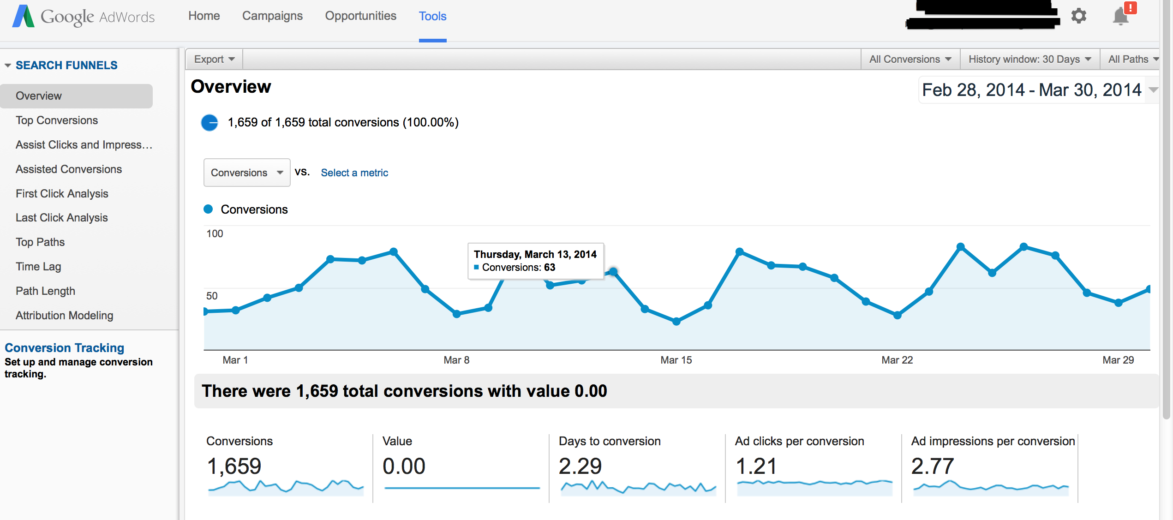
The search funnel report documents a searcher’s entire path to conversion. Sometimes the path is just one query long. Other times it’s an entire series of keywords and queries. Search funnel data can be found in three locations: 1) The Adwords interface, by adding in the assisted clicks, impressions, & conversions columns, 2) By clicking on ‘tools’>conversions>search funnels, and 3) Google Analytics.

Below is an example of a search funnel report.

Search Funnel 1

Interpreting the search funnel report can seem daunting. There are dozens of mini reports and filters that show search funnel activity in a variety of ways. I’ve provided simple definitions to help make it easier to remember what the report’s key fields mean.

Assisted Clicks: Clicks on keywords that led to a conversion on a different keyword.

Assisted Impressions: Impressions that led to other impressions that led to a conversion.

First/Last Click Analysis: Keyword performance at the beginning or end of the conversion path.

Click Assisted Conversions: Total number of conversions a keyword contributed to by having assisted clicks.

Top Paths: The actual path searchers took that led to a conversion.

Path Length: The amount of clicks it took until a conversion occurred.

Attribution Modeling: What marketing channel got credit for the conversion?

Search funnel data is collected via conversion tracking. If conversion tracking is already installed, no additional set up is required. If tracking isn’t installed, all you have to do is create a conversion pixel and install it per Google’s directions. For more information on setting up conversion tracking, just visit Google’s help center.

Now that we have a basic understanding of what the search funnel report, the next question is:

How Should I Use The Data in the Search Funnel Report?

I use search funnel reports to communicate value to my clients, and to better understand user behavior. For instance, when it’s time to decide where to increase or pull back spend, I can justify keeping keywords live that might normally get paused if I were looking exclusively at the bottom line data.

Below is a sample keyword report that I pulled from the Google interface. All I did was add assisted clicks, click assisted conversions, assisted impressions, & impression assisted conversions.

keywords

The cost per converted click for ‘nursing associates program’ is $389. Based on that bottom line cost, I wouldn’t want to continue on with that keyword. However, there is 1 impression assisted click. Whether you value your assisted conversions equally as last click conversions or not, this extra conversion means the keyword is performing much closer to goal and is worth keeping live.

On the other hand, the 2nd keyword, ‘nurse degrees’ has only 1 conversion at a $327 cost per converted click, and it has 0 assisted clicks, conversions, or impressions. In this instance, I can be reasonably assured this keyword is not producing any conversions and is only running up cost, and can therefore be paused.

Below is an example of user behavior. I’m particularly interested in this query path. Notice the progression from a general interest search (‘degree in dental hygiene’), to a more targeted search (‘dental hygienist schools’), and finally to a specific search (‘dental hygienist schools Georgia’).

Screen Shot 2014-03-31 at 4.18.04 PM

From this simple view, I’ve learned 2 things: 1) general keywords are leading to conversions down funnel, and 2) User searches in this path are very deliberate. Each search becomes more refined as the searcher advances through their research process. I also learned I need to fill any keywords gaps by making sure my list contains keywords that mirror the conversion path my prospects are taking.

Want to Catch an Affiliate Red-Handed in PPC

- Credit goes to Eric (Original Author) & PPC Hero Original Link

It’s important to understand that in PPC, you’re often part of a bigger picture than you realize. Whether in-house or agency, there are many moving parts– external non-Google display buys, social networking, old media advertising, SEO, webinars… the list is virtually endless. It can be easy to slip into an egocentric viewpoint and say to yourself: “Surely, I’m the only person getting paid to do PPC for this company. Right?”
Right?
Well, that may not be the case. To my detriment, I found this out just recently when working with one of my clients. So, to set the stage:
Over the course of a few months, performance in this AdWords account steadily declined. Upon review, the main culprit for the downturn was a steady drop in brand conversions. Here were the steps I pursued in troubleshooting this problem:

1. A Display Network audit to examine assisted conversion metrics.
My initial guess led me to explore some of our recent display optimizations– perhaps an excluded placement was contributing far more view-through conversions than previously suspected? Or did our decrease in display spend harm our overall brand performance?
This was a big dead end. I’m usually pretty good at accounting for assisted conversions, but there were no major errors found on that front. So I examined our Search campaigns via step number two:

2. A Search Network audit using the Search Funnels tool.
To troubleshoot the Search Network, I focused my efforts on the Search Funnels tool added to the AdWords interface. The thought here was to holistically examine our account and make sure I hadn’t paused any “team player” campaigns that allowed our “superstar” brand campaigns to convert.
A sample Search Funnels report pulled from the AdWords interface, cross-referencing CPA vs. Impression-assisted conversion metrics.
A usage case for the Search Funnels report pulled from the AdWords interface.
The above report comes from a different account, but the analysis remains the same. The most generous campaigns are, unsurprisingly, non-branded and competitor campaigns. Our branded campaign (and certain flavors of non-brand campaigns) are the primary beneficiaries of the work put in by the top campaigns.
Here, my main concern was to be sure that I didn’t kill off any campaigns that were indirectly providing more conversions than I had initially counted. In the above example, several campaigns that are above this account’s $27.50 CPA goal had indirectly contributed an additional 33-50% of their conversion volume elsewhere.
In this case, these campaigns were in no danger of being paused, but it might be tempting to make that same mistake elsewhere– especially if you don’t run this kind of analysis first. Pausing those campaigns would, theoretically, lead to a decline in brand conversions.
Unfortunately, this analysis also led nowhere. In desperation, I turned to an oft-ignored tool found in the “Keywords” tab:

3. A Keyword audit using the “Keyword diagnosis” function to troubleshoot brand keywords.
Fun fact: in addition to aiding with policy, negative keyword, and quality score issues, the Keyword diagnosis function can tell when your ads aren’t showing due to another account using the same destination URL in their ad. This is doubly helpful when that other account happens to be an affiliate marketer advertising at your expense on your own branded terms.
The AdWords Keyword Diagnosis function.
You would find that message over in the “Ad status” field, where it would say “Not showing (other)”. The status bubble will give you the details.
I found that out. And boy, was I surprised.
This led to the following three steps in quick succession:

4. Visited the Search Engine Results Page, saw an ad that wasn’t mine.
To which I then:

5. Used several expletives to voice my displeasure.
Quickly followed by:

6. Clicking on the ad, making note of the unique tracking information to identify the affiliate.
All joking aside, this was the most critical step. The renegade affiliate was kind enough to include unique tracking identifiers in his destination URL (which makes sense– he wouldn’t have gotten paid otherwise). That tracking information allowed us to quickly identify the offending advertiser and inform the client that he had an overeager affiliate stealing branded conversions.
In this case, the resolution was quick and decisive. The affiliate was fired and we got our brand conversions back no worse for wear. The only casualty here was my blood pressure.
In all my time in PPC, this was the first time I’ve ever come across a renegade affiliate. While I’m sure it won’t be the last, I’m confident that I’ll be able to catch them going forward. But next time, I think I’ll check the Search Engine Results Page first.

Want To Implement Psychology of Color to Increase Website Conversions

- Credit goes to Jeremy Smith (original author) & Kismetrics  Original Link

Color wields enormous sway over our attitudes and emotions. When our eyes take in a color, they communicate with a region of the brain known as the hypothalamus, which in turn sends a cascade of signals to the pituitary gland, on to the endocrine system, and then to the thyroid glands. The thyroid glands signal the release of hormones, which cause fluctuation in mood, emotion, and resulting behavior.
Research from QuickSprout indicates that 90% of all product assessments have to do with color. “Color,” writes Neil Patel, is “85% of the reason you purchased a specific product.” It’s a no-brainer fact of any website that color affects conversions. Big time.
So, the bottom line is: use the right colors, and you win.

What is Color Psychology?

In order to really appreciate the tips below, you’ll benefit from a little information on color psychology.
Color psychology is the science of how color affects human behavior. Color psychology actually is a branch of the broader field of behavioral psychology. Suffice it to say that it’s a pretty complicated field. Some skeptics are even dismissive of the whole field of color psychology, due to the difficulty of testing theories. My own research on the topic, as this article conveys, lacks scientific evidence to back up every claim. But that alone is no reason to dismiss the profound and unarguable effect that color has on people.
There are key facts of color theory that are indisputable. In a peer reviewed journal article, Satyendra Singh determined that it takes a mere 90 seconds for a customer to form an opinion about a product. And, 62-90% of that interaction is determined by the color of the product alone.
Color psychology is a must-study field for leaders, office managers, architects, gardeners, chefs, product designers, packaging designers, store owners, and even expectant parents painting the nursery for the new arrival! Color is critical. Our success depends upon how we use color.

Where Should You Use Color?

Let’s get oriented to our context. Since color is ubiquitous, we need to understand where you should use these color tips. This article discusses the use of color in website design. Specifically, we’re talking about the color scheme of a website, which includes the tint of hero graphics, headline type, borders, backgrounds, buttons, and popups.
In the example below, NinjaJump uses a green-yellow-red color scheme in their logo, phone number, video C2A, menu bar, graphics, category menu, sub headings, and sidebar. The tips that we discuss below can be applied in similar ways — menus, sidebars, color schemes, etc.

Using the Right Color in the Right Way

Color is a tricky thing. You have to use it in the right way, at the right time, with the right audience, and for the right purpose.
For example, if you are selling bouncy jump houses — those things that kids play in — you don’t want to use a black website. Props, NinjaJump.com.
1-ninja-jump
For the jump house site, you want lots of bright and vibrant colors, probably some reds, greens, and maybe a splash of yellow for good measure. If, on the other hand, you’re selling a product to women, you don’t want to use brown or orange. Maybe that’s why L’oreal uses black and white, with purple overlay, in their e-commerce homepage.
2-loreal
I’ll explain all the tricks below. In order to succeed at using the right color psychology, you need to follow these core principles:
The right way
The right time
The right audience
The right purpose
Here are some tips that the pros use when dealing with conversions and color.

Color Tips that Will Improve Your Conversions

1. Women don’t like gray, orange, and brown. They like blue, purple, and green.

The sociological differences between color preferences is a whole branch of study unto itself. Patel got it right when he cited the colors preferred, and disliked, by the two genders.
3-color-targeting-demographics
In a survey on color and gender, 35% of women said blue was their favorite color, followed by purple (23%) and green (14%). 33% of women confessed that orange was their least favorite color, followed by brown (33%) and gray (17%).
Other studies have corroborated these findings, revealing a female aversion to earthy tones, and a preference for primary colors with tints. Look at how this is played out. Visit nearly any e-commerce site whose target audience is female, and you’ll find these female color preferences affirmed.
Milani Cosmetics has a primarily female customer base. Thus, there’s not a shred of orange, gray, or brown on the homepage:
4-milani-website
Woman’s Day uses all three of the favorite colors of women (blue, purple, and green) on their homepage, thus inviting in their target audience:
5-womans-day-website
Most people think that the universally-loved female color is pink. It’s not. Just a small percentage of women choose pink as their favorite color. Thus, while pink may suggest femininity in color psychology, this doesn’t mean that pink is appealing to all women, or even most women. Use colors other than pink — like blue, purple, and green — and you may improve the appeal of your e-commerce website to female visitors. And that may, in turn, improve conversions.

2. Men don’t like purple, orange, and brown. Men like blue, green, and black.

If you’re marketing to men, these are the colors to stay away from: purple, orange, and brown. Instead, use blue, green, and black. These colors — blue, green, and black — are traditionally associated with maleness. However, it comes as a slight surprise to some that brown isn’t a favorite pick.

3. Use blue in order to cultivate user’s trust.

Blue is one of the most-used colors, with good reason. A lot of people like blue.
Read the literature on blue, and you’ll come across messages like
  • The color blue is a color of trust, peace, order, and loyalty. (source)
  • Blue is the color of corporate America and it says, “Chill . . . believe and trust me . . . have confidence in what I am saying!” (source)
  • Blue calls to mind feelings of calmness and serenity. It often is described as peaceful, tranquil, secure, and orderly. (source)
There is wide agreement in the research community on the psychological effects of the color blue. Its subtle message of trustworthiness and serenity is true. You can use this to your advantage on your website and landing pages.
The world’s biggest social network is blue. For a company whose core values are transparency and trust, this probably is not an accident.
6-facebook-homepage
A company that serves as a conduit for billions of dollars, PayPal, also prefers the color blue. Chances are, this helps to improve their trustworthiness. If they were to try, say, red or orange as the theme color and branding, they probably wouldn’t have the same level of conversion.
7-paypal-website
Blue is, in fact, a color heavily used by many banks. Here’s CapitalOne.com, a major Internet bank:
8-capital-one-website
Although blue is pretty much an all-round great color, it should never be used for anything related to food. Dieters have used blue plates to successfully prevent them from eating more. Evolutionary theory suggests that blue is a color associated with poison. There aren’t very many blue foods — blueberries and plums just about cover it. Thus, never use blue if you’re selling foodie stuff.

4. Yellow is for warnings.

Yellow is a color of warning. Hence, the color yellow is used for warning signs, traffic signals, and wet floor signs.
9-two-way-sign
10-caution-wet-floor
It seems odd, then, that some color psychologists declare yellow to be the color of happiness. Business Insider reports that “brands use yellow to show that they’re fun and friendly.” There is a chance that yellow can suggest playfulness. However, since yellow stimulates the brain’s excitement center, the playfulness feeling may be simply a state of heightened emotion and response, not exactly sheer joy.
Color psychology is closely tied to memories and experiences. So, if someone had a very pleasant experience with someone wearing a yellow shirt, eating at a fast food establishment with yellow arches, or living in a home with yellow walls, then the yellow color may cause joy by memory association.
One of the most-cited “facts” about the color yellow is that it makes babies cry and people angry. To date, I have not found any study that backs up this claim, even though everyone is fairly comfortable repeating it.
11-google-serp
I’ve even read that “the color yellow can cause nausea,” though I’m doubtful about this.
12-yellow-causes-nausea
If you find the study about cranky babies and angry people living in yellow-walled houses, please let me know. I’m pretty sure that babies are going to cry and people are going to get ticked, regardless of the paint color. Whatever the case, it does seem true that “yellow activates the anxiety center of the brain,” as reported by one color expert.
A heightened anxiety level during any website experience is never a good thing, unless it comes in small doses. Thus, a yellow call to action may create just a touch of anxiety that’s needed to make them click the desired call to action.
Use yellow in small doses unless you want to cause unnecessary anxiety.

5. Green is ideal for environmental and outdoor products.

Perhaps the most intuitive color connection is green — the color of outdoors, eco-friendly, nature, and the environment. Green essentially is a chromatic symbol for nature itself.
Apart from its fairly obvious outdoorsy suggestiveness, green also is a color that can improve creativity. Labeled “the green effect,” one study indicated that participants had more bursts of creativity when presented with a flash of green color as opposed to any other color.
If the focus of your website has anything to do with nature, environment, organic, or outdoors, green should be your color of choice.
Green isn’t just about nature, though. Green also is a good call to action color, especially when used in combination with the “isolation effect,” also known as the von Restorff effect, which states that you remember things better if they stand out. You remember the Statue of Liberty because it’s big, tall, green, and there aren’t a whole lot of them in the New York harbor. In color psychology, the isolation effect occurs when a focus item, such as a conversion step, is the only item of a particular color. The technique works wonders for calls to action, and green is an ideal choice.
Here’s how Conrad Feagin uses it:
13-discover-how
All of Dell’s conversion elements are green.
14-dell-pricing-page
15-dell-inspiron
The word “green” itself is a buzzword for environmental awareness and appreciation. Using the word and the color itself can lend an environmental aura to your website, improving your reputation among those who are passionate about environmental concerns.

5. Orange is a fun color that can create a sense of haste or impulse.

The positive side of orange is that it can be used as the “fun” color. According to some, orange helps to “stimulate physical activity, competition, and confidence.” This may be why orange is used heavily by sports teams and children’s products.
This logo should be familiar, in light of recent events:
Click here to see the logo
Here’s another team that proudly uses orange:
Click here to see the logo
In fact, there are a ton of sports teams that use orange: Florida Gators, Clemson Tigers, Boise State Broncos, Syracuse, New York Knicks, New York Mets, San Diego Chargers, etc.
Amazon.com uses orange in their “limited time offer” banner. The color suggests urgency, which makes the message more noticeable and actionable:
18-amazon-kindle
It makes sense. Orange means active. Orange means fun. Orange means togetherness. Because it’s a loud and warm color. However, orange can be slightly overwhelming. An article on Psych.Answers.com advises, “Orange will be used sparingly to bring your attention to something, but not so much as to overwhelm the actual message of the advert.”
Sometimes, orange is interpreted as “cheap.” (Compare this to black, which is the color of luxury. See below.) Forbes posed the question, “Does orange mean cheap?” in an article on the “Effect of Color on Sales of Commercial Products.” The resounding answer was “yes.” If your product offering is cheap, or if you want it to be seen as such, orange may be a good choice. Vive la Big Lots.

6. Black adds a sense of luxury and value.

The darker the tone, the more lux it is, says our internal color psychology. An article from Lifescript describes black as “elegance, sophistication, power,” which is exactly what luxury designers and high-end e-commerce sites want you to feel. The article goes on to describe black as the color of “timeless, classic” which helps further explain the use of black in high-value products.
In a Business Insider piece on color and branding, the author relates the significance of black:
“Black can also be seen as a luxurious color. ‘Black, when used correctly can communicate glamour, sophistication, exclusivity.’”
Louis Vuitton handbags are not cheap. Absent from the site are colors and designs of whimsy and fun. This is serious value:
19-louis-vuitton
Citizen Watch, better than the average Timex, also uses the dark-tone website design:
20-citizen-eco-drive
Lamborghini does the same thing. Black is the name of the game:
21-lamborghini
If you are selling high-value luxury consumer items on your website, black probably would be a good choice.

7. Use bright primary colors for your call to action.

In strict testing environments, the highest-converting colors for calls to action are bright primary and secondary colors – red, green, orange, yellow.
Darker colors like black, dark gray, brown, or purple have very low conversion rates. Brighter ones have higher conversion rates.
Women’s Health uses a bright mauve-tinted shade for their popup call to action. They’ve got the female-associated purple/pink tint going for them, along with a bright tone.
22-bikini-body
GreenGeeks uses a yellow button:
23-start-selling-today
The biggest retailer in the world uses that famous “add to cart” button. It’s yellow:
24-amazon-qty
Some of the best conversion colors are the “ugly” ones — orange and yellow. An article on ColorMatters.com states, “Psychologically, the ‘anti-aesthetic’ colors may well capture more attention than those on the aesthetically-correct list.” Since the goal of a conversion element is to capture attention, then you may do just fine with that big orange button (BOB). Or yellow.

8. Don’t neglect white.

In most of the color psychology material I read, there is a forgotten feature. Maybe that’s because color theorists can’t agree on whether white is a color or not. I don’t really care whether it is or not. What I do know is that copious use of white space is a powerful design feature. Take, for example, the most popular website in the world. It’s basically all white:
25-google
White is often forgotten, because its primary use is as a background color. Most well-designed websites today use plenty of white space in order to create a sense of freedom, spaciousness, and breathability.

Conclusion

The Internet is a colorful place, and there is a lot that can be accomplished by using color in the right way, at the right time, with the right audience, and for the right purpose.
Naturally, this article leads to questions about making changes in your company’s context. What about if your company has a specific color style guide? What if the logo color dictates a certain tint? What if the lead designer dictates color requirements? How do you deal with that?
You may not be in a position to rewrite your style guide and pick your own website color palette or font colors on the email template. So, how can you use color psychology in these situations? There are a few options:
  • If the colors really suck, campaign for change. In some situations, you may need to make a difference. If you’re a high-heel designer selling to upscale women, but have a crappy orange logo, share your concerns with the decision-makers. People sometimes make stupid color decisions. Kindly show them why and how a killer color scheme can make a conversion difference.
  • Use psychology-appropriate colors that match the existing color scheme. Sure, you need to adapt to the color scheme, but you can still use a splash of strategic color here and there. Let’s say, for sake of example, that you have a blue-themed website. Fine. You can create a popup to harvest email addresses, and use a bright yellow button. The button is psychology-appropriate, and it doesn’t do damage to the company’s color branding.
The more freedom you have in your color scheme, the better. Here are some solid takeaways as you implement color psychology into your website:
  • Test several colors. Despite what some may say, there is no right color for a conversion text or button. Try a green, purple, or yellow button. Explore the advantages of a black background scheme vs. a white background. Find out which works best for your audience and with your product.
  • Don’t just leave color choice up to your designer. I have enormous respect for most web designers. I’ve worked with many of them. However, don’t let your designer dictate what colors you should use on your website. Color is a conversion issue, not just an “Oh, it looks good” issue. Color aesthetics is not everything. Color conversion effects are important! You should be heavily involved in the color selection of your landing pages in order to improve your conversions.
  • Avoid color overload. I’ve just spent over 3,000 words telling you how important and awesome color is. Now, you’re going to go out and color something. But don’t go overboard. Remember my final point. I put it last for a reason. White is a color, and it should be your BFF color, too. Reign in your color enthusiasm with a whole lot of white. Too many colors can create a sense of confusion.

Are You Facing Zero AdWords Conversions Problem

- Credit goes to Iain Dooley (original author) & unbounce  Original Link


It’s exciting when you first start buying AdWords traffic.
You have your offer, you have your landing page up, you’re gonna make it after all!
But that excitement quickly turns to dismay when you find that no one is buying your stuff. Nobody’s signing up.
And every day AdWords keeps taking your money.
At this point many people simply give up on AdWords.
“AdWords just doesn’t work for my business!”
“Maybe we’ll try Facebook ads!”
“We’ll do better with SEO and content marketing!”
The sad truth is that there are very few businesses that are likely to succeed in the long term if they can’t get even a few customers through AdWords initially.
That’s a pretty big claim, but read on and you’ll see why I’m confident in making it.

What’s your problem?

The first step in getting more AdWords conversions is figuring out what a conversion even means for your business.
AdWords conversion tracking allows you to see which of your ads and keywords are getting you the best results.
The actual mechanics of setting up conversion tracking are explained pretty well in Google’s own support documentation and on the face of it this seems like a pretty trivial issue.
If you run a SaaS business, you would set up a conversion event to trigger when someone signs up.
If you’re running an eCommerce business you would set up a conversion event to trigger when someone buys from you.
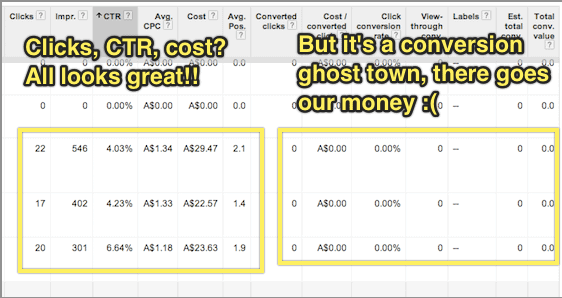
What the Google support documentation (and virtually every other resource on conversion tracking I’ve ever encountered) fails to discuss, though, is what to do when you have zero conversions.
AdWords-conversion-event

Separating out your marketing problem from your sales problem

Chances are that you’re not going to get sales or sign-ups immediately after you start advertising.
This is caused by one of the following 2 issues (or sometimes both):
  1. Keyword targeting: which search terms represent the best opportunities for you to connect with your target market cost effectively?
  2. Conversion: how do we actually sell to our target market?
You can think of these as being a “marketing problem” and a “sales problem” respectively.
If you find that you have a steady stream of affordable traffic from people looking for your product but no one buys, you have a sales problem.
If you find that you can’t afford or can’t find any significant traffic volume from people in your target market, you have a marketing problem.
It’s quite difficult to try and fix both marketing and sales problems simultaneously.
When you’re working on targeting your AdWords spend, especially if your product or service is a bit ambiguous or something quite new, it can be very useful to know which keywords indicate someone as being in your target market even if they haven’t bought from you yet.
For example, say you have a solution for small investors to quickly and easily purchase low-risk diversified company stocks with little research or upfront cash investment. Your target market is certainly online and searching for things related to your solution, but they’re not searching for exactly what it is you’re selling because they don’t know it exists yet.
You have a marketing problem.
Alternatively, say you sell ladies shoes in petite sizes. People are online searching specifically for what it is you’re selling, but they don’t buy from you.
You have a sales problem.
In other words, you want to try and solve your marketing problem independently of your sales problem and this is where using an “intermediary” conversion event in AdWords can help.

Placing the Conversion Event At the Beginning of Your Marketing Funnel

If you sell widgets, and people are looking for widgets, and they come to your site and don’t buy widgets from you, it’s pretty obvious that there’s a problem.
It’s not always immediately apparent, though, whether this is a marketing problem or a sales problem.
The trick here is to fix the marketing problem first by picking just a few of the most promising search terms and focusing on selling to these people.
That way you can hone your sales process while risking very little money on AdWords traffic that doesn’t convert.
But how do you know which search terms are the most promising if no one is actually buying from you?

A good example of this is if you’re running an online shoe store focused on shoes for early childhood up to age 4.
When someone searches for “kids shoes” and comes to your site, but doesn’t buy, was it because your site is poorly optimised and has a hostile user experience (a sales problem), or was it because people searching for kids shoes are mostly looking for shoes for school-aged children over the age of 5 (a marketing problem)?
To find out, you can place a conversion event at the start of your purchase process, rather than the finish. For example, you could trigger a conversion if someone adds any product to their cart.
Another tactic might be to put together a landing page that has a very simple headline/value proposition and a “Learn more” button that goes to your product page.
If you make your headline clear enough, eg. “Healthy shoes for children aged 4 and under” you can be certain that anyone who clicks “learn more” is looking for shoes for their children aged four and under.

Using Google Tag Manager to Track Conversions

In some cases, the task of triggering an “intermediary” conversion event can be technically laborious.
For example, imagine that I wanted to trigger a conversion event if someone went to any page on my site, other than the homepage. Or that I wanted to trigger a conversion when someone clicked “buy now”, triggering a checkout popup window (even if they didn’t complete their purchase).
Google Tag Manager is a tremendously useful tool for tracking complex conversion events in both AdWords and Google Analytics.
Not only can you do traditional “page based” conversions using “rule sets” that trigger your conversions (for example, “trigger this conversion on any page other than the homepage”) but you can attach conversions to virtually any event by using Google Tag Manager Auto Event Tracking.
There’s plenty of good info on how to get started with Google Tag Manager already around the interwebs, so I’ll leave the details of this as an exercise for the reader.

Tracking Multiple Conversion Events Simultaneously

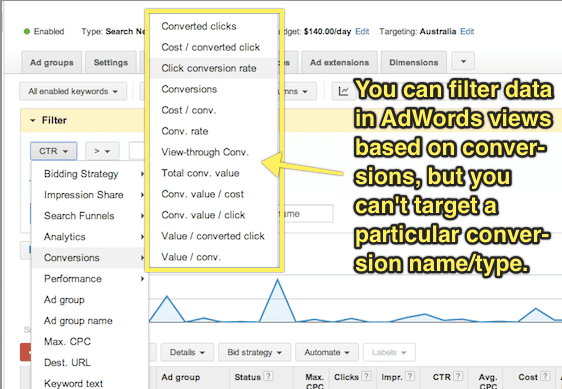
While you can use multiple conversion events and then extract data using AdWords segments to see which keywords are converting according to a particular event, I would highly recommend keeping things simple and just working with one single conversion event at a time.
Using a single conversion event at any given time means you can simply look at your conversion rate in all AdWords screens without having to download a report first and, more importantly, that you can filter your data within AdWords based on conversion rate.
adwords-conversion-event-2
It’s important to remember, though that if you’re working with a single conversion event at a time, that your “conversion rate” will change it’s meaning over time.
That’s to say that if you start off using a “click on any page other than the homepage” event as your conversion event while you target your keywords, then switch to “view of plans/pricing page” while you test your page copy, then switch to tracking “clicks of the signup button”, you will need to record when each of these changes is made so that you look at your conversion rate only within the appropriate timeframe.

Don’t Give Up!

Using PPC landing pages to drive sales for your business is like a super power.
In fact, it’s so powerful that Juan Martitegui from MindValley Hispano made the claim in his Mixergy Interview that “It’s not a business unless you have found a profitable way to buy customers.”
But remember that AdWords isn’t just marketing – it’s also market research. Setting realistic intermediary conversion events allows you to quickly, easily and cheaply validate ideas even before you start selling.
I hope that by applying the principles in this article you’ll be able to use AdWords conversion tracking to incrementally improve each stage of your conversion funnel, and build an unstoppable sales machine for your business or your clients.

Have You Avoided These 3 Landing Page Optimization Mistakes

- Credit goes to Michael Aagaard (original author) & Ubounce  Original Link

Making mistakes and learning from them is an essential part of mastering the art of landing page optimization. I’ve found that out the hard way.
The good news is that there’s no reason you have to make the same mistakes that I did.
In this post, I’ll let you in on 3 basic landing page optimization mistakes that have cost me a lot of conversions. Moreover, I’ll give you simple tips that’ll help you avoid making these mistakes yourself.

1. “Optimizing” With No Clear Conversion Goal In Mind

Knowing what your goals are is essential to achieving success in any realm. Landing page optimization is no exception.
If you want to create a high-converting landing page, you need to start by defining the conversion goal of your landing page. After that, you need to build a landing page treatment that revolves around your conversion goal.
If your goal is to get prospects to fill out a lead gen form, your landing page should be laser-focused on getting them to fill out that particular form. If your goal is to get potential customers to buy a product, your landing page should be laser-focused on getting them to buy that product.

How I used to get it wrong

I used to do this wrong all the time, but there’s one story in particular that comes to mind.
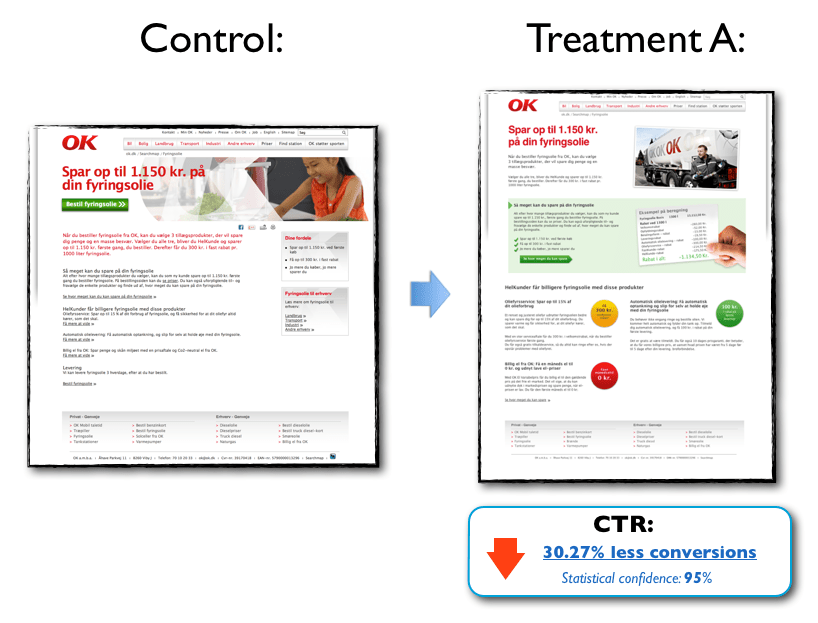
I was working on an LPO project with a designer and the page we were working on was copy-heavy and very boring, so we decided to do a redesign. We were very proud of our work and felt 120% certain that our new landing page would rock – simply because we thought it looked a lot better.
Luckily, we tested the page in the real world. Because as beautiful as it may have been, the landing page treatment actually hurt conversion significantly:
landing-page-mistakes-1
Click image for fill size
The product in this case was heating oil, and our goal was to generate leads for the client. Now, deciding who you are going to buy heating oil from is a big decision for most people and a beautiful landing page is not enough to make more people say yes.
Unfortunately, in all the excitement we forgot about the conversion goal and the target audience and went off on a design trip that resulted in a page that actually scared off more leads than it generated.

A simple way to avoid this mistake

Define a clear conversion goal before you even start thinking about optimizing your landing page and keep it top of mind in every step of the optimization process.
When your design draft is done, go over the individual elements one at a time and ask yourself, “How will this element help prospects make the right decision?”
If the answer is, “Hmm, I’m not sure – but it looks cool!” you may want to consider whether that element should even be on the landing page. As my friend Roger Dooley says:

“If it isn’t motivation, it’s friction.”» Tweet this «

2. Basing Optimization Decisions On Whims and Personal Preferences

In LPO, the quality of your work will ultimately be measured by the impact it has on conversion – not how beautiful it makes the page look or how sexy it makes the copy sound.
If you want to be a successful optimizer, it’s important that the changes you make are informed solutions to real problems – and not just arbitrary guesses.

How I used to get it wrong

I used to base my optimization efforts on whatever felt good or seemed like a great idea in the moment. This approach gave me immediate creative satisfaction but rarely did it result in conversion lifts.
I’ve wasted precious time working on minor design details when there were much more fundamental issues that needed to be resolved. Small creative changes are fun a lot of fun to geek out on, but they rarely have direct impact on conversion if basic things like your headline are off.
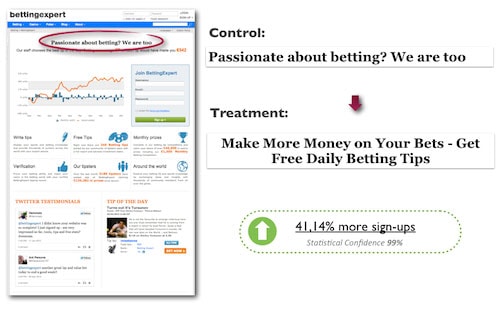
Here’s an example where changing a headline increased sign-ups on a betting forum landing page by 41.14%:
landing-page-optimization-mistakes-2
In this case, the headline treatment did not come about on a whim or because I felt that it sounded awesome. This headline was created based on data on target audience insight. Moreover, the treatment is focused 100% on giving prospects a good and relevant reason to stay on the page and sign up.
Notice that the headline starts with the verb “get” – a particularly powerful word that can work wonders on your messaging. For more on the awesome conversion power of “get” check out this article.
In my experience, ideas for treatments that come about on a whim usually lead to poor results. You can of course get lucky and stumble into something that works, but in the long term it’s really not a winning strategy.

A simple way to avoid this mistake

The more targeted and strategic an A/B test is, the more likely it’ll be to have a positive impact on conversions.
A solid optimization hypothesis goes a long way in keeping you on the right track and ensuring that you’re conducting valuable marketing experiments that will actually have an impact in the mind of the prospect –and, by extension, on conversions.
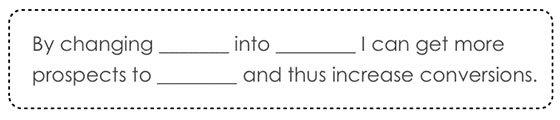
In landing page optimization, the optimization hypothesis is the basic (but data-driven) assumption that you base your optimized variant on. It encapsulates what you want to change on the landing page and what impact you expect to see from making that change. Moreover, it forces you to scrutinize your test ideas and helps you keep your eyes on the goal.
Formulating an optimization hypothesis can be as simple as filling out the blanks in this template:
landing-page-optimization-mistakes-3
Check out this article for a more in-depth guide on how to write a solid hypothesis.

3. Assuming That “One Size Fits All”

Life would be easier if the one-size-fits-all, cookie-cutter approach worked. So much easier.
However, in my experience there is no such thing as a global solution that works every time. All products, offers, landing pages, and companies are different, just like the motivations of your potential customers will be different. You need to find out what works for your specific target audience.

How I used to get it wrong

I used to think that every single case study or blog post I read was directly applicable to any given landing page.
“So a call-to-action above the fold performed best in this LPO case study. Okay, then I should always place my CTA at the top of the page.”
As you can probably imagine, it didn’t take many landing page experiments to find out having the CTA at the top of the page isn’t always the best solution. I’ve tested lots of landing pages where a CTA placed below the fold out-performed a CTA placed above the fold.
But really it’s not a question of above or below the fold – it’s a question of placing the call-to-action where it best complements the decision-making process of your prospects.
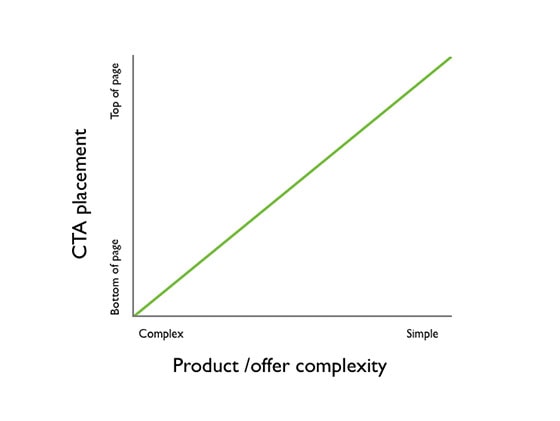
As a general rule of thumb, if the product/offer is complex and the prospect has to digest a lot of information in order to make an informed decision, positioning the CTA lower on the page generally works best.
On the other hand, if the product/offer is very simple and the prospect hardly has to do any thinking in order to make an informed decision, positioning the CTA above the fold generally works best.
But always test, test, test to find out what works best for your campaign.
landing-page-optimization-mistakes-4

A simple way to avoid this mistake:

Learn what you can from other people’s results, but don’t just assume that you can simply replicate those results on your own landing page.
You can get a lot of inspiration and ideas from case studies but before you start implementing things, always take the time to build a solid hypothesis on how this particular test idea will increase conversion on your specific landing page.
In many cases, this simple exercise is enough to keep you from implementing things that are unlikely to work on your landing page and target audience.

The Main Lesson I’ve Learned From All My Mistakes

landing-page-optimizaton-mistaks-5
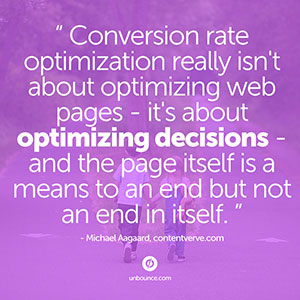
Your “target audience” on the other side of the screen is made up of flesh and blood. Ultimately, their decisions and actions will determine whether your conversion rate goes up or down.
If you leave your potential customers out of the equation, your optimization efforts will never, ever reach their full potential.
What landing page optimization mistakes have you made and learned from?

Attribution Modeling in AdWords --- from Google

 - Credit goes to PPC Hero Original link

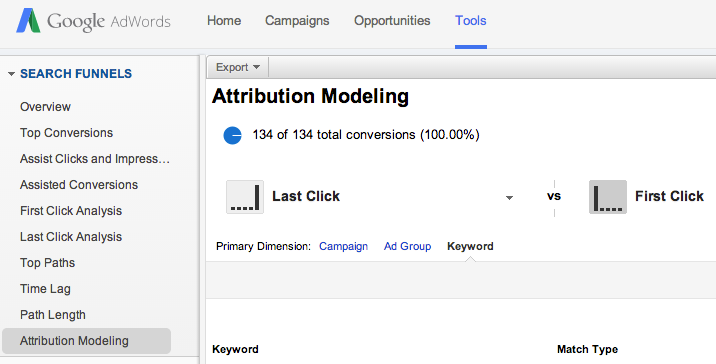
 Google has just released the Search Funnels Attribution Modeling Tool in AdWords. This tool allows you to identify campaigns, ad groups, or keywords that are assisting conversions or are a part of the conversion process. While this tool has been available in Analytics for quite some time, it’s a new feature in AdWords.
Where To Find It
You can find this by navigating to Tools and then Search Funnels. From there you can select Attribution Modeling to compare different models at the campaign, ad group, or keyword level. There are also tabs for Assist Clicks and Impressions, Assisted Conversions, and First and Last Click Analysis.
Attribution Modeling2
As a quick refresher, here is a definition of each model:
  • Last Click: credit goes to the last clicked keyword
  • First Click: credit goes to the first clicked keyword
  • Linear: credit is distributed equally among all clicks on the conversion path
  • Time decay: more credit is given to clicks that happen closer to actual conversion
  • Position-based: 40% credit is given to the first and last clicked keyword, and the remaining 20% is divided among the clicks in-between
Why It’s Helpful
While you could always access this data in analytics, it’s helpful to have it right in AdWords. The First Click attribution model is useful so that you don’t cut out or reduce bids on keywords that are aiding the conversion process but aren’t the last clicked keyword. If you find that users are visiting your page more than once via PPC ads before converting, you might change your ad copy strategy or adjust your bidding strategy.
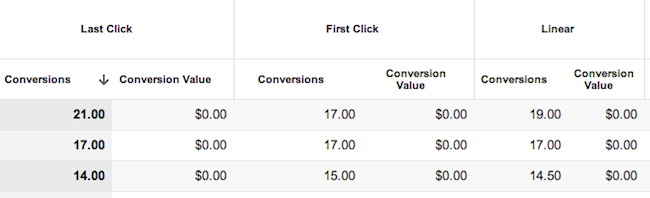
keyword attribution
Some keywords have a greater impact as a first click or a last click.
AdWords makes it fairly simple to do this with the Model Comparison Tool and the Top Paths feature, which allows you to see all of the converting keywords in order of when they were clicked. I have also found the Query Path (within Top Paths) to be interesting to look at, as it gives you some insight as to how and when customers are searching for your products/services and clicking on your ads.
It is important to note however, that looking at this information in AdWords doesn’t quite give you the whole story. It might be worthwhile to still use Analytics to get a better understanding of all traffic sources coming to your site and how users are interacting with your site. I find that it’s helpful to look at both attribution modeling and top conversion paths in Analytics for both AdWords traffic and all other traffic.
This change isn’t an earth shattering one, but it is nice to see more Analytics features being implemented into the AdWords interface. This kind of information is helpful when making optimizations and getting an overall picture of your account and how your keywords and campaigns are interacting with each other.
What other features from Analytics would you like to see in AdWords?

Webinar --- Battle for Power in a Marketing Landscape

- Credit goes to PPCHero. Original link

Stretching the marketing dollar can be a daily battle and with the continuous tussle for PPC in particular, you’ve probably had your share of challenging issues and questions. How do you prioritize your marketing dollars? When should you think about moving your marketing budget around? How do you handle “micro-managing” of your PPC accounts? Should you hire an agency for PPC marketing, an in-house staff member, or go the automated path?
In the recording below, digital advertising experts from Hanapin, Searchforce, and Cabela’s talk marketing and contend their daily power struggles from their each unique perspectives, which cover every facet of the industry: an agency, in-house team, and automation software.
You’ll get expert-level PPC tips like:
*How to be a successful gladiator for your PPC accounts
*Insight into the different perspectives of PPC marketing
*How the market landscape can affect your PPC budgeting decisions
*How to tackle “micro-managing” of a PPC budget
Prepare for the ultimate battle of insights, tips, and expert-advice!
Here is the webinar recording:

Webinar Link


And here is the slideshare presentation:

 Slidshare Link

Some Of The Google Analytics Resources

- Credit goes to Ted Parry (Original Author). Original link


Google Analytics is one of the best free data analysis tools on the web. But having this powerful tool at your disposal is irrelevant if you don’t know how to harness its potential.
I suppose there is something to learn for people with varied expertise in Analytics from the post given below :

For Beginners

A quick guide for setup and get going:
  1. The Complete Guide to Setting up Google Analytics – This post is an opportunity to identify what code you’ll need, the account structure, and various other things necessary to get set up successfully.
  2. Beginner’s Guide to Google Analytics – This three-part series delves into setting up your account (part 1), setting up goals (part 2), and measuring visitor interaction (part 3).
  3. Google Analytics Tutorial for Beginners 2014 – Video guide on how to navigate the Google Analytics interface and use certain features.
  4. A Guide to Getting Started with Analytics – Goes into detail about how to understand what your traffic is doing and which trends to watch.

Data Segmentation

 It will allow you to compare data and make judgments.
  1. 16 Google Analytics Advanced Segments Tips – A combination of different segments you can apply to your analytics data to get insight. Examples include segmenting based on which type of traffic spends the most or which type of traffic bounces immediately.
  2. Segment Average Visit Duration in Analytics – See how you can get a better view of what average visitor duration means by segmenting your traffic.
  3. Google Analytics: Tracking Demographics of Ecommerce Visitors – A blog post on how to get demographic reports and how to analyze this data.
  4. Calculating the ROI of Your Marketing Channels – Shows you how to capture campaign data to calculate your return on investment and ad spending.

Small Business Analytics

These guides should give know how about measurement of ROI from digital channels.
  1. Web Analytics Guide For Small & Medium Sized Businesses – Breaks down exactly what things a small/medium sized business owner should be looking at. Tells you how to install the code, how to define business objectives, set up goal tracking, understand which channels are working, and how to report on all of it.
  2. The Small Business Guide to Google Analytics – This fantastic mini-site is a mix between an infographic and a blog post. It goes over all the simplicities a small business owner needs to understand.
  3. Understanding Web Analytics: Small Business Guide – Goes into details around the basic stats but gives a good introduction to the main sections of Google Analytics.
  4. 5 Google Analytics features for Business Owners – Looks at the features small business owners should be paying the most attention to.
  5. How to Track Anything with Google Analytics – Learn to track the most basic of things from outbound links to email sign ups.

Universal Analytics

Provide business insight to impact the bottom line.
  1. Complete Guide To Universal Analytics – Should you switch to Universal Analytics? This article aims to give a hint at whether you should and how to set it up successfully.
  2. Universal Analytics: The Benefits and How to Upgrade – An infographic on the benefits of Universal Analytics, what it brings to the table, and things you should be aware of (such as making sure your remarketing programs support Universal Analytics).
  3. Advanced Content Tracking with Universal Analytics – Ever wondered whether your readers are actually reading? Well, you’ll be able to find out with this JavaScript code. It allows you to see how far they’re getting and will surely be useful with Universal Analytics.

Analytics for Conversion Rate Optimization

Conversion rate optimization is a hot topic and one that often is used in conjunction with Google Analytics. How to comprehend key features and how to run a split test is something worth knowing
  1. Building Your Marketing Funnel with Google Analytics – Having trouble understanding which marketing channels are working best? Read this guide on how to segment your data with Google Analytics and discover opportunities for growth.
  2. Tracking Product Journey from Carting to Purchasing – If you own an e-commerce website, then this PDF guide is a must read. It will tell you exactly what you’ll need to track, from conversion rate to whether someone has removed an item from their cart.
  3. A Guide to Measuring Split Tests in Google Analytics – A guide on implementing your split testing strategy and continual analysis through Google Analytics.

Reporting and Excel

Do you work agency side, then reporting will be a large factor in maintaining your relationship with your client/boss.The articles below will tell you how one can get even more value from your weekly/monthly reporting.
  1. 10 Optimization Experts Share Their Favorite Google Analytics Reports – Ten experts chime in on their best reports for conversion within Google Analytics. Even if you use just one report, it would be worth your time to read it.
  2. 21 Real-World Examples Of Concatenating Marketing Data In Excel – Concatenating often is an under-utilized but powerful command within Excel. Annie from Annielytics provides 21 examples of using this command effectively.

Goal Tracking

Read the guides below to understand why it’s important and how to do it.
  1. Guide To: Goals And Funnels In Google Analytics – Goals are fundamental to tracking your website’s success. This guide will demonstrate how to set up goal tracking and gives examples of what you should consider tracking.
  2. Why to Define Macro and Micro Goals – Understanding the difference between macro and micro goals is very important and will help greatly when setting up goals.

Advanced Guides

This section covers some of the more obscure/complicated topics that are fairly new to the industry.
  1. The Ultimate Guide to Google Analytics Profile Filters – A guide on using filters to maximum effect. Includes ways to filter your own IP data, or only track certain metrics.
  2. Analyze Organic Search Engine Marketing with Analytics & GWMT – Advice from the official Google Analytics blog on how to measure the effectiveness of search engine marketing.
  3. 6 New Google Analytics Features – A list of six new features that Google Analytics has introduced that will impact how you view your data.
  4. Multi-Channel Attribution Modeling: The Good, Bad and Ugly Models – Goes into detail about the various types of attribution models and how to best apply them to your marketing efforts.
  5. The Full Guide to Remarketing in Google Analytics and AdWords – Remarketing has been a hot topic for a while now but has had little transparency about how to do it right. This guide shows you which tracking code to implement and other steps needed to get you up and running.
  6. (Provided): 10 Ways to Prove SEO Value in Google Analytics – Ever wondered how you can get around the not provided issue? Well, this guide gives you ten bite-size ideas on the best way to prove SEO value from Google Analytics.
  7. Google Analytics Social Tracking – Twitter, Facebook, Google Plus & Linkedin – Shows you the code you’ll need to really understand your social impact within Google Analytics. It will show which social buttons were used most frequently and will be useful for monthly reporting.
  8. Understanding Google Analytics: A Simple Guide to Advanced Terms – Great opportunity often lies within understanding the complexities of Google Analytics. Learn how to utilize filters, intelligence events, and custom dashboards within this post.
  9. Google Analytics for Ecommerce – Justin Cutroni from Google tells you how to set up e-commerce tracking, how to analyze data and report, and includes a few more advanced subjects such as cohort analysis.
  10. 7 things to consider before blindly choosing Google Tag Manager – Thinking of jumping straight into using Google tag manager? Well, before you do, consider reading this article as it details both the pros and cons of the application.

Google Analytics Exam

This can add to our credibility credible within the industry.
  1. Google Analytics Test – This is a super test aimed at helping you pass the individual analytics qualification. With over 200 questions, there is plenty of opportunity to learn and develop.
  2. Analytics Academy by Google – If you’re serious about learning analytics, then the official learning resource center of Google is a good place to start. With video tutorials and a mock assessment at the end of each module, you’ll be able to track progress and note areas where you need to improve.

Tips, Tricks, and Tools

Some of the tips, tricks, and tools below should inspire your creativity.
  1. Periodic Table of Google Analytics -Want to know the meanings of terms used in Google Analytics? Then read this handy periodic table of Google Analytics terms. You won’t regret it.
  2. Analytics Woman Chrome Extension – This might not help you immensely with Google Analytics, but it sure will take out the boredom of the Google Analytics start screen. You have the option to change the picture to something a bit more obscure.
  3. The Customer Journey to Online Purchase – Every good marketer understands that each industry’s customers react differently to various channels. This tool from Google allows you to segment by industry and gives insight into how each channel influences decisions in the purchasing process.
  4. “Not Provided” Keywords Estimator – This free tool from Digivate is used by many digital agencies to estimate what their client’s brand and non-brand traffic is. A very useful tool which always should be used when working with large brands.
  5. Top 24 Google Analytics Tips, Hacks & Automations – Luna Metrics is known to be one of the leading analytics companies. In this post, they link out to 24 of their best analytics articles.
  6. 13 Free Google Analytics Tools To Use Everyday – There is no doubt that tools can save you a lot of time and help you get to the important details. Read this to get a sense of what you could be missing out on.
  7. The Best Google Analytics Tips & Tricks for 2014 – Having an array of experts give their opinions on the latest tips and tricks will go down well in any industry. Get an idea of where Google Analytics is heading in the future with this post.
  8. 10 Actionable Google Analytics Tips – Having tips is nice, but having actionable ones is even better. Find out how to keep tabs on 404 error pages or even plot multiple rows of data.
  9. A New Method to Track Keyword Ranking using Google Analytics – This post is quite technical, and the method may require a developer to implement, but it sure is worthwhile if you set it up properly.
  10. How Call Tracking with Google Analytics Increases Your Profits – If you run a service-based business that relies on calls coming in to close sales leads, then this post could prove to be invaluable.

Expert Analytics Blogs

The best way to become the best is to learn from the best. The blogs below are compiled by experts that have years of experience in analytics and can teach you more than a trick or two.
  1. KISSmetrics Google Analytics Blog Posts – Read up on what KISSmetrics has produced over the years around Google Analytics and you’re sure to come away with something valuable.
  2. Online Behavior Analytics Blog – A blog dedicated to marketing analysis and optimization. Also has a video section if you’re more of a visual learner.
  3. Occam’s Razor – Avinash Kaushik has contributed a lot of thought leadership to the analytics industry over the years. Give his blog a read, but be sure to have a notepad next to you.
  4. Official Google Analytics Blog – The official Google Analytics blog is the first place you’ll find out about recent updates to the interface or a new feature being rolled out.
  5. Justin Cutroni’s Blog – Justin is an analytics evangelist at Google and produces some really insightful posts. Some may be a bit technical, but by the end, you’ll be wondering what Google Analytics can’t do.

Books

As well as blogs, books are another medium for learning. The two books we recommend below are written by well-respected authors within this industry. Well worth the investment.
  1. Web Analytics 2.0 (Avinash Kaushik) – This book has been cited by many industry experts as being one to read. It ties in all aspects of analytics and makes advanced principles easier to understand.
  2. Advanced Web Metrics with Google Analytics (Brian Clifton) – A book produced by another respected figure (Brian Clifton). Read this to increase your depth of knowledge in more of the advanced metrics.


Want To Write Better PPC Ads --- Some More Tips For You Then

If you want to sell products or generate leads online, a user-friendly, conversion-optimized website is Step 1. But when it comes to search engine marketing, it doesn’t matter how beautiful your website is if people never get there.

Pay-per-click (PPC) advertisements placed in search engine results and on other relevant sites can be an extremely effective means of driving qualified traffic to your site – one that more than pays for itself, if you’re doing it right.

Even though you have to pay for each click on one of your ads, it’s important to aim for a good click-through rate (CTR). CTR – the ratio of clicks to impressions – represents the percentage of people who see your ad and then click through to your website. Lots of impressions without a lot of clicks is a sign that your ad isn’t speaking to the people who see it. This could be because you’re bidding on the wrong keywords, but almost always, you can significantly increase CTR – and ROI – by writing stronger ad copy.

A great PPC ad is a combination of best practices and little details that get you noticed. In this guide, we’ll share ten tips for crafting more compelling, more clickable text ads, including information to help you develop:
  • Eye-grabbing headlines and descriptions that scream “I’m relevant to your needs!”
  • Specific calls to action that reinforce desires and create urgency
  • Well-structured ads that earn high Quality Scores and boost your whole PPC account


Don’t neglect this core component of your PPC campaign! Read on to learn how you can start writing stronger, more clickable ads today. We’ll start with some basic ad writing best practices, then move on to more unusual tricks you may not have thought of.

Let’s get started!

1. Include Features, Benefits & A Call To Action

At the end of the day, the most effective ads will have three components: They will tell the features, sell the benefits and have a call to action (CTA) for the product or service being advertised. No amount of keyword stuffing (inserting the search term you are bidding on into the ad and landing page as many times as possible) or other tricks will get you as much lift as an ad that is selling compelling benefits and has a strong call to action.

Creating these ads, however, isn’t as easy as just sitting at your computer with an open spreadsheet and hoping inspiration strikes. It takes an in-depth understanding of your business (or your client’s) and your unique selling proposition (USP). A great way to accomplish this is by using a Feature-Benefit Matrix spreadsheet to uncover the USP and the strongest points to convey in an ad.

The Feature-Benefit Matrix looks like this:

Feature Benefit Matrix

You simply list your features to the left, then list out a few benefits of each feature, and on the right you fill in your most compelling calls to action for your PPC ads. Then you go back through and identify you strongest 2-3 combinations, and you have an ad!

2. End Description Line 1 With Punctuation

   If you end the first line of your ad after the headline with a period or other end punctuation, and your average position is in the top 3 spots, you will get a single elongated headline that has a lot of pulling power.

Take a look at the sponsored results for a Google search for “Pet Insurance”:

AdWords Ads

You can see here that the top ad has a long headline that includes the first description line and ends with a period: “Pet Insurance in Colorado – Top Rated Pet Insurance.”

The second ad, on the other hand, has “9 out of 10 veterinarians recommend” pulled into its headline – this is great copy, but it would have been even stronger if that headline was a complete thought. Instead, the end of the sentence is under the display URL (the full thought being “9 out of 10 veterinarians recommend VPI”).

3. Make Full Use Of The Display URL


The display URL is a great way to find some extra space in a PPC ad for a compelling call-to-action or benefit statement, or simply to increase relevancy by adding in the search term ...
+