Latest From My Blog

Showing posts with label SEO. Show all posts

Want To Take Post Conversion To Next Level --- Here Are Some Examples

- Credit goes to Karon Thackston (original author) & Unbounce  Original Link


As conversion-oriented marketers, our focus is typically on persuading traffic to take action once people visit our landing pages. The Holy Grail is getting the click (sale, subscription, etc.). And – once that happens – many marketers simply thank the customer and happily walk away with cash in hand.
Big mistake.
Thank you pages are much more than pieces of virtual real estate on which to display gratitude and order numbers. These pages are an integral part of an optimized conversion system that, when used properly, can continue to boost your revenue.
Here are several examples of thank you pages that do an outstanding job of taking post-conversion to the next level.

1. Jigsaw Health – Limited Time Offer

jigsawhealth-560px
There’s no better proof that visitors are in conversion mode than when they click the buy button. You’ve earned their trust, explained the benefits of your offer and persuaded customers to action. Don’t lose the momentum with a lax thank you page.
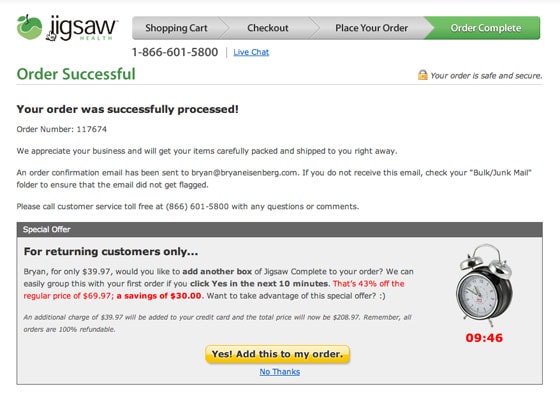
Premium dietary supplement manufacturer Jigsaw Health provides extremely limited-time offers to returning visitors, as shown above.
In addition to the standard handshake and order number, Jigsaw draws out that buying mindset by enticing shoppers with deep, short-lived discounts that are hard to pass up.
The countdown timer (under the clock on the right) compounds the sense of urgency, as the red copy immediately gets the point across that 43% savings are about to slip away. And therein lies the psychological trigger this thank you page is based on: Loss aversion.
As the customer watches the seconds tick past, she feels the pressure mounting: “Is this something I take every month?” “Will the supplement expire before I use it?” “43% is a big discount!” All these questions and thoughts can easily bring the visitor to yet another buying decision.
Because Jigsaw Health’s shopping cart has the ability to simply add the upsell to the existing order, it’s a quick, one-click add-on.

2. AWeber – Social Sharing

ThankYouPages-Aweber-560px
What’s the biggest challenge marketers face when leads sign up for something free? Is it customer support issues? Maybe it’s delivery hurdles?
Nope! The problem comes in actually getting leads to consume the freebie they signed up for.
List management software company AWeber has some simple but effective ways to urge people who have registered for a free webinar to actually attend.
The problem lies in the fact that there is nothing vested in the transaction. Yes, the lead committed (sort of) to attend when they registered. But since most companies offer video recordings these days, that commitment holds little weight. Leads expect to be able to watch the webinar later. Some do, most don’t.
Through a combination of calendar tools and social sharing on their webinar thank you page, those who signed up will be reminded of the event via their own tools (Outlook, etc.) or will have shared a post saying they will attend. That one-two punch reinforces their sense of obligation.

3. Unbounce – Driving Subscriptions

webinar-marketing-post-conversion
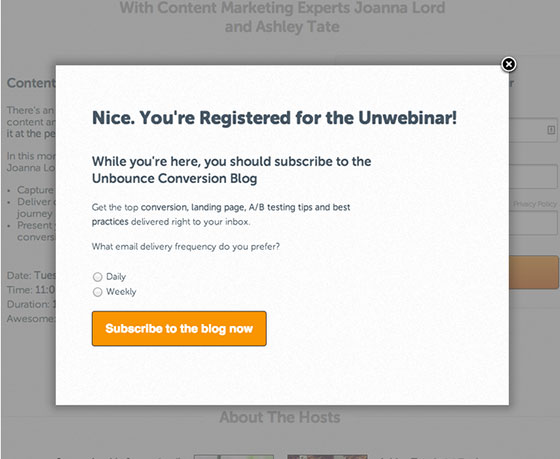
AWeber isn’t the only SaaS company that knows how to rock a webinar thank you page. Unbounce, the landing page builder you know and love, employed a list-building strategy that ramped up their blog subscriber base by 60% in just two (yes, two) webinars
Leads that register for a webinar are already tuned into the content you’re offering. It only makes sense that they would get excited about receiving more top-notch info from you if given the chance. So give them the chance!
Unbounce put this simple subscription option on their webinar thank you page and got huge results. I’ve also been using this list-building method for years. It’s one of the highest-converting tactics I’ve ever tried.

4. Social Triggers – Building Relationships

ThankYouPages-Social-560px
While you might expect a social media pro to incorporate social aspects into his site, Derek Halpern of Social Triggers goes a step beyond asking people to click a share or like button. He encourages those who have downloaded his free ebook to start a mini-community right on his thank you page.
Derek uses his knowledge about social proof to get thousands of mini-testimonials and referrals right on his thank you page by using a simple WordPress plugin. The timing is perfect, as these smiling, happy people have just downloaded a freebie they are excited about.
In addition, this strategy gets huge engagement scores on Facebook and (so far) has enlisted the help of over 1,200 people in spreading the word (and growing Derek’s list!).

5. Spanish Pod 101 – Facilitating the Upsell

ThankYouPages-Spanish-560px
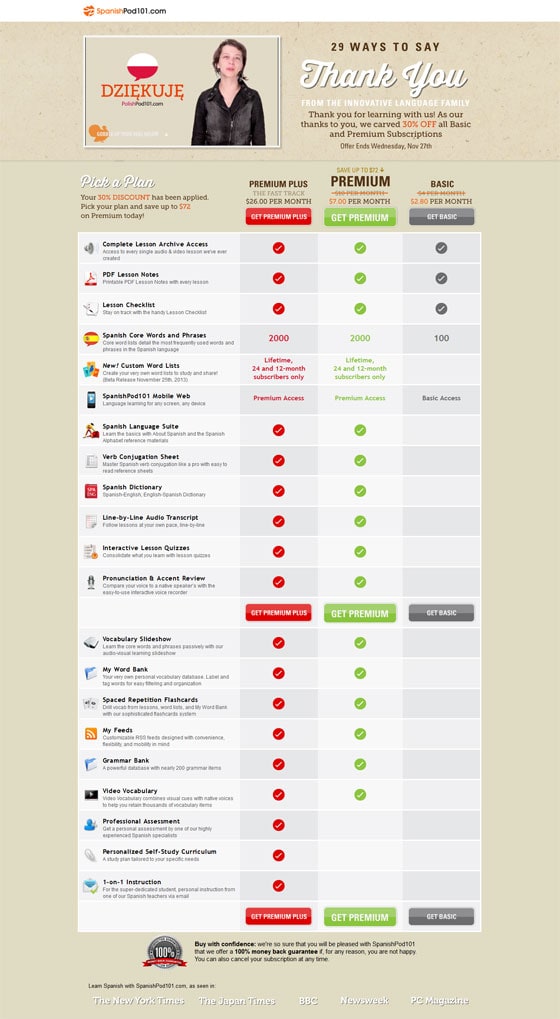
Sure, anybody can type the words “thank you” on a web page, but Spanish Pod 101 verbally expresses their gratitude in a video with 29 different languages. In addition, they include a 30% discount on other subscription learning programs.
I have to admit I was intrigued by all the languages and faces in the video, so this unique twist had me engaged. Eventually, I began to scroll as curiosity about the discount kicked in. Talk about a 1-2 punch.
The feature/benefit list and comparison chart help customers quickly choose the program that is right for them. And, of course, trust symbols, such as the 100% guarantee, confirm that this is a risk-free purchase.

6. RoboForm – Incentivizing Referrals

ThankYouPages-Robo-560px
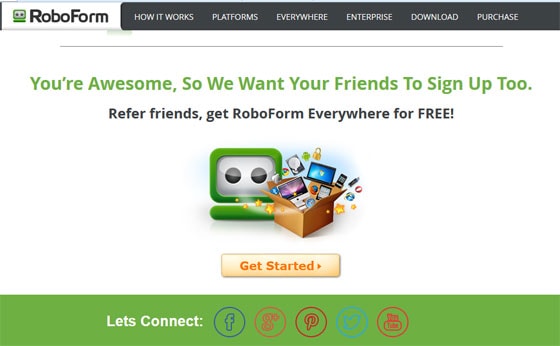
When customers upgrade, it’s a pretty good indication that they are satisfied. RoboForm takes advantage of that state of contentment when users download the latest version of their software.
On its thank you page, the password protection company offers an easy way to share with friends and get a little something for yourself, too.
After all, satisfaction is a good reason to share products and services with others, but getting free stuff is much more compelling! Are you having flashbacks from the holiday season?
Many retailers use this same approach to sell gift cards. How many times have we seen promos that advertise a $10 card for you when you buy two $25 cards for others?
Although the denominations may vary, these offers have proven to work well season after season. Now we see online companies putting that same idea to work every day.

7. James Grandstaff – Piquing Curiosity
ThankYouPages-5Day-560px
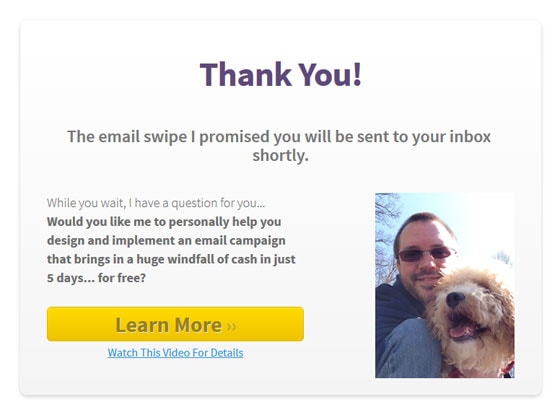
Most marketers who offer free ebooks, white papers or reports leave the heavy lifting to the report itself. Email marketer James Grandstaff does an admirable job of piquing curiosity on his thank you page and driving post-conversions sooner rather than later.
Considering that the majority of leads who download a free report never open it, this is a brilliant move to push hot leads further along in the process faster than usual.

What Shape Are Your Thank You Pages In?

There’s no time like the present. Take a few minutes this week to evaluate your own thank you pages. Check the ones associated with:
  • Newsletter/Blog subscriptions
  • Sales pages
  • Free downloads
  • Webinar registrations
  • Live demo signups
  • Ecommerce shopping carts
  • Quote requests
  • Online banking transactions
Even the thank you page for your lowly contact form can probably use an overhaul.
Instead of straight lines and dead ends, think circular when it comes to thank you pages. By providing another touchpoint, you can nudge your customers along the marketing funnel faster than you might think.
Are You Facing Zero AdWords Conversions Problem

- Credit goes to Iain Dooley (original author) & unbounce  Original Link


It’s exciting when you first start buying AdWords traffic.
You have your offer, you have your landing page up, you’re gonna make it after all!
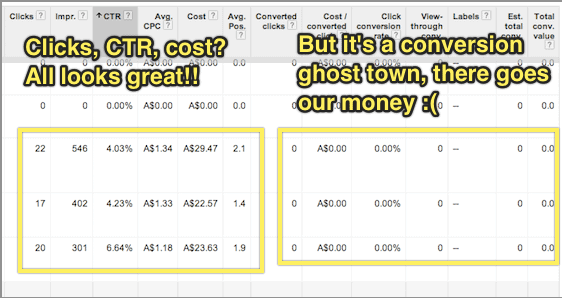
But that excitement quickly turns to dismay when you find that no one is buying your stuff. Nobody’s signing up.
And every day AdWords keeps taking your money.
At this point many people simply give up on AdWords.
“AdWords just doesn’t work for my business!”
“Maybe we’ll try Facebook ads!”
“We’ll do better with SEO and content marketing!”
The sad truth is that there are very few businesses that are likely to succeed in the long term if they can’t get even a few customers through AdWords initially.
That’s a pretty big claim, but read on and you’ll see why I’m confident in making it.

What’s your problem?

The first step in getting more AdWords conversions is figuring out what a conversion even means for your business.
AdWords conversion tracking allows you to see which of your ads and keywords are getting you the best results.
The actual mechanics of setting up conversion tracking are explained pretty well in Google’s own support documentation and on the face of it this seems like a pretty trivial issue.
If you run a SaaS business, you would set up a conversion event to trigger when someone signs up.
If you’re running an eCommerce business you would set up a conversion event to trigger when someone buys from you.
What the Google support documentation (and virtually every other resource on conversion tracking I’ve ever encountered) fails to discuss, though, is what to do when you have zero conversions.
AdWords-conversion-event

Separating out your marketing problem from your sales problem

Chances are that you’re not going to get sales or sign-ups immediately after you start advertising.
This is caused by one of the following 2 issues (or sometimes both):
  1. Keyword targeting: which search terms represent the best opportunities for you to connect with your target market cost effectively?
  2. Conversion: how do we actually sell to our target market?
You can think of these as being a “marketing problem” and a “sales problem” respectively.
If you find that you have a steady stream of affordable traffic from people looking for your product but no one buys, you have a sales problem.
If you find that you can’t afford or can’t find any significant traffic volume from people in your target market, you have a marketing problem.
It’s quite difficult to try and fix both marketing and sales problems simultaneously.
When you’re working on targeting your AdWords spend, especially if your product or service is a bit ambiguous or something quite new, it can be very useful to know which keywords indicate someone as being in your target market even if they haven’t bought from you yet.
For example, say you have a solution for small investors to quickly and easily purchase low-risk diversified company stocks with little research or upfront cash investment. Your target market is certainly online and searching for things related to your solution, but they’re not searching for exactly what it is you’re selling because they don’t know it exists yet.
You have a marketing problem.
Alternatively, say you sell ladies shoes in petite sizes. People are online searching specifically for what it is you’re selling, but they don’t buy from you.
You have a sales problem.
In other words, you want to try and solve your marketing problem independently of your sales problem and this is where using an “intermediary” conversion event in AdWords can help.

Placing the Conversion Event At the Beginning of Your Marketing Funnel

If you sell widgets, and people are looking for widgets, and they come to your site and don’t buy widgets from you, it’s pretty obvious that there’s a problem.
It’s not always immediately apparent, though, whether this is a marketing problem or a sales problem.
The trick here is to fix the marketing problem first by picking just a few of the most promising search terms and focusing on selling to these people.
That way you can hone your sales process while risking very little money on AdWords traffic that doesn’t convert.
But how do you know which search terms are the most promising if no one is actually buying from you?

A good example of this is if you’re running an online shoe store focused on shoes for early childhood up to age 4.
When someone searches for “kids shoes” and comes to your site, but doesn’t buy, was it because your site is poorly optimised and has a hostile user experience (a sales problem), or was it because people searching for kids shoes are mostly looking for shoes for school-aged children over the age of 5 (a marketing problem)?
To find out, you can place a conversion event at the start of your purchase process, rather than the finish. For example, you could trigger a conversion if someone adds any product to their cart.
Another tactic might be to put together a landing page that has a very simple headline/value proposition and a “Learn more” button that goes to your product page.
If you make your headline clear enough, eg. “Healthy shoes for children aged 4 and under” you can be certain that anyone who clicks “learn more” is looking for shoes for their children aged four and under.

Using Google Tag Manager to Track Conversions

In some cases, the task of triggering an “intermediary” conversion event can be technically laborious.
For example, imagine that I wanted to trigger a conversion event if someone went to any page on my site, other than the homepage. Or that I wanted to trigger a conversion when someone clicked “buy now”, triggering a checkout popup window (even if they didn’t complete their purchase).
Google Tag Manager is a tremendously useful tool for tracking complex conversion events in both AdWords and Google Analytics.
Not only can you do traditional “page based” conversions using “rule sets” that trigger your conversions (for example, “trigger this conversion on any page other than the homepage”) but you can attach conversions to virtually any event by using Google Tag Manager Auto Event Tracking.
There’s plenty of good info on how to get started with Google Tag Manager already around the interwebs, so I’ll leave the details of this as an exercise for the reader.

Tracking Multiple Conversion Events Simultaneously

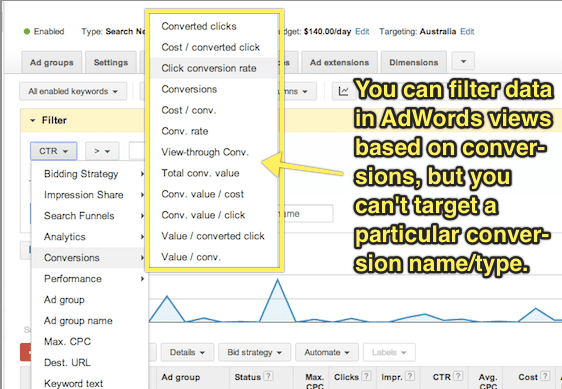
While you can use multiple conversion events and then extract data using AdWords segments to see which keywords are converting according to a particular event, I would highly recommend keeping things simple and just working with one single conversion event at a time.
Using a single conversion event at any given time means you can simply look at your conversion rate in all AdWords screens without having to download a report first and, more importantly, that you can filter your data within AdWords based on conversion rate.
adwords-conversion-event-2
It’s important to remember, though that if you’re working with a single conversion event at a time, that your “conversion rate” will change it’s meaning over time.
That’s to say that if you start off using a “click on any page other than the homepage” event as your conversion event while you target your keywords, then switch to “view of plans/pricing page” while you test your page copy, then switch to tracking “clicks of the signup button”, you will need to record when each of these changes is made so that you look at your conversion rate only within the appropriate timeframe.

Don’t Give Up!

Using PPC landing pages to drive sales for your business is like a super power.
In fact, it’s so powerful that Juan Martitegui from MindValley Hispano made the claim in his Mixergy Interview that “It’s not a business unless you have found a profitable way to buy customers.”
But remember that AdWords isn’t just marketing – it’s also market research. Setting realistic intermediary conversion events allows you to quickly, easily and cheaply validate ideas even before you start selling.
I hope that by applying the principles in this article you’ll be able to use AdWords conversion tracking to incrementally improve each stage of your conversion funnel, and build an unstoppable sales machine for your business or your clients.

Have You Avoided These 3 Landing Page Optimization Mistakes

- Credit goes to Michael Aagaard (original author) & Ubounce  Original Link

Making mistakes and learning from them is an essential part of mastering the art of landing page optimization. I’ve found that out the hard way.
The good news is that there’s no reason you have to make the same mistakes that I did.
In this post, I’ll let you in on 3 basic landing page optimization mistakes that have cost me a lot of conversions. Moreover, I’ll give you simple tips that’ll help you avoid making these mistakes yourself.

1. “Optimizing” With No Clear Conversion Goal In Mind

Knowing what your goals are is essential to achieving success in any realm. Landing page optimization is no exception.
If you want to create a high-converting landing page, you need to start by defining the conversion goal of your landing page. After that, you need to build a landing page treatment that revolves around your conversion goal.
If your goal is to get prospects to fill out a lead gen form, your landing page should be laser-focused on getting them to fill out that particular form. If your goal is to get potential customers to buy a product, your landing page should be laser-focused on getting them to buy that product.

How I used to get it wrong

I used to do this wrong all the time, but there’s one story in particular that comes to mind.
I was working on an LPO project with a designer and the page we were working on was copy-heavy and very boring, so we decided to do a redesign. We were very proud of our work and felt 120% certain that our new landing page would rock – simply because we thought it looked a lot better.
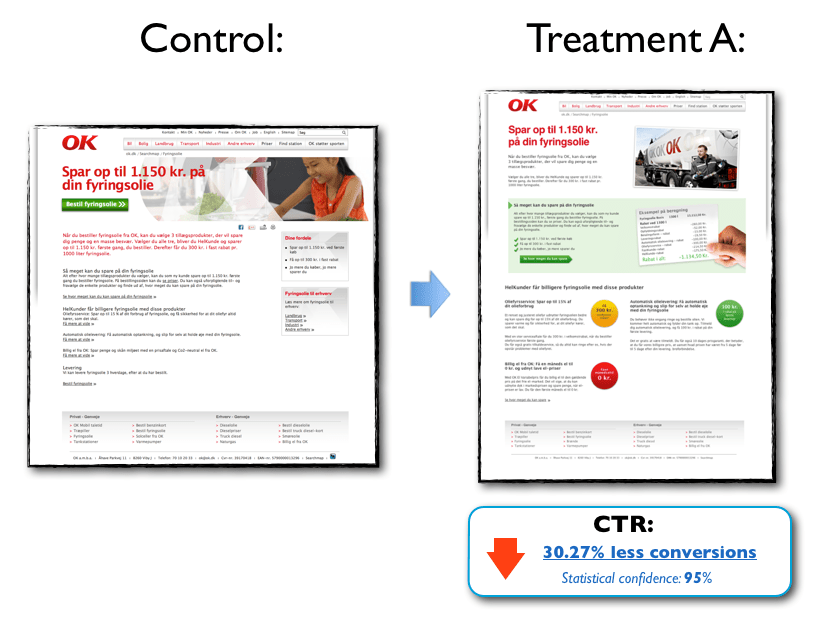
Luckily, we tested the page in the real world. Because as beautiful as it may have been, the landing page treatment actually hurt conversion significantly:
landing-page-mistakes-1
Click image for fill size
The product in this case was heating oil, and our goal was to generate leads for the client. Now, deciding who you are going to buy heating oil from is a big decision for most people and a beautiful landing page is not enough to make more people say yes.
Unfortunately, in all the excitement we forgot about the conversion goal and the target audience and went off on a design trip that resulted in a page that actually scared off more leads than it generated.

A simple way to avoid this mistake

Define a clear conversion goal before you even start thinking about optimizing your landing page and keep it top of mind in every step of the optimization process.
When your design draft is done, go over the individual elements one at a time and ask yourself, “How will this element help prospects make the right decision?”
If the answer is, “Hmm, I’m not sure – but it looks cool!” you may want to consider whether that element should even be on the landing page. As my friend Roger Dooley says:

“If it isn’t motivation, it’s friction.”» Tweet this «

2. Basing Optimization Decisions On Whims and Personal Preferences

In LPO, the quality of your work will ultimately be measured by the impact it has on conversion – not how beautiful it makes the page look or how sexy it makes the copy sound.
If you want to be a successful optimizer, it’s important that the changes you make are informed solutions to real problems – and not just arbitrary guesses.

How I used to get it wrong

I used to base my optimization efforts on whatever felt good or seemed like a great idea in the moment. This approach gave me immediate creative satisfaction but rarely did it result in conversion lifts.
I’ve wasted precious time working on minor design details when there were much more fundamental issues that needed to be resolved. Small creative changes are fun a lot of fun to geek out on, but they rarely have direct impact on conversion if basic things like your headline are off.
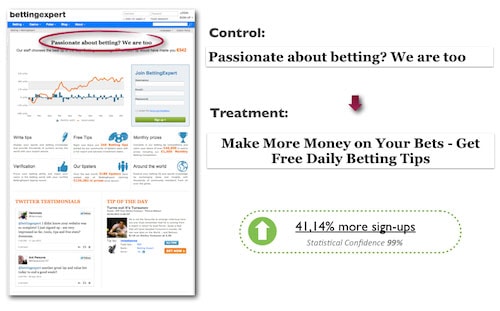
Here’s an example where changing a headline increased sign-ups on a betting forum landing page by 41.14%:
landing-page-optimization-mistakes-2
In this case, the headline treatment did not come about on a whim or because I felt that it sounded awesome. This headline was created based on data on target audience insight. Moreover, the treatment is focused 100% on giving prospects a good and relevant reason to stay on the page and sign up.
Notice that the headline starts with the verb “get” – a particularly powerful word that can work wonders on your messaging. For more on the awesome conversion power of “get” check out this article.
In my experience, ideas for treatments that come about on a whim usually lead to poor results. You can of course get lucky and stumble into something that works, but in the long term it’s really not a winning strategy.

A simple way to avoid this mistake

The more targeted and strategic an A/B test is, the more likely it’ll be to have a positive impact on conversions.
A solid optimization hypothesis goes a long way in keeping you on the right track and ensuring that you’re conducting valuable marketing experiments that will actually have an impact in the mind of the prospect –and, by extension, on conversions.
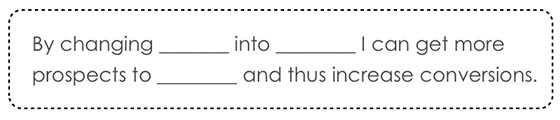
In landing page optimization, the optimization hypothesis is the basic (but data-driven) assumption that you base your optimized variant on. It encapsulates what you want to change on the landing page and what impact you expect to see from making that change. Moreover, it forces you to scrutinize your test ideas and helps you keep your eyes on the goal.
Formulating an optimization hypothesis can be as simple as filling out the blanks in this template:
landing-page-optimization-mistakes-3
Check out this article for a more in-depth guide on how to write a solid hypothesis.

3. Assuming That “One Size Fits All”

Life would be easier if the one-size-fits-all, cookie-cutter approach worked. So much easier.
However, in my experience there is no such thing as a global solution that works every time. All products, offers, landing pages, and companies are different, just like the motivations of your potential customers will be different. You need to find out what works for your specific target audience.

How I used to get it wrong

I used to think that every single case study or blog post I read was directly applicable to any given landing page.
“So a call-to-action above the fold performed best in this LPO case study. Okay, then I should always place my CTA at the top of the page.”
As you can probably imagine, it didn’t take many landing page experiments to find out having the CTA at the top of the page isn’t always the best solution. I’ve tested lots of landing pages where a CTA placed below the fold out-performed a CTA placed above the fold.
But really it’s not a question of above or below the fold – it’s a question of placing the call-to-action where it best complements the decision-making process of your prospects.
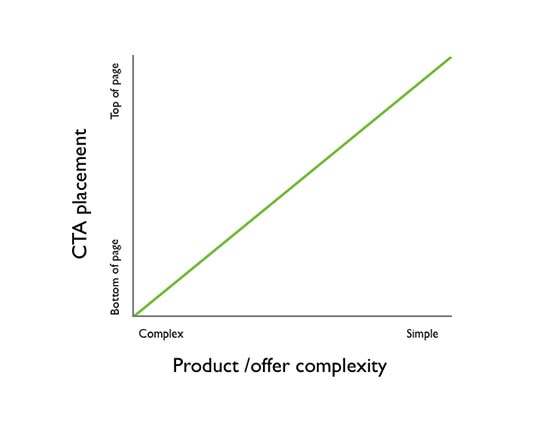
As a general rule of thumb, if the product/offer is complex and the prospect has to digest a lot of information in order to make an informed decision, positioning the CTA lower on the page generally works best.
On the other hand, if the product/offer is very simple and the prospect hardly has to do any thinking in order to make an informed decision, positioning the CTA above the fold generally works best.
But always test, test, test to find out what works best for your campaign.
landing-page-optimization-mistakes-4

A simple way to avoid this mistake:

Learn what you can from other people’s results, but don’t just assume that you can simply replicate those results on your own landing page.
You can get a lot of inspiration and ideas from case studies but before you start implementing things, always take the time to build a solid hypothesis on how this particular test idea will increase conversion on your specific landing page.
In many cases, this simple exercise is enough to keep you from implementing things that are unlikely to work on your landing page and target audience.

The Main Lesson I’ve Learned From All My Mistakes

landing-page-optimizaton-mistaks-5
Your “target audience” on the other side of the screen is made up of flesh and blood. Ultimately, their decisions and actions will determine whether your conversion rate goes up or down.
If you leave your potential customers out of the equation, your optimization efforts will never, ever reach their full potential.
What landing page optimization mistakes have you made and learned from?

Want To Learn Something From Best & Worst Landing Pages On Web

- Credit goes to Megan Marrs (Original Author) & Word Stream. Original link

Before we get started, it’s important to remember that landing pages aren’t just about the page itself. Process comes into play as well – what did visitors click to be brought to your landing page? If it was an ad, what did the ad say? If it was a newsletter blast, what links did they click? The “landing” process and movement through the funnel is just as important as the physical page design.

In this post, we’re going to evaluate and grade a few landing page examples from each Google search, as well as take a look at some innovative landing page designs that break the mold.

Landing Page Examples Search #1: "Photography Lighting Kit"


The first landing page example comes from Kaezi.
landing page examples 2014
This Kaezi landing page looks great – it’s showing a bunch of studio light kits we might be interested in, and one can click an individual set for more details. There are also some appropriate related categories in the left-hand navigation bar we also might be interested in. Overall the design is clean and we can see the "add to cart" buttons above the fold.
Grade: B+

Next is the photography lighting kit landing page for Cowboy Studio.
Product landing page examples
The first huge problem is intent – I clicked an ad for photography lighting kits, and this is what I get. This isn’t any kind of kit – it’s just one strobe light. As a consumer chances are pretty good that I’d back myself right out of this landing page disaster and find a page that is better at meeting my needs.
The intent is way off, and the design of this page is a mess. There is a lot of wasted space with the social share buttons and enlarge photo/email a friend buttons taking up way too much prime real estate. The info I really want (details on the product) is lost way below the fold. This info should be bulleted and sit right beside the main product image.
landing page info
What’s really frustrating is that this site does have what I’m looking for – they just make it hard to find. A little meandering around the site helped me find some actual photography lighting kits, similar to what Kaezi showed.
wonderful landing page examples
Grade: C-

That was a pretty bad landing page, but it does actually get worse. Hide your kids, hide your wives, things are about to get really ugly with this “photography lighting kit” landing page example from Fovitec.
landing page examples
Immediately upon arriving at this landing page, as a visitor I am completely disoriented. Where the heck am I? I clicked an ad for photography lighting equipment, so why don’t I see anything even remotely photography-oriented? The only hint that I haven’t accidentally clicked a random pop-up ad is the Fovitec logo featuring an aperture icon in the “O” (although whatever camera allusions the word “Fovitec” is supposed to conjure are lost on me).
Even if I stick around long enough (and the vast majority won’t) to explore, none of the navigation links near the top seem to help me with finding lighting kits. Remember: Don't make your visitors search for what you want them to buy! Make it as easy as possible for them to convert.
Grade: F

Landing Page Examples Search #2: "Dog Beds"

Next we’ll try another Google search, this time for “dog beds,” because we all love our dogs and want them to be comfy 'n' cozy.
Orvis does a pretty solid dog bed landing page – their landing page features a wide selection of dog beds, and an eye-catching photo of a happy, napping pup. The large product photos are also appealing, and you can filter the selection by color, feature, shape, fabric, price and more. Since "dog beds" is a pretty broad query, this meets the intent well, allowing the visitor to browse and find exactly what they need. (By contrast, if I'd googled a long-tail query like "large memory foam dog bed," I'd expect the landing page to be more specific.
high converting landing page examples
Grade: A-


Next up is Big Barker Beds, a business selling orthopedic dog beds for larger dog breeds.
ppc landing page examples
This page is a struggle because it does a lot of things right, but the things it does wrong are pretty damaging. The biggest problem with this landing page is its size. It scrolls down for… get this…. 38 pages. Yup, 38 pages, because the text is HUGE. There’s some really awesome content in there, but it’s lost in the sheer quantity of info.
There are a ton of great Amazon reviews featured on the landing page, and while I love how they used the red underline to highlight key points, there are waaay too many reviews (40+). In all fairness, this landing page about XL dog beds does everything in a BIG way – the text, the reviews, everything. You can’t say the page isn’t consistent.
good landing page examples
They have 3 reviews that talk about how easy the bed is to clean, 7 about how the beds are good for arthritic dogs, 5 about how attractive the bed is, etc. It’s absolutely fantastic that so many customers love the product, and it’s really smart to showcase those good reviews, but instead of drowning the visitor is XL print, I’d recommend that there be one shining review about how easy the beds are to clean, one about how they are good for arthritic dogs, etc. Visitors already see that these beds have a five-star Amazon rating (which is a clever trust signal to promote above the fold). If potential buyers want to read more reviews from customers, they’ll go to the Amazon page. Putting every great review on your page only overwhelms web visitors.
While the trust signals up top are great, the first chunk of text below the headline could be a lot more scan-friendly.
landing page best practices
This bulleted text found when you scroll down should really be up above the fold where it can be more useful and provide visitors with a better snapshot about the dog beds.
examples of landing pages
There’s some great info on this page about why this type of bed is recommended for older, arthritic dogs (the info was especially interesting for me as owner of an senior canine) but a lot of this great content gets buried because of the sheer enormity of the page.
Some simple rearrangement of content and text resizing could help this landing page out a lot. (Caveat: I don't know this company's conversion rate, so it's possible that alllll that text below the fold actually helps the page. Stranger results have happened with A/B tests.)
Grade: B

Next up is Pottery Barn. Pottery Barn’s “dog beds” landing page gets a solid fail – clicking their dog bed ad brings me to a landing page for décor accessories. I see pillows, blankets, and slip covers, but nothing dog related.
landing page design examples
What’s really silly is that after searching for dog beds with the site search tool, I find that Pottery Barn does offer dog beds. So why didn’t my landing page look more like this?
example of landing pages
Pottery Barn doubtlessly has a hefty advertising budget, so why such careless work when it comes to landing pages? This is a real missed opportunity on the part of Pottery Barn. The Pottery Barn brand is well known and has a solid following – I’m sure many consumers would choose PB dog beds over others, but driving PPC clicks to the wrong landing page is throwing away potential purchases.
Grade: F

Landing Page Examples Search #3: "Silk Flowers"

Let’s look at what landing page examples we get as we search Google for “silk flowers.”
This landing page starts off with a big flyer talking about all the cool crafts I can make with silk flowers.
product-landing-page-example
That’s cool… I guess. Really I already had an idea in mind and just want to check out the flowers. There they are down below the fold, thrown together in a hodge-podge manner.
examples of landing pages
What’s interesting is that when I do click on that flyer about the DIY crafts I can make with silk flowers, I’m taken to this page.
ppc landing page examples
Hey, it's your most popular silk flowers! This is a much better landing page than the one I was taken to initially. Here we see a wide assortment of silk flowers sorted by name and bright, colorful photos. This is a good landing page – it would have been perfect for my initial search for “silk flowers.” However, in order to get here, I had to click a link talking about DIY silk flowers crafts. I don’t see any craft info here. Sounds like this site really needs to focus on intent and think about where they really want to direct visitors.
Grade: C+
Our next silk flower landing page example comes from eFavorMart.
website landing page examples
This is another unattractive landing page that’s reminiscent of early 2000s. This landing page isn’t doing much with its headings, and the boring, lengthy (and small-print) content is riddled with very obvious cases of keyword stuffing. This page comes off as spammy and damages any potential trust the brand might have earned (and really, any website that starts with a lowercase “e“ or “i” already raises suspicions).
Grade: C

Landing Page Examples Search #4: "Email Marketing Software"

Let’s take a peek into the landing pages we come across in a Google search for “email marketing software.”
Hubspot comes up at the front of the pack, which isn’t a huge surprise. Their landing page lacks any strong imagery to retain the visitor’s attention, choosing instead to focus on its impressive awards and accolades.
great landing page examples
Many other landing pages struggle to rope in and condense their copy, but this Hubspot landing page gets straight to the point. There’s also more convincing copy with social trust signals and customer testimonials below the fold:
good landing page examples
This is a solid landing page example, but could still use some touching up. I’d suggest messing around a bit with the button colors. At the moment the buttons are the same color as the background with a subtle orange outline – not irresistibly clickable. Higher contrast is almost always better. There’s also something lacking with that first above-the-fold page. It’s devoid of any energy or excitement and might benefit from some more color or pop.
Grade: B+
Next up is Zoho Campaigns. Zoho also has a strong landing page design that could benefit from a few adjustments.
B2b landing page examples
Most of my criticisms are small, and may even seem petty, but truly good landing pages do require an almost scientific exactness and perfectionism. The Zoho heading should probably fit on to two lines instead of three. The main image is confusing – is this a glimpse of the product itself, or are we supposed to be drawn to the colorful designed templates Zoho offers against the bleak and dreary templates offered by other companies? It’s not clear – a different image choice could really improve this landing page.
While I like the small icons explaining the core components of Zoho campaigns, the colors are a bit too light. Shades of grey text can be preferred to black, usually used to delineate focus (darker text = more important). These icons should demand more attention, as they tell the key benefits of Zoho. There’s also just a little too much white space present. If I’d have to choose between a landing page that’s too crowded or too spaced out, I’d absolutely choose the spaced out page. However, a second testimonial or an extra icon line of features could be added while still maintaining a sleek, attractive design.
testimonial example
While the customer recommendation is good to have in there, it may be better to choose a recommendation from a more recognizable brand or client (and add their logo to the testimonial). Granted, Cathy of Forum Group Events Ltd. might be their top client, in which case, fine (no offense Cathy, nothing personal).
Grade: B
Next we’re looking at SAP. Boy howdy, this is one hideous hog of a landing page. It looks more like a resources page than a product landing page (and an ugly resources section at that). I clicked an ad that appeared for “email marketing software” and the word “email” is nowhere to be found.
bad landing page examples
It’s a shame because I don’t doubt that some of this is valuable content; it’s great that SAP is trying to create original, helpful content to share with visitors, but this isn’t the time or the place. Some serious visitor intent brainstorming is desperately required here.
Grade: D
Our last landing page example is from Infusionsoft marketing software.
best landing page examples
This landing page is quality stuff.
The headings and text are well chosen and placed, with text color variation to indicate levels of copy importance. The colored icons on the right draw the visitor’s attention to the key benefits offered by the product. The trust indicators in the upper right hand corner are discreet but noticeable. The button color and text are appropriate, and I like how the central-positioned form draws the visitor in.
A few things I would change: I might consider moving the testimonials that exist below the fold up higher and swapping out the bottom left text chunk, but it’s not the end of the world.
top landing page examples
I am irked a tiny bit that the first name form field doesn’t align with the one below, and that the button isn’t perfectly centered between the form fields, but those are easy fixes. I see a free trial offer as a better incentive than a demo, but maybe Infusionsoft has great success with their demo – each company has their own folder of testing research that can influence certain elements of their landing page. Remember, you know your company best, and it’s very possible that not all general landing page best practices will apply to you.
I believe this might be my favorite of all the landing page examples we’ve looked at.
Grade: A+

Some Of The Google Analytics Resources

- Credit goes to Ted Parry (Original Author). Original link


Google Analytics is one of the best free data analysis tools on the web. But having this powerful tool at your disposal is irrelevant if you don’t know how to harness its potential.
I suppose there is something to learn for people with varied expertise in Analytics from the post given below :

For Beginners

A quick guide for setup and get going:
  1. The Complete Guide to Setting up Google Analytics – This post is an opportunity to identify what code you’ll need, the account structure, and various other things necessary to get set up successfully.
  2. Beginner’s Guide to Google Analytics – This three-part series delves into setting up your account (part 1), setting up goals (part 2), and measuring visitor interaction (part 3).
  3. Google Analytics Tutorial for Beginners 2014 – Video guide on how to navigate the Google Analytics interface and use certain features.
  4. A Guide to Getting Started with Analytics – Goes into detail about how to understand what your traffic is doing and which trends to watch.

Data Segmentation

 It will allow you to compare data and make judgments.
  1. 16 Google Analytics Advanced Segments Tips – A combination of different segments you can apply to your analytics data to get insight. Examples include segmenting based on which type of traffic spends the most or which type of traffic bounces immediately.
  2. Segment Average Visit Duration in Analytics – See how you can get a better view of what average visitor duration means by segmenting your traffic.
  3. Google Analytics: Tracking Demographics of Ecommerce Visitors – A blog post on how to get demographic reports and how to analyze this data.
  4. Calculating the ROI of Your Marketing Channels – Shows you how to capture campaign data to calculate your return on investment and ad spending.

Small Business Analytics

These guides should give know how about measurement of ROI from digital channels.
  1. Web Analytics Guide For Small & Medium Sized Businesses – Breaks down exactly what things a small/medium sized business owner should be looking at. Tells you how to install the code, how to define business objectives, set up goal tracking, understand which channels are working, and how to report on all of it.
  2. The Small Business Guide to Google Analytics – This fantastic mini-site is a mix between an infographic and a blog post. It goes over all the simplicities a small business owner needs to understand.
  3. Understanding Web Analytics: Small Business Guide – Goes into details around the basic stats but gives a good introduction to the main sections of Google Analytics.
  4. 5 Google Analytics features for Business Owners – Looks at the features small business owners should be paying the most attention to.
  5. How to Track Anything with Google Analytics – Learn to track the most basic of things from outbound links to email sign ups.

Universal Analytics

Provide business insight to impact the bottom line.
  1. Complete Guide To Universal Analytics – Should you switch to Universal Analytics? This article aims to give a hint at whether you should and how to set it up successfully.
  2. Universal Analytics: The Benefits and How to Upgrade – An infographic on the benefits of Universal Analytics, what it brings to the table, and things you should be aware of (such as making sure your remarketing programs support Universal Analytics).
  3. Advanced Content Tracking with Universal Analytics – Ever wondered whether your readers are actually reading? Well, you’ll be able to find out with this JavaScript code. It allows you to see how far they’re getting and will surely be useful with Universal Analytics.

Analytics for Conversion Rate Optimization

Conversion rate optimization is a hot topic and one that often is used in conjunction with Google Analytics. How to comprehend key features and how to run a split test is something worth knowing
  1. Building Your Marketing Funnel with Google Analytics – Having trouble understanding which marketing channels are working best? Read this guide on how to segment your data with Google Analytics and discover opportunities for growth.
  2. Tracking Product Journey from Carting to Purchasing – If you own an e-commerce website, then this PDF guide is a must read. It will tell you exactly what you’ll need to track, from conversion rate to whether someone has removed an item from their cart.
  3. A Guide to Measuring Split Tests in Google Analytics – A guide on implementing your split testing strategy and continual analysis through Google Analytics.

Reporting and Excel

Do you work agency side, then reporting will be a large factor in maintaining your relationship with your client/boss.The articles below will tell you how one can get even more value from your weekly/monthly reporting.
  1. 10 Optimization Experts Share Their Favorite Google Analytics Reports – Ten experts chime in on their best reports for conversion within Google Analytics. Even if you use just one report, it would be worth your time to read it.
  2. 21 Real-World Examples Of Concatenating Marketing Data In Excel – Concatenating often is an under-utilized but powerful command within Excel. Annie from Annielytics provides 21 examples of using this command effectively.

Goal Tracking

Read the guides below to understand why it’s important and how to do it.
  1. Guide To: Goals And Funnels In Google Analytics – Goals are fundamental to tracking your website’s success. This guide will demonstrate how to set up goal tracking and gives examples of what you should consider tracking.
  2. Why to Define Macro and Micro Goals – Understanding the difference between macro and micro goals is very important and will help greatly when setting up goals.

Advanced Guides

This section covers some of the more obscure/complicated topics that are fairly new to the industry.
  1. The Ultimate Guide to Google Analytics Profile Filters – A guide on using filters to maximum effect. Includes ways to filter your own IP data, or only track certain metrics.
  2. Analyze Organic Search Engine Marketing with Analytics & GWMT – Advice from the official Google Analytics blog on how to measure the effectiveness of search engine marketing.
  3. 6 New Google Analytics Features – A list of six new features that Google Analytics has introduced that will impact how you view your data.
  4. Multi-Channel Attribution Modeling: The Good, Bad and Ugly Models – Goes into detail about the various types of attribution models and how to best apply them to your marketing efforts.
  5. The Full Guide to Remarketing in Google Analytics and AdWords – Remarketing has been a hot topic for a while now but has had little transparency about how to do it right. This guide shows you which tracking code to implement and other steps needed to get you up and running.
  6. (Provided): 10 Ways to Prove SEO Value in Google Analytics – Ever wondered how you can get around the not provided issue? Well, this guide gives you ten bite-size ideas on the best way to prove SEO value from Google Analytics.
  7. Google Analytics Social Tracking – Twitter, Facebook, Google Plus & Linkedin – Shows you the code you’ll need to really understand your social impact within Google Analytics. It will show which social buttons were used most frequently and will be useful for monthly reporting.
  8. Understanding Google Analytics: A Simple Guide to Advanced Terms – Great opportunity often lies within understanding the complexities of Google Analytics. Learn how to utilize filters, intelligence events, and custom dashboards within this post.
  9. Google Analytics for Ecommerce – Justin Cutroni from Google tells you how to set up e-commerce tracking, how to analyze data and report, and includes a few more advanced subjects such as cohort analysis.
  10. 7 things to consider before blindly choosing Google Tag Manager – Thinking of jumping straight into using Google tag manager? Well, before you do, consider reading this article as it details both the pros and cons of the application.

Google Analytics Exam

This can add to our credibility credible within the industry.
  1. Google Analytics Test – This is a super test aimed at helping you pass the individual analytics qualification. With over 200 questions, there is plenty of opportunity to learn and develop.
  2. Analytics Academy by Google – If you’re serious about learning analytics, then the official learning resource center of Google is a good place to start. With video tutorials and a mock assessment at the end of each module, you’ll be able to track progress and note areas where you need to improve.

Tips, Tricks, and Tools

Some of the tips, tricks, and tools below should inspire your creativity.
  1. Periodic Table of Google Analytics -Want to know the meanings of terms used in Google Analytics? Then read this handy periodic table of Google Analytics terms. You won’t regret it.
  2. Analytics Woman Chrome Extension – This might not help you immensely with Google Analytics, but it sure will take out the boredom of the Google Analytics start screen. You have the option to change the picture to something a bit more obscure.
  3. The Customer Journey to Online Purchase – Every good marketer understands that each industry’s customers react differently to various channels. This tool from Google allows you to segment by industry and gives insight into how each channel influences decisions in the purchasing process.
  4. “Not Provided” Keywords Estimator – This free tool from Digivate is used by many digital agencies to estimate what their client’s brand and non-brand traffic is. A very useful tool which always should be used when working with large brands.
  5. Top 24 Google Analytics Tips, Hacks & Automations – Luna Metrics is known to be one of the leading analytics companies. In this post, they link out to 24 of their best analytics articles.
  6. 13 Free Google Analytics Tools To Use Everyday – There is no doubt that tools can save you a lot of time and help you get to the important details. Read this to get a sense of what you could be missing out on.
  7. The Best Google Analytics Tips & Tricks for 2014 – Having an array of experts give their opinions on the latest tips and tricks will go down well in any industry. Get an idea of where Google Analytics is heading in the future with this post.
  8. 10 Actionable Google Analytics Tips – Having tips is nice, but having actionable ones is even better. Find out how to keep tabs on 404 error pages or even plot multiple rows of data.
  9. A New Method to Track Keyword Ranking using Google Analytics – This post is quite technical, and the method may require a developer to implement, but it sure is worthwhile if you set it up properly.
  10. How Call Tracking with Google Analytics Increases Your Profits – If you run a service-based business that relies on calls coming in to close sales leads, then this post could prove to be invaluable.

Expert Analytics Blogs

The best way to become the best is to learn from the best. The blogs below are compiled by experts that have years of experience in analytics and can teach you more than a trick or two.
  1. KISSmetrics Google Analytics Blog Posts – Read up on what KISSmetrics has produced over the years around Google Analytics and you’re sure to come away with something valuable.
  2. Online Behavior Analytics Blog – A blog dedicated to marketing analysis and optimization. Also has a video section if you’re more of a visual learner.
  3. Occam’s Razor – Avinash Kaushik has contributed a lot of thought leadership to the analytics industry over the years. Give his blog a read, but be sure to have a notepad next to you.
  4. Official Google Analytics Blog – The official Google Analytics blog is the first place you’ll find out about recent updates to the interface or a new feature being rolled out.
  5. Justin Cutroni’s Blog – Justin is an analytics evangelist at Google and produces some really insightful posts. Some may be a bit technical, but by the end, you’ll be wondering what Google Analytics can’t do.

Books

As well as blogs, books are another medium for learning. The two books we recommend below are written by well-respected authors within this industry. Well worth the investment.
  1. Web Analytics 2.0 (Avinash Kaushik) – This book has been cited by many industry experts as being one to read. It ties in all aspects of analytics and makes advanced principles easier to understand.
  2. Advanced Web Metrics with Google Analytics (Brian Clifton) – A book produced by another respected figure (Brian Clifton). Read this to increase your depth of knowledge in more of the advanced metrics.


Adwords Call Extensions --- Always Remember The Data Gaps

sew-phone

Do you have major gaps in call tracking data from Google AdWords Call Extensions? You just might, if you haven’t followed important rules. Thankfully, there are solutions to fill these data gaps.

Call Extensions Basics


Call tracking is fundamentally important for online advertising, yet so many companies completely miss this. The Google AdWords Call Extensions don't fill that need 100 percent (it only tracks calls from the SERPs, not your website). However, having a phone number published with your text ad means you can at least get a baseline understanding of how many potential leads or customers are willing to pick up the phone and call.


img-call-ext-serps


Setting up Call Extensions is simple. Using the Ad Extensions tab, choose to create the Call Extension at the ad group or campaign level. From there, enter your desired phone number. Then choose to utilize the Google forwarding number (which enables call reporting for non-mobile click-to-call activity) or to simply publish your phone number in the SERPs.

img-call-ext-new-number


Why is the Google Forwarding Number Important?


For mobile search traffic, Call Extension data is easy to access. A searcher clicks the phone number and calls. This “click-to-call” activity is tracked at the campaign, ad group, ad and keyword level in AdWords (via Segment > Click Type). Great!

For desktops and tablets, the data is fully dependent on the use of the Google forwarding number. When set up, you will be able to report on phone impressions, number of calls and create “call conversions” as an added metric (based on length of call). However, this data is limited to campaign and ad group layers only; there is no ad or keyword level data.

If you do not set up the forwarding number, you will be blind to how many calls you generate by using the Call Extension from desktops and tablets.

Call Extension Data Gaps


But what about those data gaps I mentioned? If you aren't mindful of the rules behind Call Extensions -- and more specifically forwarding numbers -- you stand a chance to have major gaps in your AdWords call tracking data:

Minimum click threshold per ad group. Your root phone number will show in the Call Extension without a minimum number of clicks. However, the forwarding number (and therefore deeper metrics for desktops/tablets) will only show if the ad group has a minimum of 20 clicks in a 4 week time period. Beware: You may be receiving calls but don't have the data to back it up! Made a bunch of changes lately and somehow saw Call Extension calls drop? This might be why.
Automated bids kill forwarding numbers. In short, if you use Conversion Optimizer, Target CPA Flexible Bid Strategies or other automated bids within AdWords, the Call Extension forwarding number WILL NOT WORK. If you are reporting Call Extension calls to a client or boss and run auto bids in AdWords, you need to follow up on how this affects your stats!

One serious issue to watch out for if you have ad groups that need to be paused and resumed frequently: This type of activity disrupts data flow and can force the forwarding number to stop showing!

Solutions and Alternatives to Fill Data Gaps


As with most data gap issues faced in marketing, there are solutions… or at the very least, alternatives. Here is a quick list of solutions and alternatives to avoid Call Extension data gaps:
  • If you are using Call Extensions with the Google forwarding number enabled, do a review of your campaign settings TODAY.
  • Do you have Conversion Optimizer or Flexible Bid Strategies running? Then the forwarding number isn’t working. Make a decision to either be O.K. without call data for desktops/tablets or change your bidding strategy.
  • Do your ad groups have enough data to trigger the forwarding number? If not, take the extra effort to beef these ad groups up so that the forwarding number will work.
  • If there is push-back from a client or internal decision maker on using the Google forwarding number, take the time to build a case for reporting and data clarity. This data is needed to understand performance of and optimize your campaigns.
  • If the forwarding number is simply not an option, secure a unique phone number that you dedicate to Call Extensions and can keep track of outside of Google AdWords.
  • Solve all of your problems and more! Get a service like Mongoose Metrics where you can track all of your calls. Bonus? You can record calls from all data sources (SEO, social, other paid channels) and with a deeper data set to boot. Full disclosure: I do not work for, do not get referral fees or have any other relationship with Mongoose – I just like their services!
 
Google’s Call Extensions are a great way to get additional phone calls and to better understand the behavior of your potential leads and customers. As with any feature in AdWords, Call Extensions are loaded with ifs, ands, and a plethora of caveats that force advertisers to pay extra attention to the details.

The Google forwarding number is a fantastic device for gaining call metrics from desktops and tablets, but the potential data gaps will trip you up if you are not careful. Review your Call Extension settings, traffic data and use of automated bids in AdWords to ensure you are generating “clean” call data.

Do You Think QS Will Be Valuable For PPC For 2013-14 -- Lets Have A Look

Continuing from The Article which is can be called “The Economics of Quality Score” that provided a simple model to determine the value of Google Quality Score in your AdWords account.

We all know the value of Google's Quality Score in a high-level sense – Quality Score plays an important role in determining your Ad Rank, which is how Google determines the position in which your ad appears, which in turn determines the amount of exposure and clicks your ads will receive.

We also know that Quality Score plays a very important role in determining how much you’re charged per click. A now famous video by Hal Varian, Google’s Chief Economist, helped clarify this point – that your cost per click is calculated using the formula: Ad Rank of the ad below yours / your Quality Score.

Using this information, along with some basic arithmetic, Craig published two tables that illustrated the value of Google Quality Score at that time, as shown here:

quality score google adwords

The tables illustrate:
  1. The average savings and “penalties” experienced with high Quality Scores (8, 9, or 10) or low Quality Scores (6 or below), with 7 taken as a neutral average.
  2. The economic cost or benefit of having your Quality Score move up or down by 1 point.
 At this point, it’s important to note that the true Quality Score that Google uses to calculate your CPC isn’t really a whole number between 1 and 10. The Quality Score that is visible to you in your account is a whole number between 1 and 10. Quality Score for calculating CPC is a real number and the scale is non-linear. Furthermore there are other factors involved in calculating CPC’s that aren’t disclosed by Google.

So while the actual numbers in the chart were off, the overall point hopefully remains true – that the positive and negative effects of Quality Score and its impact on CPC are directionally correct, and so these tables serve as a powerful illustration of the value of Quality Score.

Click Here to Get Your Quality Score Report Card


What’s the Value of Google Quality Score in 2013?

Much more than it was worth four years ago.
While the overall positive and negative effects of having a good or bad Quality Score remain true today, Quality Score has changed significantly in the last 4 years.

Most significantly, a Quality Score of 7 was set to be the neutral value at the time because QS=7 was the average Quality Score for most keywords back then. As Craig put it:
Note that we set QS=7 as the neutral value because using ClickEquations to review a wide range of accounts we’ve seen that QS=7 appears to be the mean quality score across a very large and diverse set of keywords.

Since then Quality Scores of 7 have become much scarcer and the average Quality Score has fallen.

Here’s a quick snapshot of what the Impression Weighted Average Quality Score looks like in 2013. Note that I’m weighting Keyword Quality Scores by impressions – because different keywords have different search volumes.

quality score distribution

I compiled this data by doing a manual analysis of several hundred new clients that WordStream signed up in the first two months of 2013.

Based on this manual analysis, I estimate that today’s impression weighted average Quality Score in 2013 is just slightly over 5 (out of a possible 10).

A Quality Score of 5 Is the New 7


Keywords, on an impression-weighted basis, now have an average Google Quality Score of 5. Therefore, accounts (or campaigns or ad groups) with average volume-weighted keyword Quality Scores better than 5 can be considered better than average, and are thereby benefiting relative to most advertisers. Accounts with average Quality Scores lower than 5 are below average, and those scores are detrimental to your account.

So re-running the calculations, but this time using a Quality Score of 5 as the new mean value for Quality Score (the “base value”), the Economics of Quality Score in 2013 now looks more like this:

Google Quality Score Impact


The #1 take-away here is that as average Quality Score has drifted lower, the “value” of having an above-average Quality Score has increased tremendously.
Also note that on a percentage change basis, the Quality Score “discounts” for above-average QS keywords have increased from 66% to 200% compared to their 2009 values, as illustrated in the preceding table.

For this and other reasons, I’ve often argued that Quality Score is the most important success metric in achieving AdWords success – and this is more true now than ever before.
Note that the marginal savings or cost increases for a 1-point increase or decrease in Quality Score remain unchanged (by definition), but are included in the table for the sake of completeness.

What’s My Average Google Quality Score? How to Check Your Impression-Weighted Quality Score


Now that I’ve described the value of Quality Score, and how it’s more important now than ever, you might be asking yourself – what’s my Quality Score? There’s two ways to figure it out – an easy way and a hard way. Let’s start with the hard way.

Finding Your Average AdWords Quality Score the Hard Way


To manually figure out your average Quality Score, follow these steps:
  • Log into AdWords.
  • For each Search Campaign, navigate to the Keywords Tab, click on the “columns” button, then add the “Quality Score” attribute, as illustrated below.
  • Export the data into a spreadsheet and calculate your impression weighted average Quality Score by multiplying each keyword Quality Score by the number of impressions accrued to that keyword. Add up this product for all keywords, and then divide by the total number of impressions accrued by those keywords. That’s your impression-weighted quality score for your Account (or campaign, ad group, etc.).

 google quality score checker
Finding your Google Quality Score using the AdWords Interface

Finding Your AdWords Quality Score the Easy Way


Another way to quickly visualize your impression-weighted Google Quality Score distribution is to just grade your account using the AdWords Performance Grader. This free tool will do an instant audit of your PPC account across 8 different key performance metrics, including impression-weighted Quality Score.

The report will calculate and display your average Quality Score and plot a distribution of the number of impressions happening at each visible Quality Score for the last 90 days, and compare that to a “Recommended Curve” for your business. Here’s an example of what the Quality Score section of the report looks like.

Check Google Quality Score


Now Is the Time to Improve Your Google Quality Score


Knowing that your Quality Scores may be saving you up to 50%, or costing you up to 400%, should provide strong motivation for everyone to both understand and work to improve your Quality Scores.
+