Latest From My Blog

Showing posts with label Keyword Match Type. Show all posts

Want To Understand Your Keyword Performance Better Use Google Search Funnel Reports

- Credit goes to Jeff Baum (original writer) & PPC Hero Original Link


I’ve always taken a bottom line approach to evaluating keyword performance. I want to know how much was spent on clicks, how many conversions those clicks generated, and if my keywords are profitable and performing to client or in-house goals. I base optimizations on these bottom line metrics and decide whether to pause certain keywords.

What I have recently come to understand is that bottom line performance does not tell the entire story.  As users become more sophisticated in their searching patterns, the path from initial search to conversion is growing longer. This conversion path is called a ‘search funnel’.

Understanding an account’s conversion path will help you make more informed optimizations and overall account management decisions. Quite often, your underperforming keywords could be indirectly helping other keywords in the account to convert. Pausing an underperforming keyword that drives conversions in another area of the account will ultimately hurt overall volume and profitability.

Today we will dive into the search funnel report and discuss how to best use it, so you can better understand what comprises the conversion path.

What Is The Search Funnel Report?

The search funnel report documents a searcher’s entire path to conversion. Sometimes the path is just one query long. Other times it’s an entire series of keywords and queries. Search funnel data can be found in three locations: 1) The Adwords interface, by adding in the assisted clicks, impressions, & conversions columns, 2) By clicking on ‘tools’>conversions>search funnels, and 3) Google Analytics.

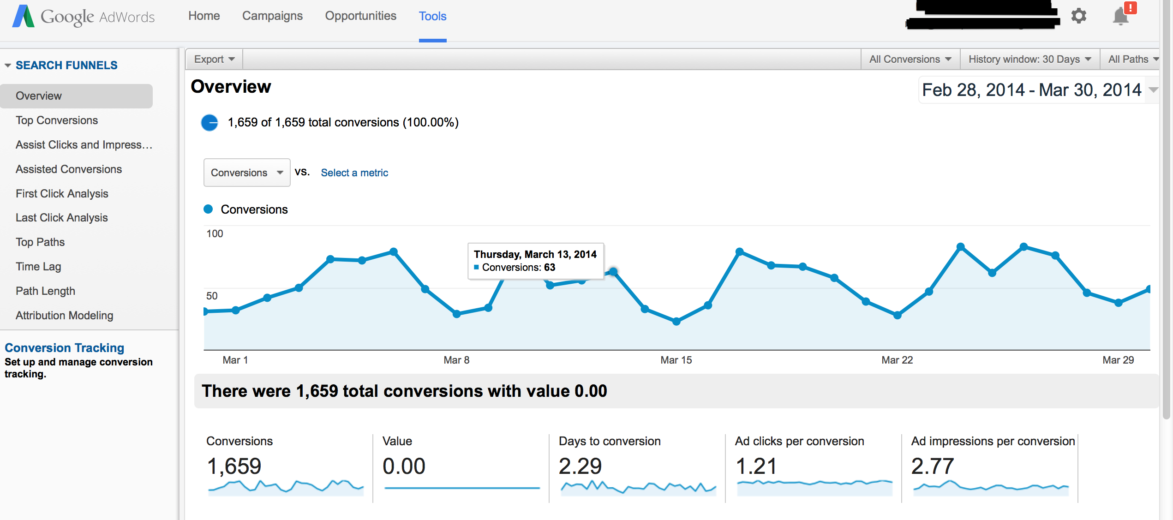
Below is an example of a search funnel report.

Search Funnel 1

Interpreting the search funnel report can seem daunting. There are dozens of mini reports and filters that show search funnel activity in a variety of ways. I’ve provided simple definitions to help make it easier to remember what the report’s key fields mean.

Assisted Clicks: Clicks on keywords that led to a conversion on a different keyword.

Assisted Impressions: Impressions that led to other impressions that led to a conversion.

First/Last Click Analysis: Keyword performance at the beginning or end of the conversion path.

Click Assisted Conversions: Total number of conversions a keyword contributed to by having assisted clicks.

Top Paths: The actual path searchers took that led to a conversion.

Path Length: The amount of clicks it took until a conversion occurred.

Attribution Modeling: What marketing channel got credit for the conversion?

Search funnel data is collected via conversion tracking. If conversion tracking is already installed, no additional set up is required. If tracking isn’t installed, all you have to do is create a conversion pixel and install it per Google’s directions. For more information on setting up conversion tracking, just visit Google’s help center.

Now that we have a basic understanding of what the search funnel report, the next question is:

How Should I Use The Data in the Search Funnel Report?

I use search funnel reports to communicate value to my clients, and to better understand user behavior. For instance, when it’s time to decide where to increase or pull back spend, I can justify keeping keywords live that might normally get paused if I were looking exclusively at the bottom line data.

Below is a sample keyword report that I pulled from the Google interface. All I did was add assisted clicks, click assisted conversions, assisted impressions, & impression assisted conversions.

keywords

The cost per converted click for ‘nursing associates program’ is $389. Based on that bottom line cost, I wouldn’t want to continue on with that keyword. However, there is 1 impression assisted click. Whether you value your assisted conversions equally as last click conversions or not, this extra conversion means the keyword is performing much closer to goal and is worth keeping live.

On the other hand, the 2nd keyword, ‘nurse degrees’ has only 1 conversion at a $327 cost per converted click, and it has 0 assisted clicks, conversions, or impressions. In this instance, I can be reasonably assured this keyword is not producing any conversions and is only running up cost, and can therefore be paused.

Below is an example of user behavior. I’m particularly interested in this query path. Notice the progression from a general interest search (‘degree in dental hygiene’), to a more targeted search (‘dental hygienist schools’), and finally to a specific search (‘dental hygienist schools Georgia’).

Screen Shot 2014-03-31 at 4.18.04 PM

From this simple view, I’ve learned 2 things: 1) general keywords are leading to conversions down funnel, and 2) User searches in this path are very deliberate. Each search becomes more refined as the searcher advances through their research process. I also learned I need to fill any keywords gaps by making sure my list contains keywords that mirror the conversion path my prospects are taking.
Attribution Modeling in AdWords --- from Google

 - Credit goes to PPC Hero Original link

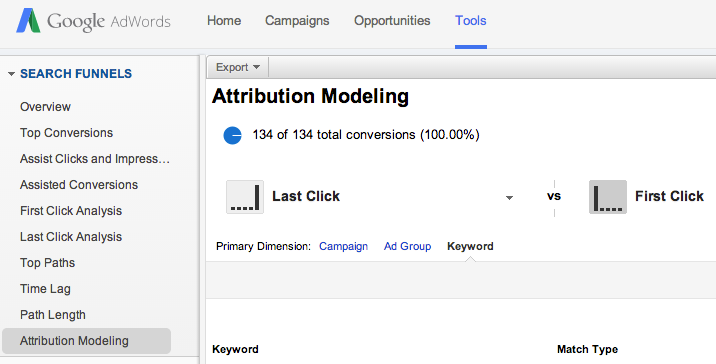
 Google has just released the Search Funnels Attribution Modeling Tool in AdWords. This tool allows you to identify campaigns, ad groups, or keywords that are assisting conversions or are a part of the conversion process. While this tool has been available in Analytics for quite some time, it’s a new feature in AdWords.
Where To Find It
You can find this by navigating to Tools and then Search Funnels. From there you can select Attribution Modeling to compare different models at the campaign, ad group, or keyword level. There are also tabs for Assist Clicks and Impressions, Assisted Conversions, and First and Last Click Analysis.
Attribution Modeling2
As a quick refresher, here is a definition of each model:
  • Last Click: credit goes to the last clicked keyword
  • First Click: credit goes to the first clicked keyword
  • Linear: credit is distributed equally among all clicks on the conversion path
  • Time decay: more credit is given to clicks that happen closer to actual conversion
  • Position-based: 40% credit is given to the first and last clicked keyword, and the remaining 20% is divided among the clicks in-between
Why It’s Helpful
While you could always access this data in analytics, it’s helpful to have it right in AdWords. The First Click attribution model is useful so that you don’t cut out or reduce bids on keywords that are aiding the conversion process but aren’t the last clicked keyword. If you find that users are visiting your page more than once via PPC ads before converting, you might change your ad copy strategy or adjust your bidding strategy.
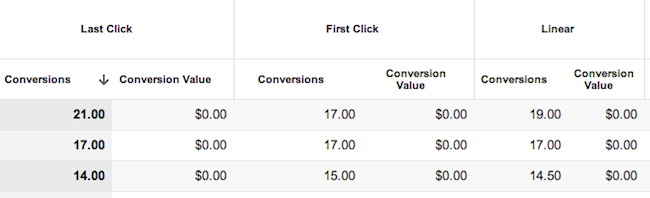
keyword attribution
Some keywords have a greater impact as a first click or a last click.
AdWords makes it fairly simple to do this with the Model Comparison Tool and the Top Paths feature, which allows you to see all of the converting keywords in order of when they were clicked. I have also found the Query Path (within Top Paths) to be interesting to look at, as it gives you some insight as to how and when customers are searching for your products/services and clicking on your ads.
It is important to note however, that looking at this information in AdWords doesn’t quite give you the whole story. It might be worthwhile to still use Analytics to get a better understanding of all traffic sources coming to your site and how users are interacting with your site. I find that it’s helpful to look at both attribution modeling and top conversion paths in Analytics for both AdWords traffic and all other traffic.
This change isn’t an earth shattering one, but it is nice to see more Analytics features being implemented into the AdWords interface. This kind of information is helpful when making optimizations and getting an overall picture of your account and how your keywords and campaigns are interacting with each other.
What other features from Analytics would you like to see in AdWords?

Some Real Time Bidding Predictions For 2014

In the digital space, 2013 has been another massive year. 2013 has been branded the year of mobile, the year of video, the year of enhanced campaigns (gasp!), and the year of audience, etc.
Arguably 2013 could also be branded the year of real-time bidding. RTB has become the buzzword in display and digital marketing as a whole due to the advancement of opportunities for dynamically run biddable display campaigns.

This article, however, won't discuss all the amazing RTB related excitement that has come out of 2013, but rather discuss what the future is for the biddable display arena. My predictions for RTB in 2014 are as follows.

1. Rich Media Ads


Ad formats are becoming increasingly engaging and interactive. Dynamic creative allows advertisers to insert images and text based on combinations of variables, which isn’t just limited to e-commerce products.

In 2014, expect travel and publishing advertisers to use dynamic capabilities more creatively to create highly targeted and flexible ad copy. In addition, the use of rich media and engagement ads will continue to grow.

Engagement metrics will be optimizable, meaning advertisers are able to judge performance of ads even when users don’t leave the publisher’s website. This means publishers and advertisers share the benefits of engagement ads.

Free products like Google Web Designer, which allows for free creation of rich media ads, will help advertisers create these ads quickly and efficiently.

Expect more rich media and engagement formats which are easier to create and easily made dynamic.

2. Social Networks


The recent agreement between Google’s DoubleClick Bid Manager (DBM) and Facebook is a huge step forward in the alignment of social websites and biddable display. DBM advertisers will be able to reach first party and third party audience lists on Facebook and target them cross devices.
Expect more social networks to make their inventory available to exchanges in 2014.

3. Branding Metrics


Auditing the value of display campaigns has never been more important. Advertisers are becoming more aware of the optimization opportunities within biddable display and are understanding how direct conversions can be achieved through highly targeted and strategically run RTB campaigns.
DSPs will strive to provide new metrics to prove the value not only of direct conversions from display campaigns, but also the impact of visibility of display ads on brand recognition and awareness.

Expect more insights on viewability of ads and the impact on search to come in 2014.

4. Programmatic Video


DBM have recently created an option for in-stream video advertising via real-time bidding. This allows video ads to be served across a number of video exchanges, of course YouTube being the biggest.

Expect the CPM bidding model to be refined to allow for cheaper and more direct conversion options from biddable video. The number of video exchanges continues to grow, and it's in their best interest to make their inventory available in the biddable space. Note this isn't limited to just DoubleClick; video via private auctions on premium inventory is being discussed by a range of DSPs and publishers.

Expect expansion of biddable display throughout 2014.

5. Private Marketplace Deals


Similar to the addition of social networks allowing their inventory to be targeted via demand-side platforms like DBM, an increasing number of publishers will be using DSPs as a way to easily make their premium content available to a larger number of advertisers. This helps bridge the gap between reservation display and exchange buying, meaning that advertisers can reach premium content which may have previously been only available via direct reservation deals, and premium publishers still have a choice over the brands who have access to their highly valuable inventory.
Expect even larger volumes of premium inventory to become available via auctions.

RTB in 2014


These are just five predictions of the many expected advancements and changes that will inevitably come to the RTB space in 2014. If 2013 wasn’t the year of RTB within our industry, 2014 has absolute potential to be the year advertisers and publishers alike get onboard and start using display inventory to its full performance potential.

Adwords Match Options - The Basic KeyWord Match Types

Selecting targeted keywords is the first step to setting up a PPC campaign in Google AdWords, but the keyword matching options that you use can also have a large impact on your success. There are five AdWords match types: Broad Match, Modified Broad Match, Phrase Match, Exact Match, and Negative Match. All keyword match types have advantages and drawbacks, so we'll discuss each in detail to help you choose the most advantageous options for your goals.

For our discussion of the different AdWords matching options, we'll use "Gel Batteries" as the example keyword to illustrate how different options affect when your advertisements will be displayed.

Broad Match

Broad match is the default matching option for keywords used in your AdWords campaigns. A broad match keyword will be entered as Gel Batteries into your keyword list, without quotes, brackets, or other symbols.

Broad Match

When using the broad match option, your advertisement may display whenever someone enters your keywords into the search box, regardless of what order they appear in or what additional words are added. For example, the search queries "do gel batteries leak" or "do car batteries contain gel" could trigger your ad. This match option will also allow your ad to show for terms that Google interprets to be relevant to your keyword phrase, even if the search query does not include the exact keyword. So in this case your ad could also be displayed for a closely related term such as "car battery" or miss the mark completely with a term such as "AA batteries" or "hair gel."

Broad match phrases are best used when your goal is to bring in the maximum amount of visitors possible. Since the advertisements will display for a broad variety of search terms, your ad will be visible to a large number of people in a short amount of time. This can be very desirable with a sufficient advertising budget and can quickly increase your exposure. In addition, you'll be able to discover long-tail phrases that you never could have anticipated. (A healthy portion of search queries are completely unique and have never been searched on before.)

The immediate drawback of using broad match phrases is that while you will get a larger volume of traffic to your site, this traffic will likely not be as targeted and therefore has a lower chance of converting. You have limited control over what search terms your ads are displayed against, and you may not agree with what Google interprets as being relevant to your ad and your business.

This can easily lead to high advertising costs with low or no return on investment (ROI) in the short term. If you do make use of broad match in your AdWords campaign, be sure to read the section below on negative keywords, as these are essential to filtering out unwanted traffic and reining in costs.

Modified Broad Match


Modified broad match is a newer matching option that provides a little more control than standard broad match. To use modified broad match, append a plus sign to one or more terms in your keyword phrase to force Google to only match your ad against search queries that include that term.

For example, if your keyword is +Gel Batteries, Google will only match your ad against queries that include the word "gel" (or a very close variant), but they query needn't contain the word "batteries." So your ad might match against a search for "gel cells" but not "cell batteries." If your modified broad match keyword is Gel +Batteries, on the other hand, your ad will only display in response to queries that contain the word "battery" or "batteries." If you add a plus sign before both words, both must appear in the search query, but they could appear in any order and with additional terms.

The benefit of using the modified broad match option is that you have more control over how frequently your ad is displayed, so your traffic will be more targeted. However, narrower targeting will also reduce the overall traffic you bring in from those keywords.


Phrase Match


The phrase match keyword option offers a much more targeted approach than broad match, but still allows flexibility for Google to match your ads to more queries than your exact keyword phrase. When using the phrase match option, your advertisement will appear for searches that include your keyword phrase in the correct order, but can still display for queries including additional words.

To use the phrase match option in AdWords, enter your keyword phrase in quotation marks. Entering your phrase as “Gel Batteries” indicates to Google that your advertisements should only appear when someone has entered a search term that includes this exact phrase, but additional terms in the query are OK. For example your ad might match against queries such as "gel batteries for motorcycles" or "used gel batteries."

Phrase match allows you to be more targeted with your search terms but still capture additional traffic from keyword phrases that you did not think of when building your list. It's one of the best ways to expand your keyword lists and find more targeted phrases to use in your campaigns. This match type will not usually bring in quite the volume of traffic that the broad option does, but it is more targeted to your niche. It can also be handy when bidding on keywords that change in meaning depending on the order of the terms (such as "book store" and "store books").

Exact Match


exact match

When using the exact match option, you enter your keyword phrase with brackets around the words: [Gel Batteries]. The exact match option is the most targeted option available and will only let your ad display when people search for the exact phrase in the exact order in which the phrase is entered. For example, if you bid on [Automotive Gel Batteries] your ad would not appear for "auto gel batteries" or "gel batteries."

Using this technique imposes strict limits on your ads and will drastically reduce the frequency that your ad is displayed. This is not necessarily a bad thing, though; by only showing your ad to people who are searching for exactly what you are offering, you can dramatically increase your chances of a conversion. You can also reduce your overall costs, since you'll be paying for fewer clicks.

The drawback to using this match type is that you will not be able to capture long-tail data to expand your keyword list. In addition you may miss a lot of traffic that is relevant to your keyword.

Negative Match


Negative keywords are not a stand-alone match type; rather they are used in conjunction with the broad and phrase match options. As mentioned above, when using broad and phrase match keywords, there is a risk of generating a large amount of traffic that is not truly relevant to your offering and unlikely to convert. These clicks can quickly become costly and deplete your budget. So it's crucial to use negative keywords to keep ROI high while employing the broad and phrase match options.

Designating a negative keyword prevents Google from ever displaying your ad in response to that keyword. To create a negative keyword, place a minus sign in front of the term. For example, if you only sell new gel batteries, setting "used" as a negative keyword (-used) will prevent your Gel Batteries ad from displaying when someone searches for "used gel batteries." Setting "disposal" as a negative keyword will prevent you from paying for clicks from people looking for "gel battery disposal services."

Businesses frequently add words like "free" to their negative keyword lists, since they indicate non-commercial traffic that won't convert. However, it's impossible to think up all the possible terms that are irrelevant or useless to your goals (just as it's impossible to create a complete keyword list by brainstorming). To find negative keywords, try using a negative keyword tool as well as regularly consulting your search query reports in AdWords to see what your ads are matching against.

Conclusion 


Each keyword matching option in AdWords has its purpose. We recommend using all the available options, depending on your goals and budget for each keyword. Always monitor your campaign performance carefully and make adjustments to match type as necessary to maximize your returns.
+