Latest From My Blog

Showing posts with label Addition. Show all posts

Want To Understand Your Keyword Performance Better Use Google Search Funnel Reports

- Credit goes to Jeff Baum (original writer) & PPC Hero Original Link


I’ve always taken a bottom line approach to evaluating keyword performance. I want to know how much was spent on clicks, how many conversions those clicks generated, and if my keywords are profitable and performing to client or in-house goals. I base optimizations on these bottom line metrics and decide whether to pause certain keywords.

What I have recently come to understand is that bottom line performance does not tell the entire story.  As users become more sophisticated in their searching patterns, the path from initial search to conversion is growing longer. This conversion path is called a ‘search funnel’.

Understanding an account’s conversion path will help you make more informed optimizations and overall account management decisions. Quite often, your underperforming keywords could be indirectly helping other keywords in the account to convert. Pausing an underperforming keyword that drives conversions in another area of the account will ultimately hurt overall volume and profitability.

Today we will dive into the search funnel report and discuss how to best use it, so you can better understand what comprises the conversion path.

What Is The Search Funnel Report?

The search funnel report documents a searcher’s entire path to conversion. Sometimes the path is just one query long. Other times it’s an entire series of keywords and queries. Search funnel data can be found in three locations: 1) The Adwords interface, by adding in the assisted clicks, impressions, & conversions columns, 2) By clicking on ‘tools’>conversions>search funnels, and 3) Google Analytics.

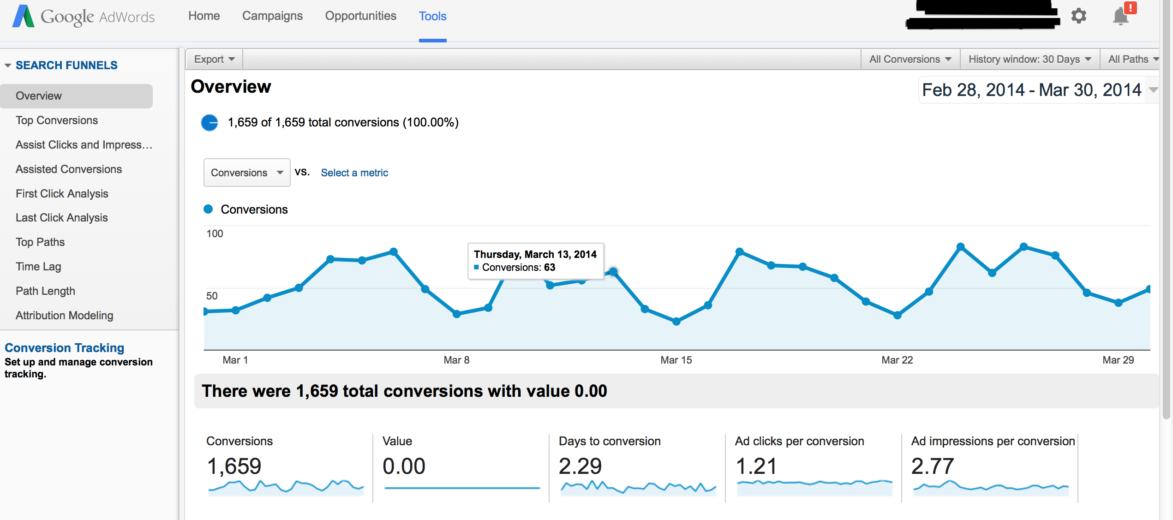
Below is an example of a search funnel report.

Search Funnel 1

Interpreting the search funnel report can seem daunting. There are dozens of mini reports and filters that show search funnel activity in a variety of ways. I’ve provided simple definitions to help make it easier to remember what the report’s key fields mean.

Assisted Clicks: Clicks on keywords that led to a conversion on a different keyword.

Assisted Impressions: Impressions that led to other impressions that led to a conversion.

First/Last Click Analysis: Keyword performance at the beginning or end of the conversion path.

Click Assisted Conversions: Total number of conversions a keyword contributed to by having assisted clicks.

Top Paths: The actual path searchers took that led to a conversion.

Path Length: The amount of clicks it took until a conversion occurred.

Attribution Modeling: What marketing channel got credit for the conversion?

Search funnel data is collected via conversion tracking. If conversion tracking is already installed, no additional set up is required. If tracking isn’t installed, all you have to do is create a conversion pixel and install it per Google’s directions. For more information on setting up conversion tracking, just visit Google’s help center.

Now that we have a basic understanding of what the search funnel report, the next question is:

How Should I Use The Data in the Search Funnel Report?

I use search funnel reports to communicate value to my clients, and to better understand user behavior. For instance, when it’s time to decide where to increase or pull back spend, I can justify keeping keywords live that might normally get paused if I were looking exclusively at the bottom line data.

Below is a sample keyword report that I pulled from the Google interface. All I did was add assisted clicks, click assisted conversions, assisted impressions, & impression assisted conversions.

keywords

The cost per converted click for ‘nursing associates program’ is $389. Based on that bottom line cost, I wouldn’t want to continue on with that keyword. However, there is 1 impression assisted click. Whether you value your assisted conversions equally as last click conversions or not, this extra conversion means the keyword is performing much closer to goal and is worth keeping live.

On the other hand, the 2nd keyword, ‘nurse degrees’ has only 1 conversion at a $327 cost per converted click, and it has 0 assisted clicks, conversions, or impressions. In this instance, I can be reasonably assured this keyword is not producing any conversions and is only running up cost, and can therefore be paused.

Below is an example of user behavior. I’m particularly interested in this query path. Notice the progression from a general interest search (‘degree in dental hygiene’), to a more targeted search (‘dental hygienist schools’), and finally to a specific search (‘dental hygienist schools Georgia’).

Screen Shot 2014-03-31 at 4.18.04 PM

From this simple view, I’ve learned 2 things: 1) general keywords are leading to conversions down funnel, and 2) User searches in this path are very deliberate. Each search becomes more refined as the searcher advances through their research process. I also learned I need to fill any keywords gaps by making sure my list contains keywords that mirror the conversion path my prospects are taking.

Webinar --- Battle for Power in a Marketing Landscape

- Credit goes to PPCHero. Original link

Stretching the marketing dollar can be a daily battle and with the continuous tussle for PPC in particular, you’ve probably had your share of challenging issues and questions. How do you prioritize your marketing dollars? When should you think about moving your marketing budget around? How do you handle “micro-managing” of your PPC accounts? Should you hire an agency for PPC marketing, an in-house staff member, or go the automated path?
In the recording below, digital advertising experts from Hanapin, Searchforce, and Cabela’s talk marketing and contend their daily power struggles from their each unique perspectives, which cover every facet of the industry: an agency, in-house team, and automation software.
You’ll get expert-level PPC tips like:
*How to be a successful gladiator for your PPC accounts
*Insight into the different perspectives of PPC marketing
*How the market landscape can affect your PPC budgeting decisions
*How to tackle “micro-managing” of a PPC budget
Prepare for the ultimate battle of insights, tips, and expert-advice!
Here is the webinar recording:

Webinar Link


And here is the slideshare presentation:

 Slidshare Link

Want To Improve CTR 5 Things To Learn From A/B Testing

We’ve been running guest posts by Ryan Healy, a copywriter for BoostCTR, for quite a while now. Each post focuses on a single A/B test and analyzes the strengths of the winning ad (that is, the ad with thehigher click-through rate). There’s so much good ad writing insight in these posts, I thought it was time to dig back through them and pull out some takeaways.

Here are five ad writing lessons gleaned from Ryan’s A/B tests that you can use to improve your AdWords CTR and Quality Score.

Lesson #1: Leave Out The Lingo


Don’t use insider jargon that your audience might not know or understand in the context of your ad. For example, look at the below ads:


PPC Ad #1
MMA - Ad #1
PPC Ad #2
MMA - Ad #2


The second version increased CTR by 70%. The first version uses some confusing terminology: “No XP reqd.” That means “No experience required,” but it’s not obvious – when I see “XP” I think “Windows,” and probably the average person does too.

To make your ads more readable and clickable, use simple, straightforward language. If you’re not sure if your ad is readable or not, run some tests!

Lesson #2: Target Your Real Target


This is related to lesson #1. Just as you should keep your target customer’s vocabulary in mind, you should make sure you’re speaking to their goals and needs. Take a look at the two ads below (“ADA” stands for “Americans with Disabilities Act”):


PPC Ad #1
Ad #1 - ADA Signs
PPC Ad #2
Ad #2 - ADA Signs


The first ad focuses on benefits for people who might read the signs (“Bold & Clear”) – but the ad should be targeting people who might buy the signs. The second ad wins (increasing CTR by a whopping 164%!) in part because it focuses on benefits for the buyer – that is, businesses who need ADA signage for compliance reasons (“Avoid Hefty Fines”).

Lesson #3: Use Verbs

Maybe it sounds obvious, but since you want people to do something when they see your ad, it’s important to use strong verbs that entice them to action. Take a look at this A/B test:


PPC Ad #1
CRM Software - Ad #1
PPC Ad #2
CRM Software - Ad #2


Ad #2 uses no verbs. (Tracking is a gerund here. Fun grammar facts!)  The first ad, which achieved 89% higher CTR, uses a verb to tell people why they should click the ad – “Watch Online CRM Demo Instantly!” People like being told what to do; it allows them to think less. Make sure your ads have a call to action centered around a commanding, descriptive verb.

Lesson #4: Match Your Ad To The Product


Use the exact brand name of the product or service you are selling in the ad. An exact match improves relevance in the eyes of Google (helping your ad rank) as well as the searcher (encouraging them to click). Notice the difference in spelling between these two ads:


PPC Ad #1
Vibram - Ad #1
PPC Ad #2
Vibram - Ad #2


Ad #1, which increased CTR by 65%, spells out “Five” instead of using the number “5.” This more closely  matches the actual name brand of the shoe. (They probably could have increased CTR even further by using the exact brand name, which is “Fivefinger,” one word.)

Lesson #5: Use An Exclamation Point

Did you notice that all of the winning ads above use exclamation points? This visual sign of enthusiasm often improves your CTR. Scan your AdWords ads and see if you could be getting more leverage just by adding this single punctuation mark.

Do You Know The AdWords Alternatives -- I've Shortlisted 15 For You

For this month’s series, we’re providing a little bit of perspective on the hectic events of 2013. As we’ve left Enhanced Campaigns pretty well covered this year, this week we’ll be dedicating our time to some of the other (non-Enhanced Campaigns) initiatives, tactics, strategies, and features that we used to excel in 2013 here at PPC Hero.

Up first? Me, and all the different ad networks I’ve explored in addition to (or instead of) AdWords over the course of the last year to grow both my accounts and their returns. It’s been a hot-button topic throughout the year, especially in the advent of Enhanced Campaigns. If some of these names sound familiar… well, then it’s probably about time you got on board.


1. Bing

Bing ads interface.
Y’know, just the usual interface.

The biggest beneficiary of the Enhanced Campaigns kerfluffle? Bing, by far. As Matt Van Wagner declared at Hero Conf this last April in Austin – you should *really* be doing Bing, especially as Enhanced Campaigns muddies the PPC landscape. While you should be wary of Bing Search Partner Lead Quality, advertising on Microsoft’s search platform can lead to great gains for any account.

Case in point – In April of this year, I pitched a client on starting a Bing account. Now in December 2013, here’s how that decision has panned out:
AdWords: 2,322 Conversions at a $78.13 CPA.
Bing: 907 Conversions at a $64.80 CPA.
I’ve had my difficulties with the Bing Ads platform in the past, but you can’t argue that math. That’s a 40% increase in Conversion volume at only 82% of the Cost Per Conversion. If you’re tapped out on Google *or* just looking to be more efficient with your existing budget, you should definitely jump in.

Turns out, I’d just wrote about this recently. But regardless, Facebook is offering more and more compelling features to test out for your business. While some of the neater tricks require a Facebook presence (or just a page, really), the robust targeting methods allow you to find users that align with your customer demographics in ways that Google just can’t match.
Interest Categories, Affinity Audiences, and Age/Gender targets in AdWords don’t hold a candle to the power of a Lookalike Audience. As an added bonus, dark posts can drive genuine engagement with your ads. Brother, you haven’t lived until you’ve had someone “Like” or “Share” a paid advertisement. Makes me feel all warm and fuzzy inside just thinking about it.

A Facebook News Post ad.
See? Warm and fuzzy.

3. AdRoll
AdRoll is one of the more well-known networks that utilize the Facebook Exchange (FBX) to remarket to users that have previously visited your site. In truth, I have some minor nitpicks with the reporting functionality and ad approval process, and they don’t interface with our reporting platform at all… but it is an easy way to get initial buy-in for some Facebook work.

AdRoll's advertising options.
Three flavors. Just like a Cornetto.

They’re also pretty feature-rich, allowing you the ability to do normal web remarketing, Facebook Sidebar remarketing, and Facebook News Feed remarketing. In a recent announcement, they’ve also announced beta signups for Twitter Retargeting with Tailored Audiences.

Twitter Remarketing announced.
I’m coming for you, Twitter.

Speaking of which…

4. Twitter
Twitter can be an incredibly powerful social platform, letting you participate in all kinds of conversations and movements around the world – like my beliefs about the practice of preheating an oven, for instance. Should you find yourself wanting to do more with this social media mainstay – even beyond AdRoll’s Tailored Audience approach, advertising with promoted tweets can be another avenue of expansion for your account.
If you’re curious about the do’s and don’ts of Twitter advertising, I’ve got some recommended viewing for you right here – courtesy of Carrie Albright of PPC Hero, John Lee of Clix Marketing, and the fine folks at 3Q Digital.

Another “Greatest Hit of 2013″ coming to you from the power duo of Albright & Lee, Carrie and John discussed the top ways for you to grab attention on LinkedIn with a practical video designed to teach you the basics of advertising on the networking giant.

6. YouTube
So this one is kind of a cheat, as it can be managed via an AdWords account. But moving on…

Youtube's advertising interface.
Remarketing on Youtube. Easy.

These first six platforms are likely going to be part of any comprehensive digital strategy – but for those of you who haven’t explored your advertising options on the second-largest search engine on Earth, you should give it a try. There are some pretty neat tricks you can use with your existing AdWords account that can make the YouTube advertising experience positively painless.

However: their keyword targeting suggestions remain awful. I’m not targeting Selena Gomez for industrial equipment, no matter how often you ask me, YouTube. While there are still discussions to be had regarding YouTube user purchase intent when viewing cat videos, I can guarantee you’ll need to know how it works in 2014.

Advertising.com's Sponsored Links Interface
Advertising.com’s Sponsored Links Interface

This platform is designed to serve sponsored listings throughout the Advertising.com/AdSonar premium network – including sites like the Huffington Post, Slate, CNN Money, and the AOL.com homepage. That’s right: the AOL Homepage.

AOL.com Homepage Ad
Do I get free AOL disks for advertising here?

I’ve been working with an implementation team over there to launch for a few of my clients, and they’ve been very responsive and helpful throughout the entire process. Good customer service wins points with me, so thanks to Mr. Shaughnessy – he and I will be talking again soon.

If you have a client that absolutely *must* show up on the Huffington Post (like I do), then this is the place to go.

Now, in the interest of brevity, I’ll lump a few together for you to explore similar options…

8. Infolinks

As mentioned previously, these are some in-text advertising options that allow you to target users with ads tailored to the text passages that align with your keyword targeting options. So, if you’ve got a product that people blog, talk, or otherwise write about, it might behoove you to give these a try.

A sample in-text ad from Result Links.

Personally? I’ve seen great returns on the Infolinks platform in particular – but this was for a product that features a metric *ton* of traffic out there in the blogging world. This might be one to test out for yourselves.

10. AdBlade

Admittedly, the name is pretty silly. But this is another ‘premium’ advertising platform that claims a reach of over 200 million users. However, there were a few downsides – the bidding is done on a CPM basis (which, in hindsight, is more of a crippling disability rather than mere downside) and there’s a distinct lack of transparency on the quality of site placements. For a site that claims a ‘premium’ inventory, they don’t let you know where your ads actually went.

12. Clicksor

These are a few more contextual display networks for you to experiment with – I’ve had a little more experience with Clicksor, but found their Conversion Tracking implementation pretty cumbersome.
Here’s a fun note: According to Wikipedia, there have been issues with end users on the Clicksor network being subjected to malware but, and I quote: “However, Clicksor has been consistently updating their ad management system to avoid malicious ads – they are currently using The Media Trust, an ad verification system that industry giants like Google, Yahoo and YouTube also use.”
Guys, I think someone from Clicksor wrote that on Wikipedia.

13. eBay Enterprises (The Network Formerly Known As Fetchback)
I’ve been working on implementing an advertising campaign with these folks for so long, they’ve gone through a name change. Really, though, the length of time has been more an issue of herding the particular client in the direction of completing tasks – my current eBay Enterprises contacts have been stellar to work with so far.

eBay Enterprises' suite of marketing options.
See? I told you they were called Fetchback.

They have a pretty nice selection of products to choose from, featuring Site and Look-Alike Retargeting, among other features. They also assist in generating creatives, both animated and dynamically generated via your product feed. Pretty snazzy stuff.

I’ll let you know about my experience with these two platforms as soon as they get back to me. Maybe this might spur them on? Regardless, they both look promising from an ROI and reach standpoint – I’ll be eager to see if the experience lives up to the hype.

And that’s it! Kind of a marathon, I know. However – this list is by no means definitive, so if you’ve got some extra platforms you’d like to throw in, or some practical advice for expanding your horizons beyond AdWords, let us know in the comments.

Its True WordStream Can Save Few Quids in PPC Costs

Google AdWords is good at telling you how to spend more money within your PPC campaigns, but if you're looking to savemoney when it comes to paid search marketing, you'll have to take matters into your own hands. Why? Because Google profits when your advertising spend is high!

That's where WordStream comes in. Our Negative Keyword Alerts, part of the 20-Minute PPC Work Week, are a revolutionary way to control costs in PPC. Negative Keyword Alerts tell you exactly where you're already wasting money in your campaigns, so you can go directly to the source of the waste and eliminate it immediately.

Your priorities as a marketer or business owner are a little bit different – you're using AdWords because you expect to see areturn on your investment. To ensure that your ROI is high, you need to:
  • Spend money only on targeted keywords and qualified clicks
  • Filter out spending on unprofitable keywords and clicks that don't convert

Again, Google doesn't help you do this because it's not in their best interest to curtail your spending. But doing this work manually – staying on top of all your ad groups and campaigns, looking for keywords that don't perform well or are irrelevant to your business – can take up an enormous amount of effort. Most PPC managers don't have the time to regularly check every ad group for these underperformers, so they have no idea how much money they're wasting.

  • Negative Keyword Alerts show you the top 10 actions you can take immediately to cut costs
  • See exactly how much money you're saving with each action
  • Proactively discover and set negative keywords to stop waste before it starts

Some PPC applications tell you when there's a problem in your account, but they don't tell you what to do about it. A diagnosis isn't worth much if it doesn't point to a cure. But WordStream doesn't just alert you to problems, it tells you how to fix them.

The Benefits Of Negative Keyword Alerts


WordStream's Negative Keyword Alerts are designed to help busy search marketers and small business advertisers get their work done faster and improve their bottom line. The benefits are clear:
  • Save money – Each Negative Keyword Alert tells you how much money you're wasting in a given ad group or campaign, and consequently how much you'll save by filtering out unwanted clicks.
  • Save time – Don't waste time combing through every nook and cranny of your AdWords account. WordStream's smart negative keyword tools automatically find areas of wasted spend in your campaigns.
  • Improve workflow – Negative Keyword Alerts guide you to the actions that will have the most impact on your profits first, so you'll know your time and effort is well spent.

Want To Create More Effective Ad Groups for PPC

Ad Groups: How to Create More Effective Ad Groups for PPC


Ad Groups are an essential component of pay-per-click marketing. Creating effective Ad Groups can help you to drive more traffic and leads at lower costs, while increasing the number of conversions on your site. This page will teach you:

  • What "Ad Group" means in reference to PPC advertising.
  • Why Ad Groups are important.
  • And, of course, how best to create an effective Ad Group for PPC.

So What's an Ad Group, Anyway?


Basically an Ad Group is the container for your keywords in your search marketing campaigns.

Ad Groups

PPC advertising is structured such that you first create an account, then create an ad campaign, which is home to Ad Groups.

Those Ad Groups then house:
In other words, ad groups are one of the main tools you have for organizing your PPC account into a meaningful hierarchy.

The Importance of Ad Groups


OK, so we now know that Ad Groups are basically a structural component within your PPC account. So why should you bother with them? What makes them important?
Ad Groups contain a lot of important stuff!

Most search engines look to your Ad Group organization to determine:

  • Which keywords your ads will show in response to.
  • What your ad will say when it runs.
  • Where the visitor will be taken when they click on your ad.
You're deciding:
  • Who to advertise to.
  • What to say to get their attention.
  • And how you'll make your final pitch when you set up an Ad Group.

How to Create Ad Groups That Really Work


"Really work" here means Ad Groups that cost less and convert more. Basically, in creating an Ad Group, you want to ensure that you're offering integration and consistency:

  • Integration - Create a system where you're consistently creating keyword groups, ad text, and landing pages that are tightly integrated with one another.
  • Consistency - This integration should lead to messaging consistency. Your ad text and landing pages should speak directly to the searches users are typing in to reach your site.

There are two central reasons these things are so important to you and to your business:
  • Lower Costs - Because of a system known as Quality Score, creating well-aligned Ad Groups means that you'll be paying less money for the same clicks.
  • More Conversions - If I search for "graphic design services" and your advertisement talks about your graphic design services, and then you send me to a page about those same graphic design services, I'm much more likely to convert than if your ad text or landing page have nothing to do with one another or aren't well integrated with your keywords.

So what actually goes in your ad groups? Text ads, of course! In our next lesson, we'll learn how PPC text ads work and how you can optimize your text ads for better PPC performance.

Want To Improve Your PPC Performance -- Here Are 7 Ways To Do It

7WaystoBoostPPC

 
Do you have an account where performance has gone stagnate? Volume tends to remain relatively flat despite your ongoing optimizations? Or maybe you have a new account and you are looking for ways to grow volume and have an immediate impact on performance?

These are both very common scenarios that PPC managers face on a regular basis. To help combat the sleepy account syndrome, I’ve decided to use my fellow Account Managers at Hanapin as a focus group to come up with 7 tips to help boost performance and grow incremental volume.

1.    Conversion Rate Optimization
How do you increase your conversions? Increase your conversion rate! One of the ways you can do this is by doing landing page testing using a tool like Optimizely (there are many out there but this is one that I’m most familiar with). You don’t have to be an expert in javascript to do landing page testing. Just place a pixel on the page and then you are able to test several different versions of your landing page. Making the smallest changes sometimes can make a BIG difference. A few CRO tests that have proven to be successful include: changing the font size, using opposite colors on the color wheel for the call-to-action of a button.

Recently we ran a CRO test that focused on the call-to-action button by moving it above the fold, changing the color and the call to action. The new version of the landing page saw a 71% increase in conversion rate compared to the original page.  To learn more about CRO check out this webinar by our very own British Sam and Crazy Egg.
 
2.    Remarketing For Search

Remarketing for search gives you an opportunity to play ball on some of those more expensive generic terms that you normally wouldn’t be able to bid on by using the same remarketing tag that you already have on your site if you are running display remarketing. For example, if you are a small retailer that sells trinkets and gifts you may not be able to compete on a term like “stocking stuffers” over the holidays without completely destroying your ROI but with remarketing for search, you can. You are able to target people in the Google search network that have already expressed interest in your product and help move them through the funnel.
 
3.    Ad Extensions – Sitelinks Google and Bing

This is a pretty standard go-to move to help increase clicks and click through rates. By utilizing all the sitelinks you have more coverage on the SERPs. There have been many updates, especially in Google, lately for sitelinks. They shortened sitelinks to 25 characters but now allow a description for each sitelink so you can take up even more space. Google also recently made a change to their rank algorithm that takes into consideration ad extensions so if this is something you aren’t currently doing you should start, ASAP!

4.    Facebook Custom and Lookalike Audiences  

If you are currently running a Facebook program or just getting started, Facebook Custom and Lookalike Audiences are a great way to grow your account efficiently. Custom Audiences let you take a list of clients and target the clients, or people similar to them on directly on Facebook. We are running this in one of our accounts and are seeing 78% lower CPAs compared to other channels. Here is an article with more information on how to set this up in your account.

5.    Mobile & PPC Specific Landing Pages 

Another big win for growing volume in stagnant accounts mentioned in the focus group of account managers was creating specific landing pages for PPC and for Mobile. Having content that is specific to what the ad and the user is searching for is imperative in helping increase conversion rates. And whether we like it or not, mobile is here and not going anywhere anytime soon. Ads that have a mobile specific ad and mobile site showed significantly higher CTRs and CVRs. There are many companies that you can use to easily build mobile sites relatively easy. One that I’ve used in the past that I found reasonable and easy to use is Mobile Hippo.

6.    Going Beyond Google – Alternative PPC Options

While Google still holds approximately 70% of the market share, that leaves 30% still out there ripe for the taking. Bing is an obvious next choice. Bing typically yields lower CPCs (depending on the terms) and is a great way to expand your account efficiently. In addition to Bing, I’ve personally seen success on other channels like Yahoo Stream Ads and Retargeting platforms like AdRoll. Fellow blogger Kayla lists 10 Alternatives to Google in this article if you are looking for ways to increase incremental conversions.

7.    Location Bid Modifiers 

One of my favorite features of enhanced campaigns is the ability to adjust bid modifiers by location within your campaign. Instead of having to segment a bunch of campaigns by state or region, you are now able to simply run a day-part analysis and adjust your location bid modifiers directly in your campaigns.  This has been a great tool to push or pull back in specific geo areas, for example by state, and allow for efficient growth. Here is an article by Carrie on things to know about day-parting.

Hopefully these tips will give you some ideas to wake up that sleepy account of yours and kick off the New Year at full speed. Let us know if you have any other tips that are your go-to move for jump-starting your accounts!
+